
Structured Knowledge Bases
Structured Knowledge Bases allow you to transform your relational data and structured datasets into intelligent, queryable data in the Amorphic Cloud Platform. This feature uses advanced AI technology to create, manage, and query knowledge bases from Redshift and S3-Athena datasets using natural language queries that are automatically converted to SQL. Whether you're building a data analytics interface, creating a business intelligence Q&A system, or making your structured data more accessible, structured knowledge bases provide the tools to interact with your data using natural language.
With Structured KnowledgeBase, you can:
- Create and manage knowledge bases with structured data sources (Redshift and S3-Athena)
- Sync and index your database schemas and table metadata
- Query knowledge bases using natural language that gets converted to SQL
- Get intelligent responses based on your actual data
- Manage access permissions and resource associations
This guide will walk you through everything you need to know to leverage Structured KnowledgeBase's capabilities effectively.
Knowledge Base Operations
Amorphic provides the following operations for Structured Knowledge Base:
| Operation | Description |
|---|---|
| Create Structured Knowledge Base | Creates a structured knowledge base in AWS Bedrock with Redshift or S3-Athena data store configuration. |
| View Structured Knowledge Base | View the details of an existing structured knowledge base. |
| Update Structured Knowledge Base | Update an existing structured knowledge base configuration. |
| Add Sources | Add new data sources to an existing knowledge base. |
| Sync Knowledge Base and Sources | Sync data sources in a knowledge base to update schema metadata. |
| View Sync Status | View sync status for a knowledge base. |
| Query Knowledge Base | Query a knowledge base using natural language and get SQL-generated responses. |
| Remove Sources | Remove data sources from a knowledge base. |
| Delete Knowledge Base | Delete an existing knowledge base. |
Getting Started
Overview
Structured KnowledgeBase is an AI-powered data repository system that enables you to:
- Transform your structured datasets (Redshift and S3-Athena) into queryable knowledge bases
- Query your data using natural language that is automatically converted to SQL
- Get intelligent responses based on your actual data content
- Sync and index schema changes and new data
- Manage multiple sources within a single knowledge base
The system integrates with AWS Bedrock to provide advanced natural language to SQL conversion capabilities, making your structured data more accessible without requiring SQL knowledge.
All sources must be properly registered in the Amorphic platform and accessible to your user account. The system automatically handles schema discovery and metadata indexing during the sync process. Structured knowledge bases use SQL query generation rather than vector-based retrieval, providing more deterministic and accurate results for structured data.
Key Features
Knowledge Base Management
Structured KnowledgeBase provides comprehensive management capabilities for creating, updating, and maintaining your data repositories.
| Feature | Description |
|---|---|
| Knowledge base creation | Create new knowledge bases with Redshift or S3-Athena data store configuration |
| Source association | Attach multiple Redshift or S3-Athena datasets to a knowledge base |
| Sync management | Sync and index schema metadata with status tracking |
| Access control | Manage permissions and user access to knowledge bases |
- Knowledge bases are created with unique identifiers and can contain multiple data sources
- Sync operations are performed sequentially to avoid conflicts
- Sync operations for structured knowledge bases always sync all data sources
- Sync for structured knowledge base does not give file-level details under sync job runs
- All operations are logged for audit and compliance purposes
- The knowledge base generates SQL queries that are read-only (SELECT operations only)
Natural Language to SQL Querying
Structured KnowledgeBase leverages advanced LLMs to enable natural language interactions with your structured data:
| Feature | Description |
|---|---|
| Natural language processing | Query your data using plain English |
| SQL generation | Automatic conversion of natural language to SQL queries |
| Deterministic results | More predictable and accurate results compared to vector-based retrieval |
| Data-driven responses | Get answers based on your actual data content |
Source Synchronization
The system provides robust synchronization capabilities for keeping your knowledge bases up-to-date with schema changes:
| Feature | Description |
|---|---|
| Schema discovery | Detects and indexes new or modified tables and columns |
| Metadata indexing | Process database schema and table metadata |
| Status tracking | Monitor sync progress and completion status |
| Error handling | Retry logic with exponential backoff |
| Email notifications | Notify owners and editors of sync completion |
Schema changes (new tables or columns) require manual sync operations to be reflected in the knowledge base. If metadata is not modified, query results are up-to-date regardless of sync status.
Create Structured Knowledge Base
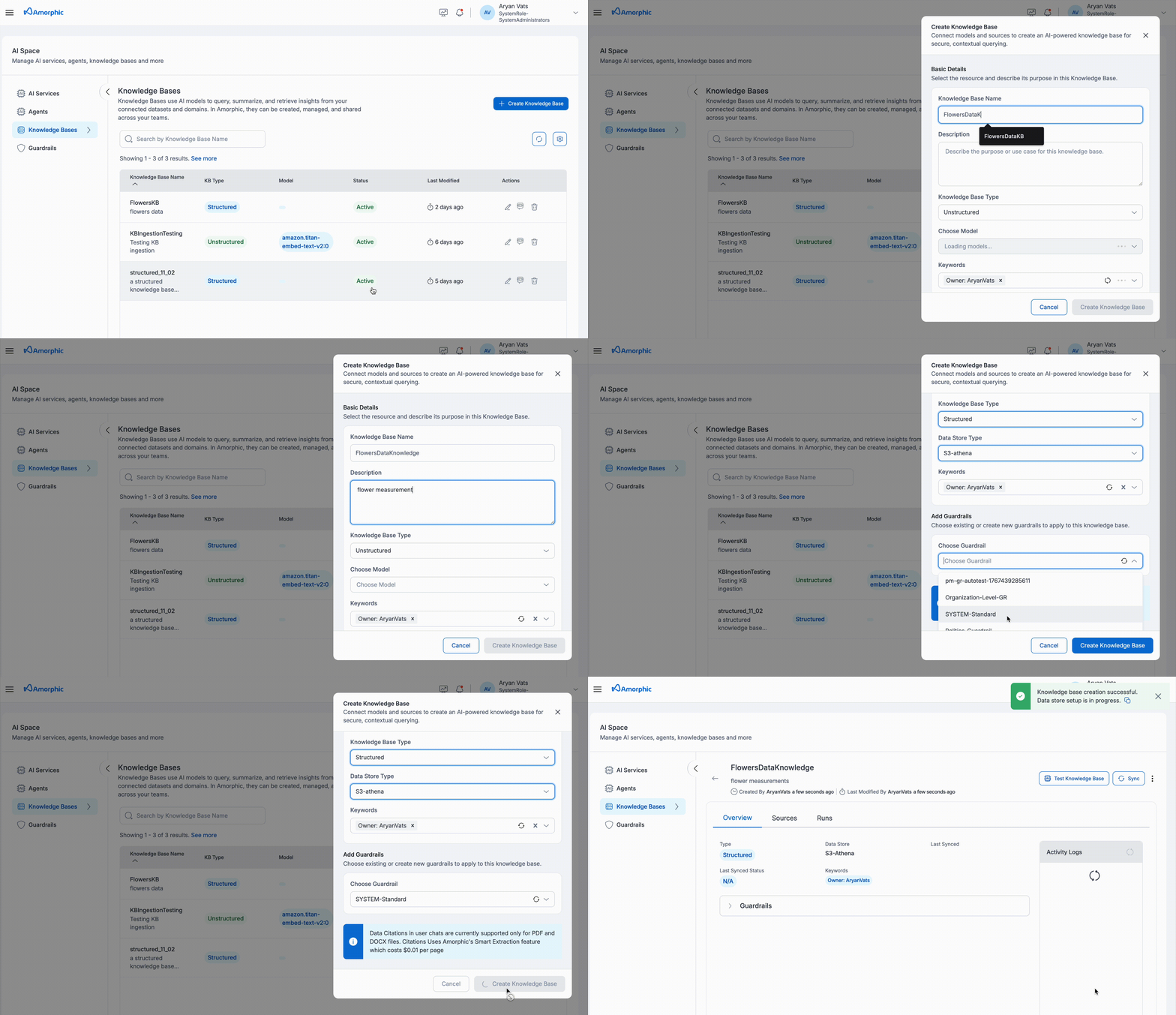
To create a Structured Knowledge Base:
- Navigate to the
AI Servicessection in the left sidebar - Select
Knowledge Basesfrom the available options - Click on
+ Create Knowledge Base. - Fill in the details shown in the table:
| Attribute | Description |
|---|---|
| Knowledge Base Name | Give your knowledge base a unique name. |
| Description | Describe the knowledge base's purpose and relevant details. |
| Knowledge Base Type | Choose Structured as the knowledge base type. |
| Data Store Type | Select the data store type: • Redshift: For Redshift datasets • S3-Athena: For S3-Athena datasets (via Glue Data Catalog) |
| Keywords | Add relevant keywords to the knowledge base. |
| Tenant Name | Tenant of the data on which the knowledge base can operate (for redshift data store type only) |
| Guardrail | Select a relevant guardrail for the knowledge base. If no guardrail is specified, the system will apply a default guardrail automatically. Note: Guardrails support input/output text filtering but not SQL-level query constraints. |
- Structured knowledge bases automatically convert natural language queries to SQL
- Only SELECT queries are generated (read-only operations)
- The system validates user access to datasets referenced in the generated SQL query
- Cross-tenant queries are not supported for redshift - for structured knowledgebases with data store redshift, the knowledge base can only query one tenant.
- Provide a clear and detailed description that accurately reflects the content and purpose of your knowledge base sources
- A well-written description helps users understand the knowledge base scope and enables agents to effectively access and utilize the information
- Include key topics, data types, and intended use cases in the description for better discoverability
- Single Tenant Scope: Each redshift structured knowledge base can connect to only one tenant, selected at creation time
- Views Not Supported: Redshift views are not indexed or queried by the knowledge base
- One Query Per Response: Within one response, the knowledge base can only execute one SQL query
View Structured Knowledge Base
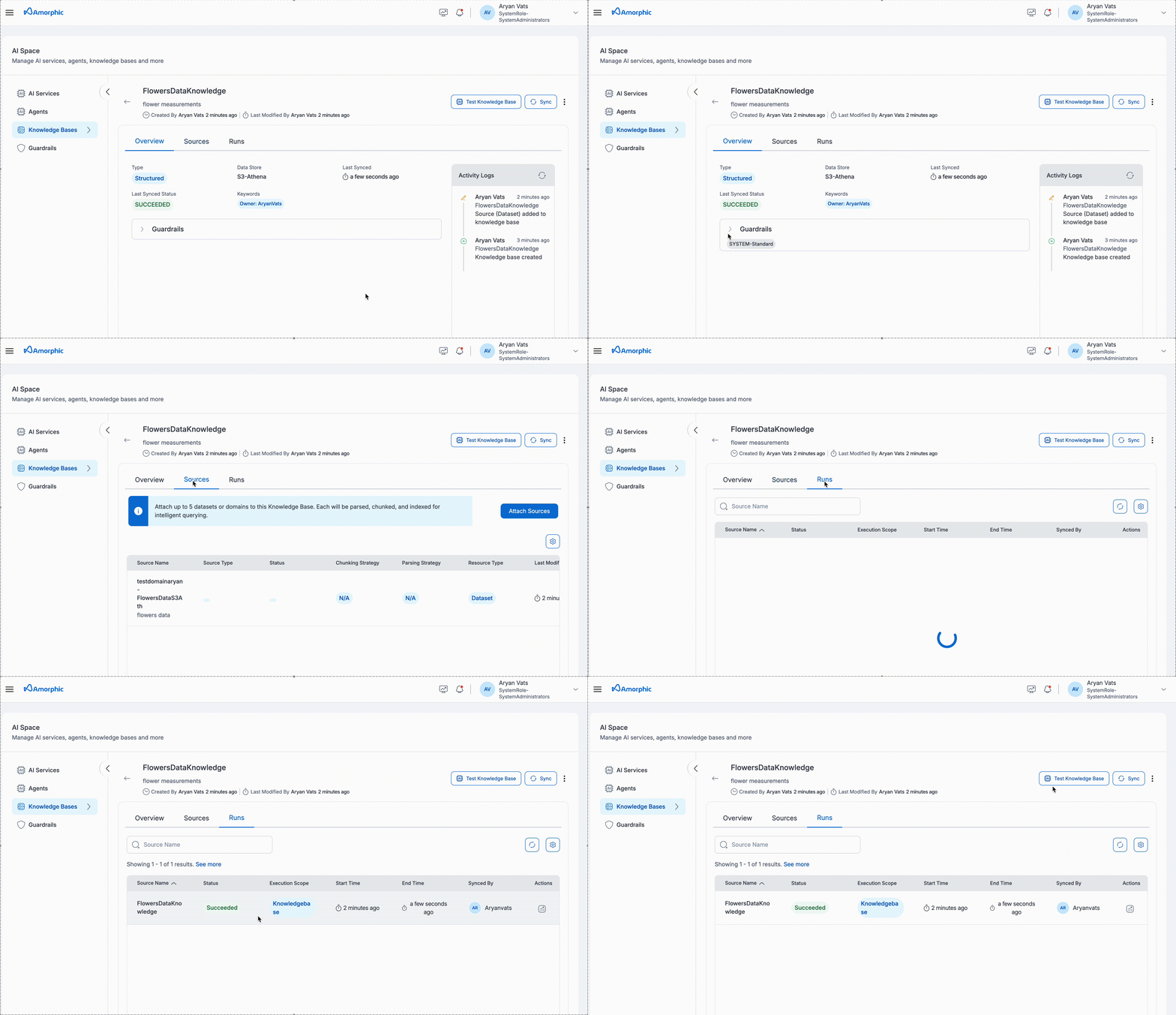 The Structured Knowledge Base details page provides comprehensive information organized into three main tabs:
| Tab | Component | Description |
|---|---|---|
| Overview | Basic Information | Knowledge Base Name: Unique identifier Description: Purpose and content details Created: Creator and creation date Updated: Last modifier and modification date |
| Data Store Information | Data Store Type: Redshift or S3-Athena Database Name: Connected database identifier Last Synced: Most recent sync timestamp Last Synced Status: Current sync state (SUCCEEDED/FAILED/IN_PROGRESS) | |
| Keywords | Associated tags and owner information | |
| Summary Cards | Sources Added: Total attached sources Tables Discovered: Total tables indexed Last Sync Time: Most recent sync operation timestamp | |
| Sources | Source Management | Information about connected data sources and their status |
| Runs | Sync Operations | Details about synchronization operations and their outcomes |
| Activity Logs | Timeline Events | Creation events Source addition records Sync operation history Knowledge base modifications Each log entry includes: User who performed the action Action description and timestamp |
The Knowledge Base details page provides comprehensive information about your knowledge base, including its configuration, metrics, and activity history. The page is organized into three main tabs: Overview, Sources, and Runs.
- The Overview tab provides the most comprehensive view of your knowledge base status and performance
- Use the Test Knowledge Base button to verify your knowledge base is working correctly
- Monitor the Activity Logs to track all changes and operations performed on your knowledge base
- The metrics help you understand the scope and health of your indexed schema metadata
Update Structured Knowledge Base
To update a Structured Knowledge Base (for example, its description or guardrail):
- Navigate to the Knowledge Base details page
- Click on the
Editaction button - Update the description and/or guardrail as needed
- Click
Saveto apply the changes
Only the description field and guardrail can be modified after a knowledge base is created. The name and data store configurations cannot be changed.
Add Sources
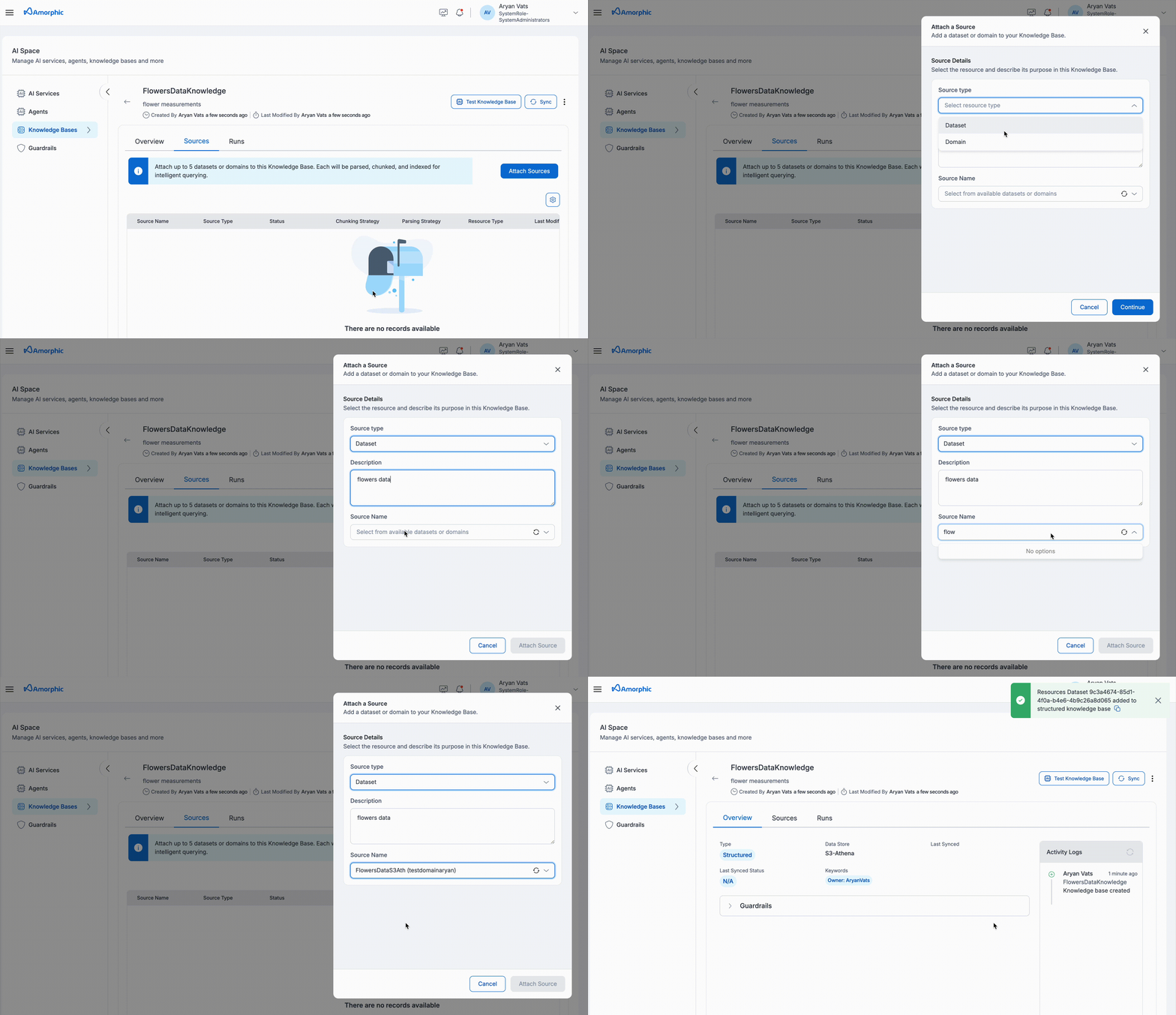 To add sources to your Structured Knowledge Base:
- Navigate to the Knowledge Base details page
- Click the
Add Sourcebutton - Select your source type (Redshift Dataset or S3-Athena Dataset)
- Configure the required fields
- Click
Saveto attach the source
The following fields need to be configured when adding a source:
| Field | Description |
|---|---|
| Source Type | Select between Redshift Dataset or S3-Athena Dataset as the source type |
| Name | Provide a unique identifier for the source |
| Description | Add details about the source content and purpose |
Important limitations:
- Currently, only Redshift and S3-Athena datasets are supported as data sources
- Maximum 5 sources can be attached per knowledge base
- If a domain is selected as a source, individual datasets from that domain cannot be added separately
- This limitation helps optimize query performance across the knowledge base
- All sources must be of the same data store type (either all Redshift or all S3-Athena)
- Domain-level and tenant-level access can be granted, provided all entities lie within the same tenant
The knowledge base enforces strict access control:
- The KB does not get access to any data not attached to the KB as a data source, even if the data is present under the same tenant
- The KB is given limited permissions to prevent editing of data (read-only SELECT operations)
- Access permissions are validated when queries are executed
- For structured knowledgebases, only datasets of target location matching the data store type may be attached
- For Redshift knowledgebases, only datasets/domains located in the same tenant as the one selected during creation may be attached
- When a domain is attached, only the datasets with target location matching the data store type of the knowledgebase will be indexed
Sync Knowledge Base and Sources
Complete Knowledge Base Sync
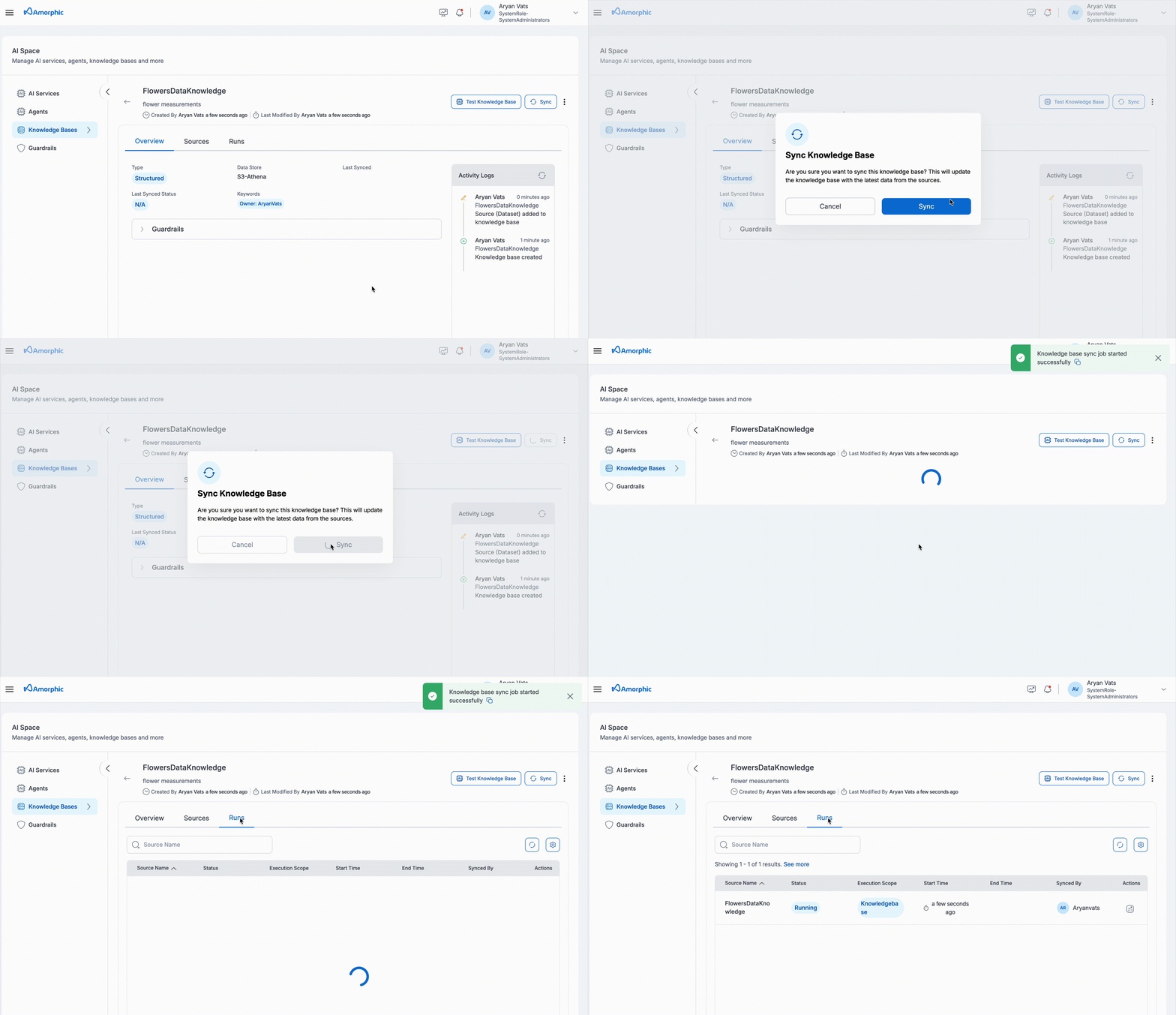
| Step | Action | Details |
|---|---|---|
| 1 | Initiate | Click Sync at knowledge base level |
| 2 | Monitor | Track progress in Runs tab |
Important considerations:
- Structured knowledge bases cannot sync individual sources, only complete knowledge base
- Only one sync operation can run at a time per knowledge base
- Sync duration can take up to a maximum of 6 hours
- Sync duration depends on the number of tables and schema complexity
- Sync operations run sequentially to prevent conflicts
- If a sync operation times out, please try syncing again
- Schema changes (new tables/columns) require manual sync to be reflected
- Email notifications confirm completion
- Failed syncs automatically retry with exponential backoff
- If metadata is not modified, query results are up-to-date regardless of sync status provided that it is not the first sync
View Sync Status
File-wise metrics for structured KB sync jobs are not available from AWS's side, but the status of the sync job can be viewed from 'Runs'
Monitoring Dashboard
Navigate to the Runs tab to view comprehensive sync details:
| Information | Description |
|---|---|
| Source Name | knowledge base |
| Execution Scope | Datasource/KnowledgeBase |
| Status | Current sync status |
| Start Time | Operation start timestamp |
| End Time | Operation completion timestamp |
| Synced By | User who initiated the sync |
Query Knowledge Base
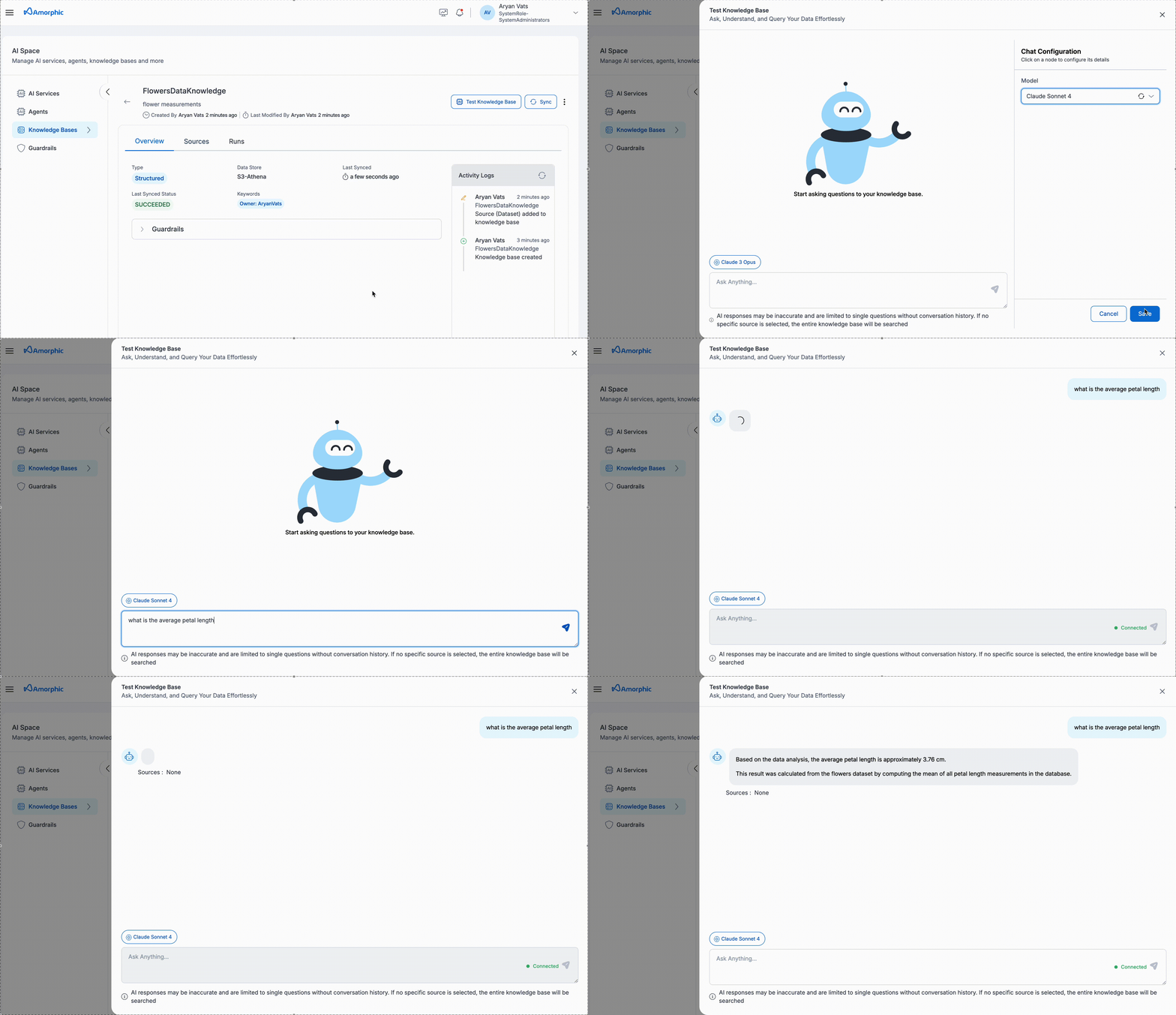
The Structured Knowledge Base provides an intuitive interface for querying your structured data using natural language, which is automatically converted to SQL queries.
| Step | Field | Description |
|---|---|---|
| 1 | Access Query Interface | Select your target knowledge base from the list Click the Test Knowledge Base button in the top rightA chat interface window will appear |
| 2 | Select AI Model | Choose an appropriate AI model for your query Recommended models for optimal results: • Claude-4-Sonnet • Other advanced models |
| 3 | Submit Query | Send the query and receive a natural-language result based on SQL execution results |
Important considerations:
- Queries work on all accessible tables within the knowledge base's connected database
- Use specific, well-formed questions for better SQL generation accuracy
- All responses include the generated SQL query for verification
- Access control ensures users only receive information from datasets they have permission to view
- The system validates dataset access before returning query results
- Only one SQL query is executed per response
For optimal results:
- Use advanced models like Claude-4-Sonnet or other advanced models
- Craft clear and specific prompts that translate well to SQL
- Start with broader queries, then refine as needed
- Use table and column names in your queries when possible for better accuracy
Remove Sources
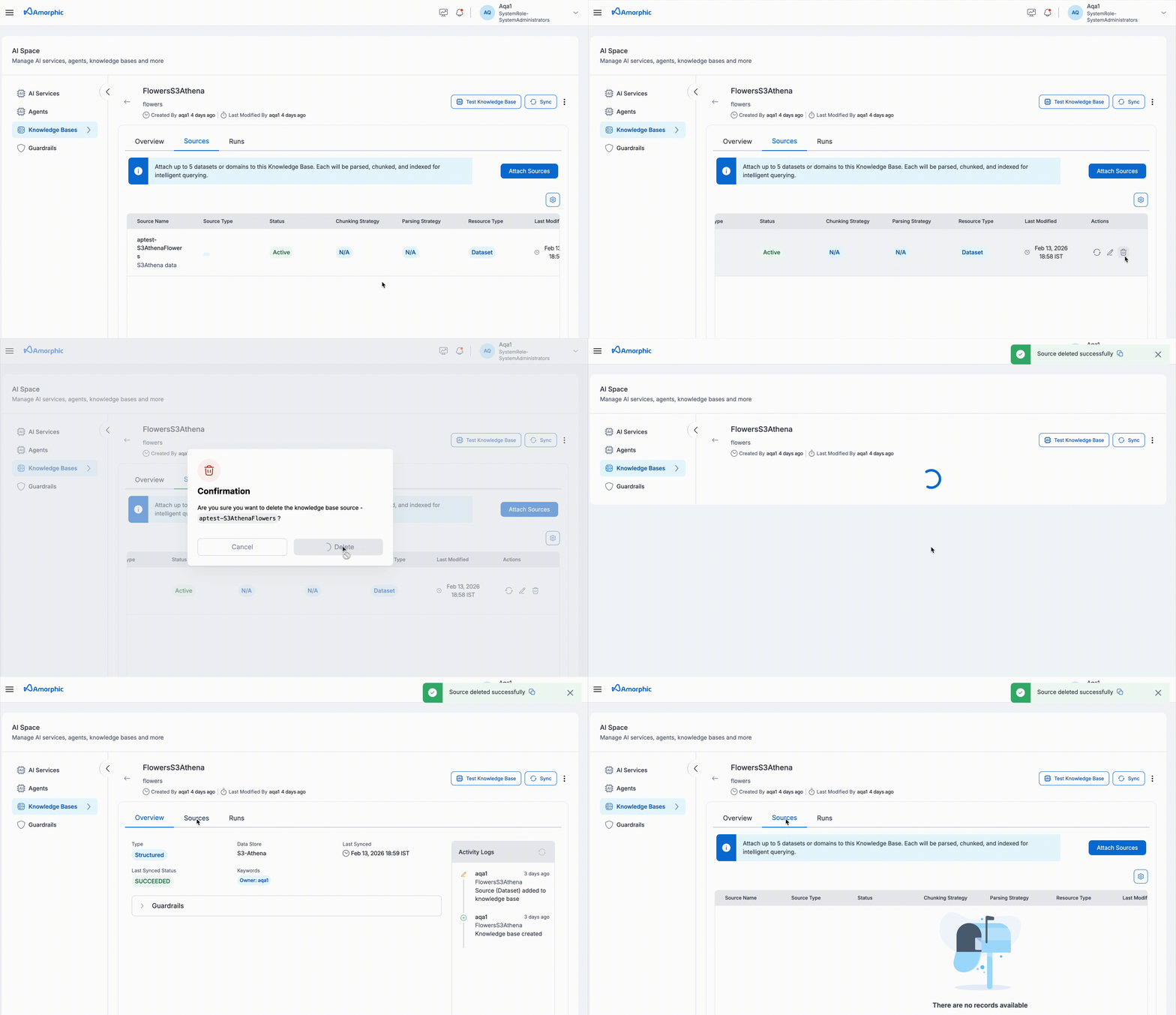 To remove sources from a structured knowledge base:
- Navigate to Knowledge Base: Go to the knowledge base details page
- Select Remove Sources: Choose the option to remove data sources
- Confirm Removal: The data sources will be detached from the knowledge base
- Clean Up: Associated permissions and metadata will be cleaned up automatically
- Removing sources will make their content unavailable for querying
- The operation cannot be undone
- Associated permissions (Redshift GRANTs) will be revoked automatically
- Metadata will be cleaned up automatically
Delete Knowledge Base
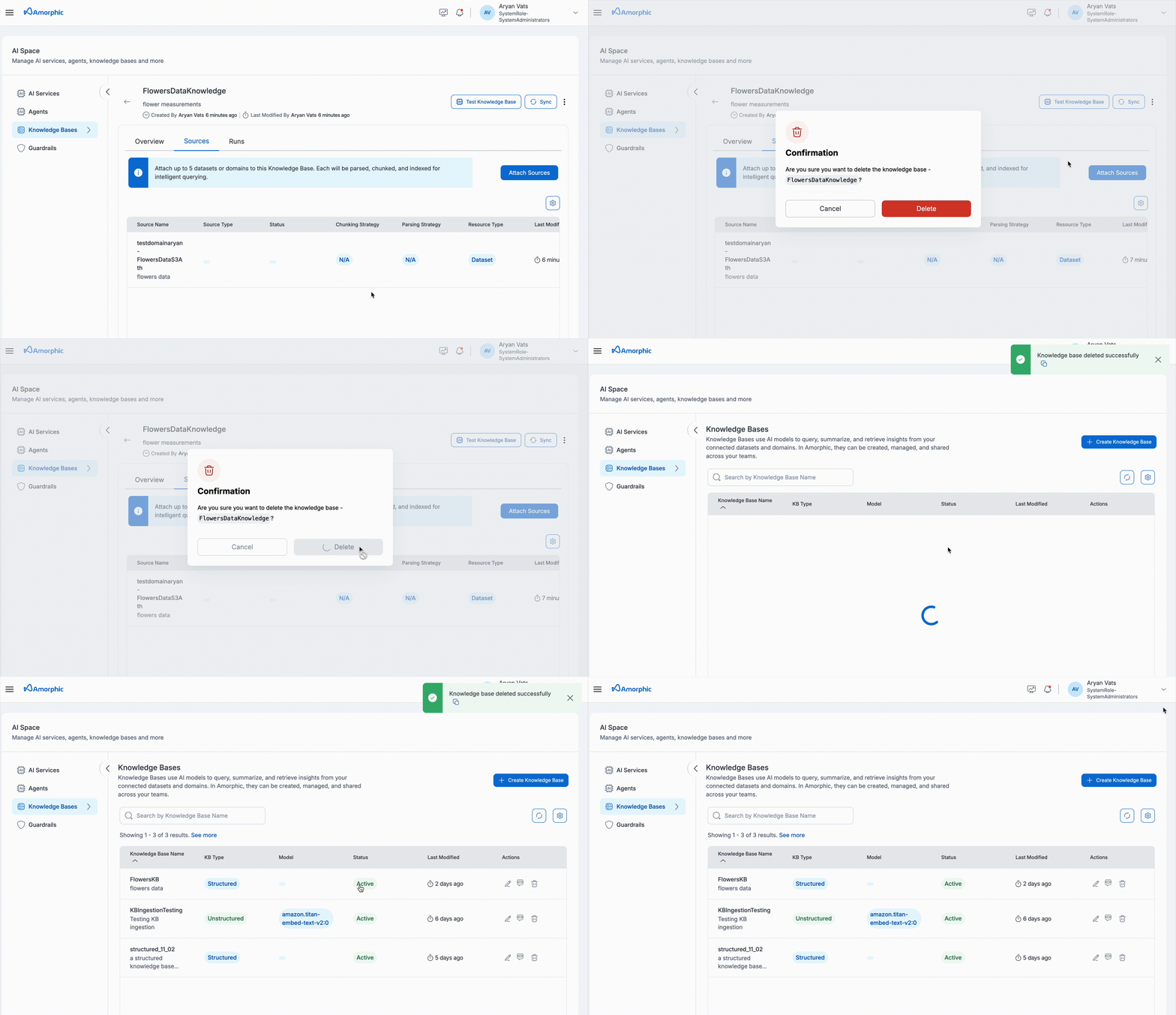
To delete a structured knowledge base:
- Navigate to Knowledge Base: Go to the knowledge base details page
- Select Delete Option: Click the delete button in the top right
- Confirm Deletion: Review the warning message and confirm deletion
- Automatic Cleanup: The system will automatically:
- Remove all associated data sources
- Revoke Redshift user permissions (GRANTs)
- Clean up related metadata and IAM permissions
This action is permanent and cannot be undone. Make sure you want to delete the knowledge base before confirming.
The knowledge base must be in Active state in order to perform the delete operation on it.
Access Control and Permissions
The system implements robust access control:
- Owner Access: Full control over knowledge base operations
- Editor Access: Can modify and sync knowledge bases, including adding/removing sources and updating settings, but cannot delete knowledge bases
- Reader Access: Can query knowledge bases
- Resource-level Permissions: Inherited from underlying data sources
- SQL Query Validation: The system validates user access to all datasets referenced in generated SQL queries before returning results
- The knowledge base uses read-only permissions (SELECT only)
- Redshift user permissions are managed automatically when sources are added/removed
- For S3-Athena sources, Glue catalog and S3 permissions are managed automatically
- Access control is enforced at query time, ensuring users only see data they have permission to access
Best Practices
To get the most out of Structured KnowledgeBase, consider these best practices:
-
Organize Sources
- Group related datasets logically
- Use descriptive names for knowledge bases
- Consider organizing data into domains for specific types of data
-
Optimize Sync Operations
- Monitor sync status and address failures promptly
- Sync after schema changes to ensure queries reflect latest structure
-
Query Optimization
- Be specific in your questions for better SQL generation
- Reference table and column names when possible
- Use context from previous queries when relevant
-
Access Management
- Regularly review and update access permissions
- Monitor usage patterns and adjust accordingly
- Implement least-privilege access principles
Using clear and descriptive table and column names will significantly improve the knowledge base's ability to generate accurate SQL queries. Consider following database naming conventions and adding table/column comments when possible.
| Data Source Type | Description |
|---|---|
| Dataset | Connect to Redshift or s3athena datasets, depending on data store type of the knowledgebase |
| Domain | Connect to a domain and access all datasets of data store type matching the KnowledgeBase within the domain |
- Only one tenant can be used for a structured KB with data store type redshift
- Redshift view type datasets are not supported and cannot be queried
- Only one SQL query is executed per response
- Sync operations have a maximum duration of 6 hours; if a timeout occurs, try syncing again
- All sources must be of the same data store type, matching the knowledgebase (either all Redshift or all S3-Athena)