
Iceberg Datasets
In Amorphic, User can create Iceberg datasets with S3Athena and Lake Formation target location which creates Iceberg table in the backend to store the data.
Athena supports read, time travel, write, and DDL queries for Apache Iceberg tables that use the Apache Parquet format for data and the AWS Glue catalog for their metastore.
Only Parquet file type is supported for Iceberg Datasets.
What is Apache Iceberg?
Apache Iceberg is an open table format for big data analysis. It can manage lots of files as tables and provides modern data lake operations like record-level inserts, updates, deletes, and time travel queries. Iceberg also makes it possible to update the table's schema and partitions, and it's optimized for usage on Amazon S3. Additionally it helps ensure data accuracy when multiple users write at the same time. To learn more, check out the Apache Iceberg Documentation.
What does Amorphic support?
Amorphic Iceberg datasets support following features:
- ACID transactions
- ACID (atomic, consistent, isolated, and durable) transactions protect the integrity of Data Catalog operations such as creating or updating a table. They enable multiple users to concurrently add and delete objects in the Amazon S3 data lake, while also allowing for queries and ML models to return consistent and up-to-date results. Iceberg tables are involved in reads and writes, and use transactions to protect the manifest metadata. AWS services such as Amazon Athena support iceberg tables. To use transactions in AWS Glue ETL jobs, begin a transaction before performing reads/writes, and commit it upon completion. For more info, see Reading from and Writing to the Data Lake Within Transactions.
- Set/Unset Table properties (User can specify attributes like Write compression, Data optimization configuration etc)
- Schema evolution (Add, Drop, Rename, Update (changing data type) columns)
- Hidden-Partitioning
- Time travel queries to specified date and time
- Version travel queries to specified snapshot ID (Table version)
- Queries combining time and version travel
- Iceberg table data can be managed directly on Athena using INSERT, UPDATE, and DELETE queries.
- Optimizing Iceberg tables data by REWRITE DATA compaction action
- Row-level deletes
For more information about Athena supported Iceberg features and limitations, Check Athena Iceberg Documentation
How to Create Iceberg Datasets?
- Users can create Iceberg datasets like Athena datasets by selecting S3Athena or Lake Formation as target location, parquet as file type, and Yes in Iceberg Table dropdown. Dataset can be created by using either of the three ways:
- Using already defined Iceberg Datasets Templates
- Importing required JSON payload
- Using the form and entering the required details
- Add Iceberg table properties in key-value pairs in Iceberg Table Properties section. Refer to Iceberg documentation for supported table properties.


Upon successful registration of Dataset metadata, users can specify partition related information through Custom Partition Options with following attributes:
- Column Name: Partition column name which should be of any column name from schema.
- Transformation: Iceberg (Hidden partitioning) converts column data using partition transform functions. Available functions: year, month, day, hour, bucket, truncate, None (no transformation).
- Transformation Input: If Transformation is either bucket or truncate then additional input should be provided. Input value should be a positive number.
For more information, Check documentation for Iceberg Partitioning.

Loading Data into Iceberg Datasets
- Data upload follows Amorphic's Data Reloads process.
- Files enter a Pending State and users have to select and process pending files.
- Pending files can be deleted before processing.
- Restrictions:
- Cannot tag or delete completed files.
- No Truncate Dataset, Download File, Apply ML or View AI/ML Results options.
At most 50 file-processing/data-load jobs for following dataset types can run at the same time:
- Apache Hudi
- Apache Iceberg
- Delta Lake
If user exceed 50 concurrent jobs in total across those dataset types, the job fails with "Concurrent run exceeded" Error. :::
Query Iceberg Datasets
Once the data is loaded into Iceberg datasets, it is available for the user to query and analyze directly from the Amorphic Playground feature by selecting the workgroup as AmazonAthenaEngineV3.
Additional commands can be performed for Iceberg datasets for the following actions:
- Iceberg table data can be managed directly on Athena using below commands
- INSERT INTO, UPDATE, DELETE FROM and MERGE INTO
- For more information, Check AWS Documentation
- View Metadata
- DESCRIBE, SHOW TBLPROPERTIES
- SHOW COLUMNS
- For more information, Check AWS Documentation
- Optimize data by REWRITE DATA compaction action
- OPTIMIZE
- For more information, Check AWS Documentation
- Perform snapshot expiration and orphan file removal
- VACUUM
- For more information, Check AWS Documentation
It's better to AVOID the above commands if user does not have knowledge on them as it'll change/delete the data and its metadata based on the specified command.
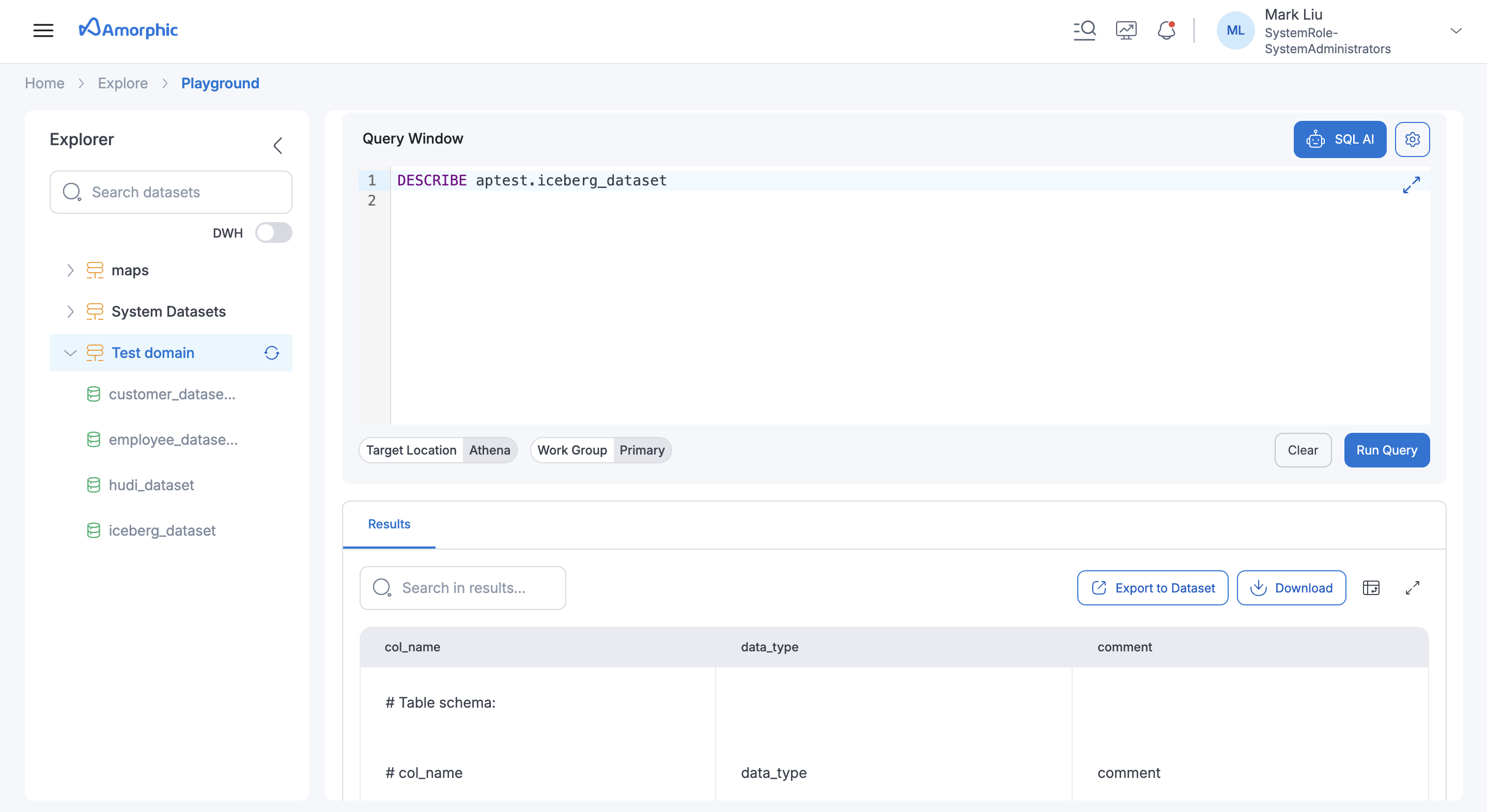
Below image shows result of "DESCRIBE" table command on an Iceberg dataset:
Iceberg Table Optimizers (API Only Feature)
Amorphic supports Iceberg Table Optimizers to automatically maintain and optimize Iceberg table data and metadata. These optimizers run in the background and help improve query performance, control storage costs, and manage table growth over time.
1. Compaction Optimizer
The Compaction optimizer rewrites Iceberg data files to reduce small-file problems caused by frequent or incremental writes. When data is ingested into multiple partitions or in small batches, Iceberg tables may end up with many small Parquet files. Compaction merges these into fewer, larger files, improving query performance and reducing S3 overhead.
2. Snapshot Retention Optimizer
Iceberg creates a snapshot for every table change. Over time, these snapshots can accumulate and increase metadata size. The Snapshot Retention optimizer automatically expires older snapshots based on configured retention rules, helping control metadata growth while retaining recent snapshots for time-travel queries.
3. Orphan File Deletion Optimizer
The Orphan File Deletion optimizer removes data and metadata files that are no longer referenced by any active Iceberg snapshot. Orphan files can be created due to failed writes, expired snapshots, or interrupted jobs. This optimizer safely cleans up such files after a retention window, helping reduce unnecessary storage usage.
Configuring optimizers
Optimizers can be enabled and configured per dataset in the dataset’s Iceberg or optimizer settings. Only one optimizer can be created or updated at a time. The following options and defaults apply.
Compaction
- Compaction strategy — Uses the compaction strategy from the Apache Iceberg table properties; defaults to binpack if not set.
- Minimum input files before compaction — Defaults to 100 files if not set.
- Delete file threshold for compaction — Defaults to 1 delete in a data file if not set.
Snapshot retention
- Snapshot retention period — Uses the snapshot retention period (max age) from the Apache Iceberg table properties; defaults to 5 days if not set.
- Minimum snapshots to retain — Uses the minimum snapshots to retain from the Apache Iceberg table properties; defaults to 1 if not set.
- Snapshot deletion run rate — Defaults to 24 hours between two job runs if not set.
- Expired snapshot files — Files associated with expired snapshots are deleted.
Orphan file deletion
- Orphan file retention — All files under the table location with a creation time older than 3 days are deleted if they are not referenced by the Apache Iceberg table metadata.
- Orphan file deletion run rate — Defaults to 24 hours between two job runs if not set.
Optimizer API
API Request Payload Details
Optimizers — GET | POST | PUT | DELETE /datasets/{id}/optimizers
Query param: type = compaction | retention | orphan-file-deletion
| Method | Query param type | Description |
|---|---|---|
| GET | Optional. Omit = return all types; set = return that type only. | List optimizer(s). |
| POST | Required. | Create one optimizer (one type per request). |
| PUT | Required. | Update the optimizer for the given type. |
| DELETE | Required. | Delete the optimizer for the given type. |
Optimizer runs — GET /datasets/{id}/optimizers/runs
List optimizer runs. Query params as supported.
Request Body Structure (POST/PUT):
{
    "Enabled": true,
    "Configuration": {}
}
Configuration by type (use one per request). The payload values in the examples below are configurable; adjust them to match your requirements.
For compaction (type=compaction):
{
    "Enabled": true,
    "Configuration": {
        "Strategy": "binpack",
        "MinInputFiles": 50,
        "DeleteFileThreshold": 1
    }
}
For snapshot retention (type=retention):
{
    "Enabled": true,
    "Configuration": {
        "SnapshotRetentionDays": 30,
        "SnapshotsToRetain": 5,
        "CleanExpiredFiles": true,
        "RunRateHours": 24
    }
}
For orphan file deletion (type=orphan-file-deletion):
{
    "Enabled": true,
    "Configuration": {
        "OrphanFileRetentionDays": 7,
        "RunRateHours": 24
    }
}
Only one optimizer can be created or updated at a time. Omitted configuration fields use the defaults described in the Configuring optimizers section.
Best Practices
- Enable Compaction for frequent incremental writes.
- Configure Snapshot Retention to balance time travel and storage cost.
- Always enable Orphan File Deletion with snapshot expiration.
Limitations (Both AWS and Amorphic)
- Supported data types
- Applicable to ONLY
S3AthenaandLake FormationTargetLocation and 'Parquet' file type. - Restricted/Not Applicable Amorphic datasets features for Iceberg datasets
- Data Validation
- Skip LZ (Validation) Process
- Malware Detection
- Data Cleanup
- Data Metrics collection
- Life Cycle Policy
- No Partition evolution (Changing partitions after table creation).
- Only predefined list of key-value pairs allowed in the table properties for creating or altering Iceberg tables. Check AWS Documentation
- Schema evolution:
- Allowed ONLY a set of update column (data type promotions) actions:
- Change an integer column to a big integer column
- Change a float column to a double
- Increase the precision of a decimal type column
- columns re-ordering is not supported.
- Allowed ONLY a set of update column (data type promotions) actions: