
S3 Tables Datasets
In Amorphic, S3 Tables datasets use Lake Formation as the target location and AWS S3 Tables as the backend to store Iceberg tables. S3 Tables is an alternative catalog to the AWS Glue catalog for Iceberg: you choose Iceberg catalog as S3 Tables when creating the dataset. The platform registers S3 Tables with Lake Formation and exposes them in Athena via a federated Glue catalog named s3tablescatalog.
Athena supports read, time travel, write, and DDL queries for Apache Iceberg tables that use the Apache Parquet format for data. For S3 Tables, the metastore is the S3 Tables service; Athena accesses it through the s3tablescatalog.
Only Parquet file type is supported for Iceberg Datasets.
What is Amazon S3 Tables?
Amazon S3 Tables provide S3 storage optimized for analytics workloads, with features to improve query performance and reduce storage costs for tables. They are purpose-built for tabular data (e.g., transactions, sensor data, ad impressions).
Data lives in a table bucket, which stores tables as subresources. Tables use the Apache Iceberg format and can be queried with standard SQL in engines such as Amazon Athena, Amazon Redshift, and Apache Spark. S3 Tables use the s3tables service namespace (distinct from Amazon S3) for access control.
For more details, see Amazon S3 Tables and table buckets Documentation.
What does Amorphic support ?
Amorphic S3 Tables datasets support the following:
- ACID transactions — Table operations are atomic, consistent, isolated, and durable; multiple users can read and write with consistent results.
- Set/Unset table properties — e.g. write compression, data optimization configuration (within allowed properties).
- Schema evolution — Add, drop, rename, and update (data type promotions) columns.
- Time travel and version travel — Query at a date/time or snapshot ID; combine time and version in queries.
- DML on Athena — INSERT INTO, UPDATE, DELETE FROM, MERGE INTO, plus DESCRIBE, SHOW TBLPROPERTIES, SHOW COLUMNS.
- Row-level deletes — Supported via Iceberg.
How to Create S3 Tables (Iceberg) Datasets?
- Users can create S3 Tables datasets by selecting Lake Formation as target location, Parquet as file format, Yes for Iceberg Table, and S3 Tables for Iceberg Catalog. You can create a dataset in any of the three ways:
- Using already defined Iceberg Datasets Templates
- Importing required JSON payload
- Using the form and entering the required details
- Add Iceberg table properties in key-value pairs in Iceberg Table Properties section. Refer to Iceberg documentation for supported table properties.
S3 Tables do not support FIPS endpoints. In FIPS-enabled environments, the platform automatically uses non-FIPS endpoints when performing S3 Tables operations.
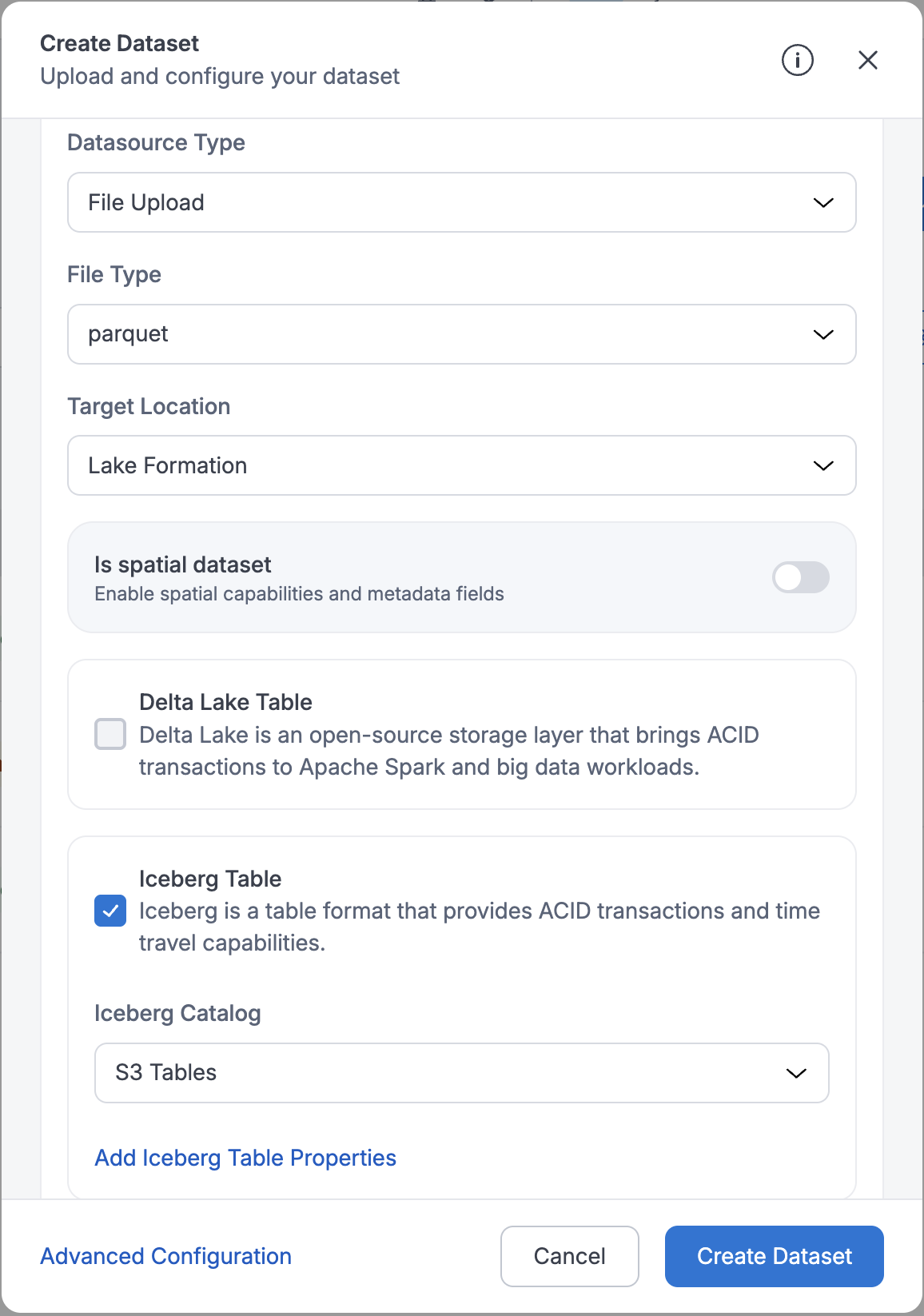
Upon successful registration of dataset metadata, the platform creates a namespace (using your domain name) and registers the Iceberg table in the S3 Tables bucket.
Loading Data into S3 Tables Datasets
- Data upload follows Amorphic's Data Reloads process.
- Files enter a Pending State and users have to select and process pending files.
- Pending files can be deleted before processing.
- Restrictions:
- Cannot tag or delete completed files.
- No Truncate Dataset, Download File, Apply ML or View AI/ML Results options.
Query S3 Tables Datasets
Once the data is loaded, S3 Tables datasets can be queried from the Amorphic Playground. Queries run against the s3tablescatalog
Allowed SQL commands in Playground for S3 Tables: SELECT, INSERT INTO, UPDATE, DELETE FROM, DESCRIBE, SHOW TBLPROPERTIES, MERGE INTO, SHOW COLUMNS.
- Note: DML (INSERT INTO, UPDATE, DELETE FROM, MERGE INTO) may be blocked when the workgroup uses SSE-KMS or CSE-KMS encryption.
It's better to AVOID the above commands if user does not have knowledge on them as it'll change/delete the data and its metadata based on the specified command.
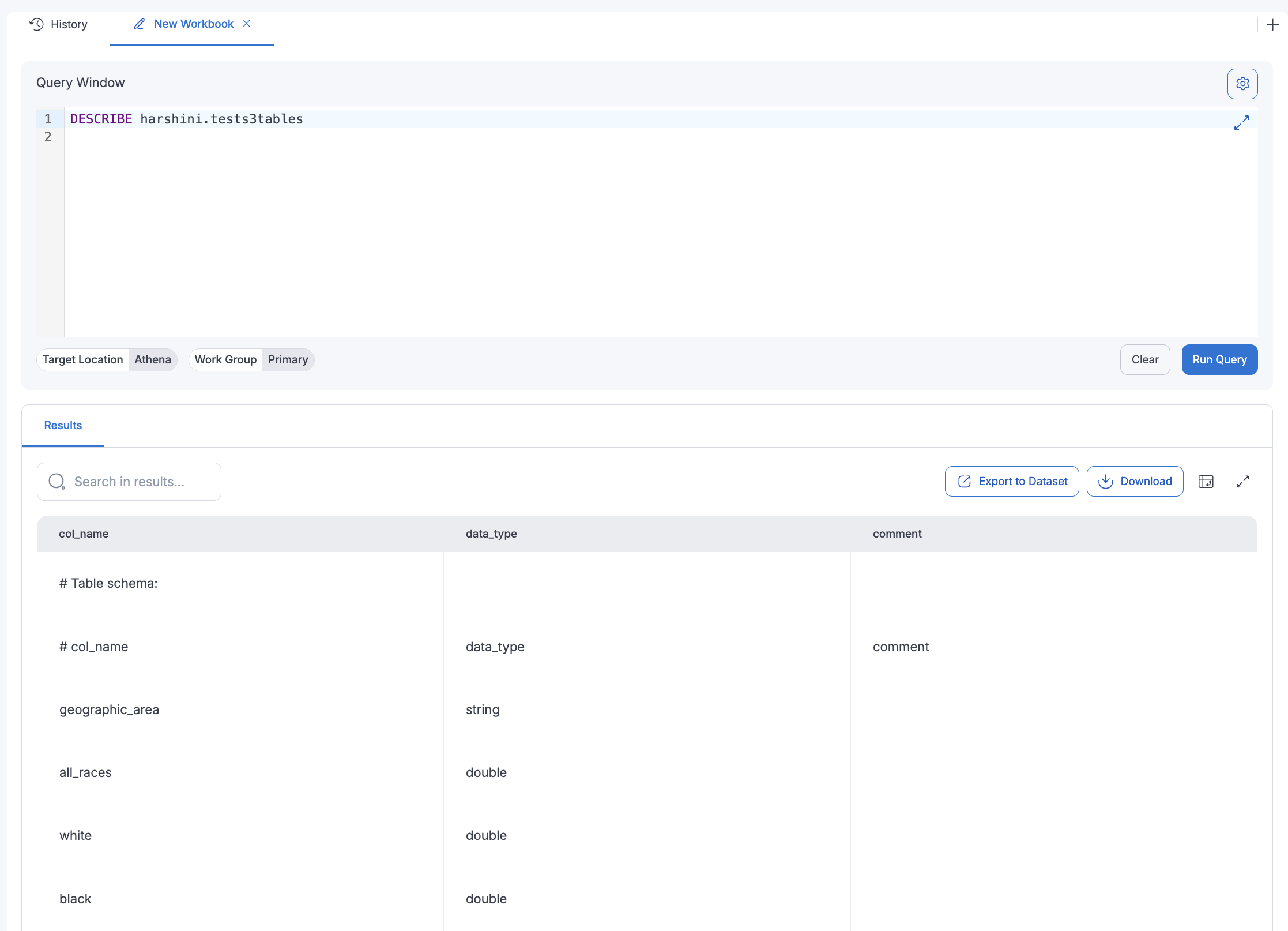
Below image shows result of "DESCRIBE" table command on an Iceberg dataset:
Limitations (Both AWS and Amorphic)
- Supported data types
- S3 Tables datasets apply only to Lake Formation target location and Parquet file type. External datasets cannot use S3 Tables catalog.
- Restricted/Not Applicable Amorphic dataset features for S3 Table datasets
- Data Validation
- Skip LZ (Validation) Process
- Malware Detection
- Data Cleanup
- Data Metrics collection
- Life Cycle Policy
- Data Profiling
- Data Quality check
- LF materialized views
- Iceberg Table Optimizers
- S3 Tables–specific restrictions:
- Partition keys currenlty are not supported for S3 Tables.
- Iceberg catalog cannot be changed after dataset creation.
- Only a predefined list of key-value pairs is allowed in table properties for creating or altering Iceberg tables. See AWS Documentation.
- Schema evolution:
- Allowed only for a set of column updates (data type promotions): integer → bigint, float → double, increase decimal precision.
- Column reordering is not supported.