
Athena Datasets
Athena Datasets allows users to store structured data in Glue tables and files in Amazon S3 and run SQL queries on the data. Data validation can be enabled to check for corrupt data, and the playground can be used to run queries on the dataset.
How does it work?
With Athena datasets as the target location, Amorphic provides users the ability to store CSV/TSV/XSLX/JSON/NDJSON/JSONL/Parquet files in S3 without the overhead of maintaining a data warehousing solution, for cost effectiveness.
Data Validation is enabled by default for S3Athena target location, but can be enabled/disabled at any time. Each file is partially sampled/read and every column is validated against the schema uploaded to the dataset while registering. This helps users quickly detect and perform data correction on corrupt or invalid data files, though it takes a few extra seconds per file and there is an additional charge per file.
As of now, users can register structured data such as CSV, TSV, XLSX, JSON, NDJSON, JSONL and Parquet files. Amorphic registers AWS Glue/Athena native column types for S3Athena and Lake Formation datasets — including date, timestamp, and nested array, struct, and map types where the file format supports them. See Supported data types below.
The CSV Parser/SerDe recommended by AWS Athena has the following limitations:
- It does not support embedded line breaks in CSV files, nor does it support empty fields in columns defined as a numeric data type.
As per the AWS Documentation, one workaround to achieve this is to import them as string columns and create views on top of it by casting them to the required data types.
Creating S3-Athena Datasets
User can create new S3-Athena Datasets by using either of the three ways:
- Using already defined S3-Athena System Templates
- Importing required JSON payload
- Using the form and entering the required details
When the user is creating the dataset from scratch using the form,
- Select target location as s3-athena.
- Supported file types - CSV/TSV/XSLX/JSON/NDJSON/JSONL/Parquet

Registering S3-Athena Datasets
- After creating the dataset, we need to register the schema for it.
Load Athena Datasets
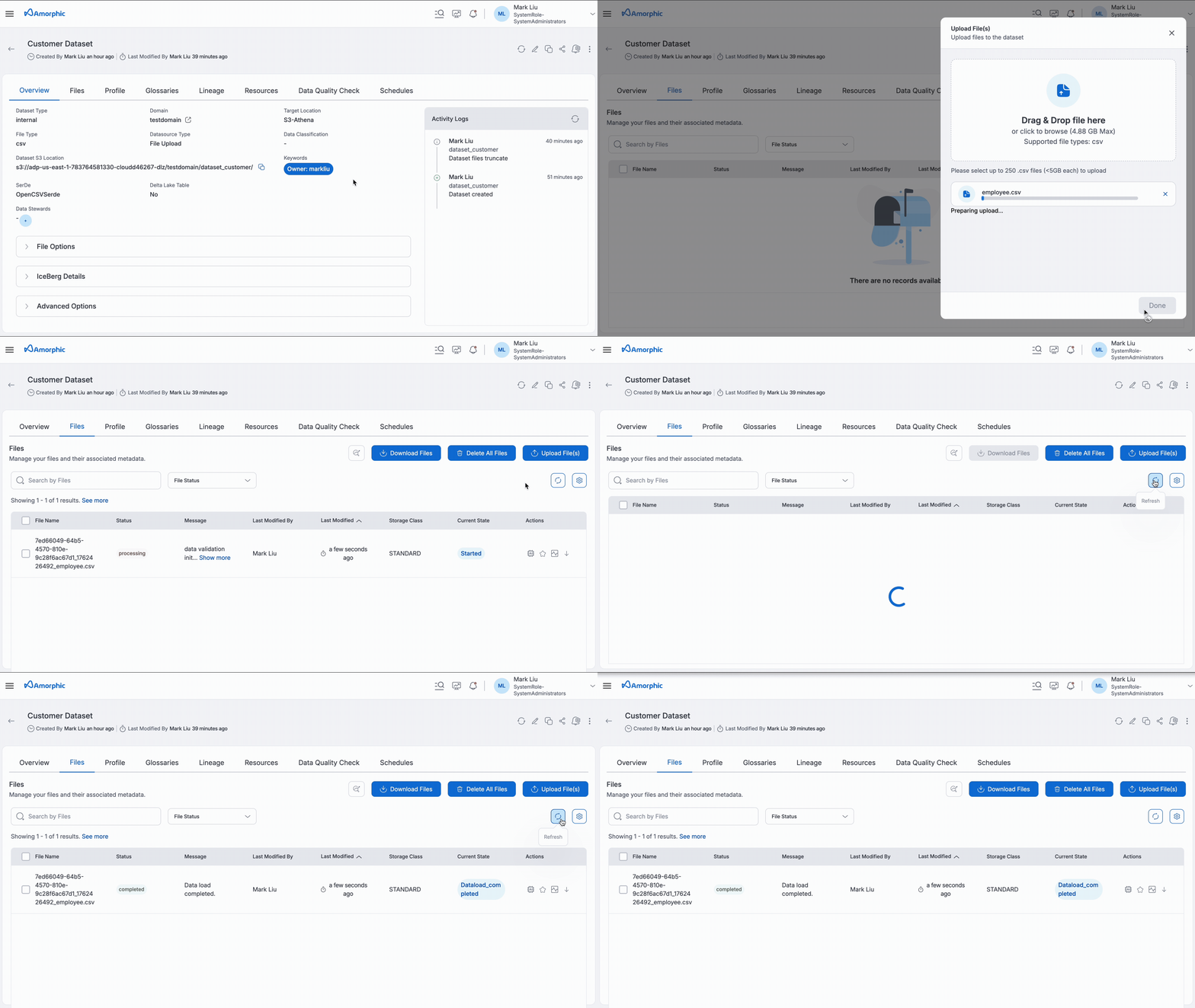
Athena Datasets provides users with a cost-effective solutions to store their structured data. All loaded datasets are immediately available for analysis using the Run Query tab in the Amorphic console. The advantage of using Athena datasets is that it provides auto data validation on each file that is uploaded, without the need for any additional ETL process.
Query Datasets
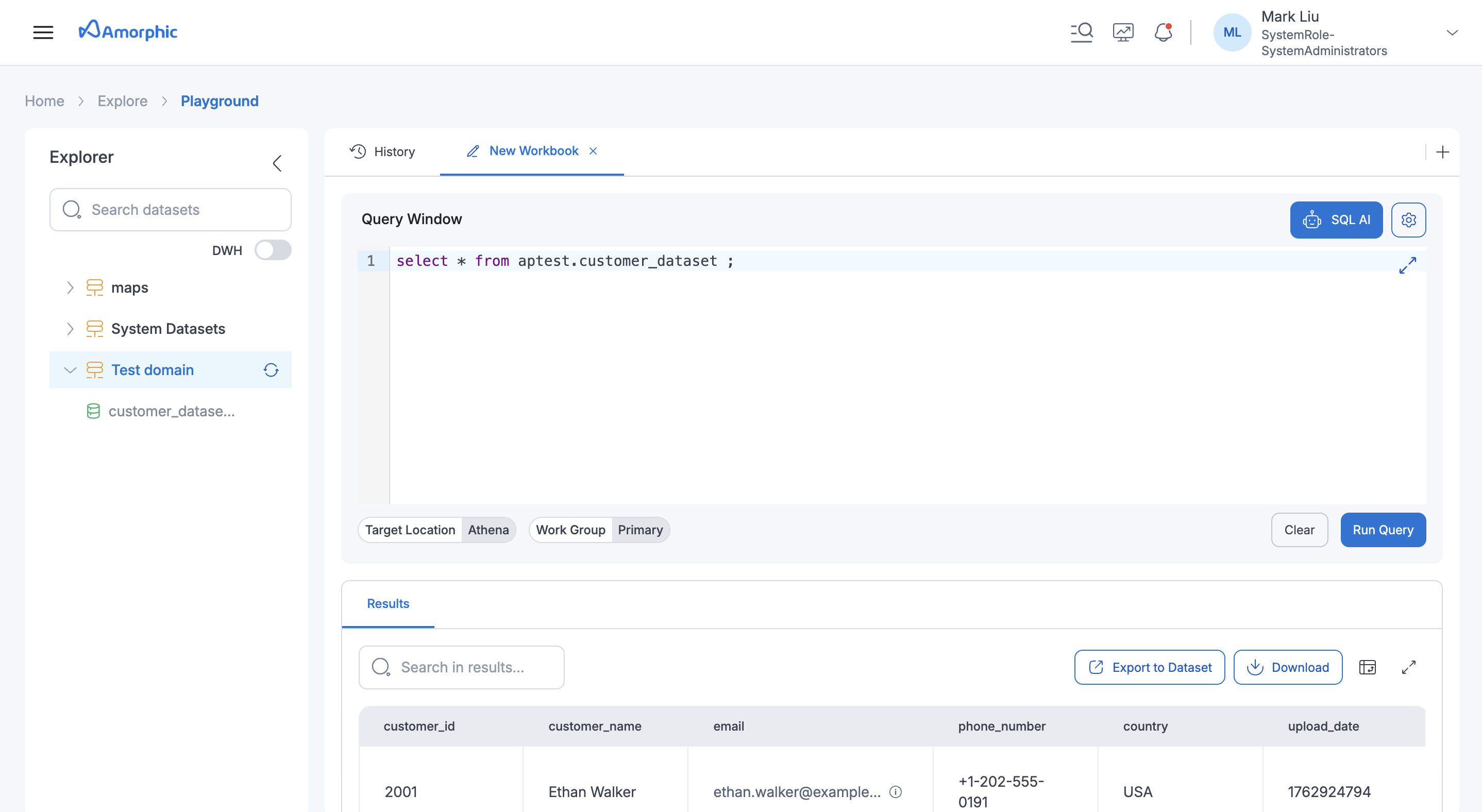
Once we have loaded data into Athena datasets, it is ready for the user to query and analyze directly from the Run Query tab. The following animation demonstrates how a user can run a sample query on Athena datasets.
For Datasets with JSON, NDJSON or JSONL file type:
- AWS Limitations
- It uses the OpenX JSON SerDe with the following limitations:
- It expects data to be in a single line (not formatted), with records separated by a new line character.
- Comma character is not allowed at the end of each line.
- The full data in the file should not be enclosed in square brackets.
- Views are not supported on top of S3-Athena JSON, NDJSON or JSONL datasets.
- It uses the OpenX JSON SerDe with the following limitations:
- Amorphic feature limitations (Not Applicable)
- Malware Detection
- Data Profiling
Below is an example of an invalid JSON, NDJSON or JSONL file:
[
    {
    "EmailId": "test-cwdl@cloudwick.com",
    "IsAdmin": "no",
    "UserId": "testuser"
    },
    {
    "EmailId": "test1-cwdl@cloudwick.com",
    "IsAdmin": "no",
    "UserId": "testuser1"
    }
]
Below is an example of a valid JSON, NDJSON or JSONL file:
{ "EmailId": "test-cwdl1@cloudwick.com", "IsAdmin": "no", "UserId": "testuser1" }
{ "EmailId": "test-cwdl2@cloudwick.com", "IsAdmin": "no", "UserId": "testuser2" }
{ "EmailId": "test-cwdl3@cloudwick.com", "IsAdmin": "yes", "UserId": "testuser3" }
{ "EmailId": "test-cwdl4@cloudwick.com", "IsAdmin": "no", "UserId": "testuser4" }
{ "EmailId": "test-cwdl5@cloudwick.com", "IsAdmin": "yes", "UserId": "testuser5" }
For JSON, NDJSON or JSONL files, if dataset validation is enabled then column names in the files must exactly match the column names in the dataset schema
Supported data types
For S3Athena and Lake Formation datasets, schema columns use AWS Glue/Athena types. When you register a schema from a sample file, Amorphic infers column types from the file structure and sample values. You can also define or edit types manually in the schema editor or API.
The only types explicitly rejected are super and varbyte. For the full Athena type reference, see AWS Athena data types.
Date and timestamp
How date and timestamp are registered depends on the file type:
| File type | Behavior |
|---|---|
| JSON, NDJSON, JSONL | date and timestamp are supported. Values like 2024-01-15 are registered as date. Whole numbers (epoch timestamps) stay as integer types. |
| Parquet | Native Parquet date/timestamp columns are registered as date/timestamp. If the column is stored as text in the file, it is registered as varchar/string. |
| CSV, TSV, XLSX | Date or timestamp-like values are registered as varchar, because the OpenCSVSerde does not reliably handle native temporal types. You can query and cast them in Athena if needed. |
For JSON-family datasets, use date when your file has date-only values (YYYY-MM-DD), and timestamp when values include a time (for example, 2024-01-15T10:30:00).
Complex types (array, struct, map)
For JSON, NDJSON, JSONL, and Parquet datasets, Amorphic can register nested columns as Glue complex types instead of flattening them into a single string column.
| Column | Type | Example value |
|---|---|---|
Tags | array<string> | ["electronics", "sale"] |
Address | struct<city:string,zipcode:string> | {"city": "Seattle", "zipcode": "98101"} |
Attributes | map<string,string> | {"color": "blue", "size": "M"} |
When you upload a sample file during schema registration, Amorphic infers nested types from the file structure.
Example JSON file:
{
  "UserId": "testuser1",
  "Tags": ["admin", "active"],
  "Profile": { "city": "Seattle", "country": "US" }
}
A matching schema might define Tags as array<string> and Profile as struct<city:string,country:string>.
| File type / table format | Complex types |
|---|---|
| JSON, NDJSON, JSONL, Parquet | Supported. Register and query nested columns in Glue syntax. |
| CSV, TSV, XLSX | Not supported as native nested types. On registration, complex types are stored as varchar(256). You cannot add or change a column to a complex type through schema edit. |
| Iceberg / Hudi (parquet or JSON-family) | Supported in the lakehouse schema. |
| Delta Lake | Not kept as native nested catalog types; stored as varchar/string. |
- When data validation is enabled, complex cell values must match the registered shape (arrays as lists, structs/maps as objects).
- A nested column cannot be used as a partition key.
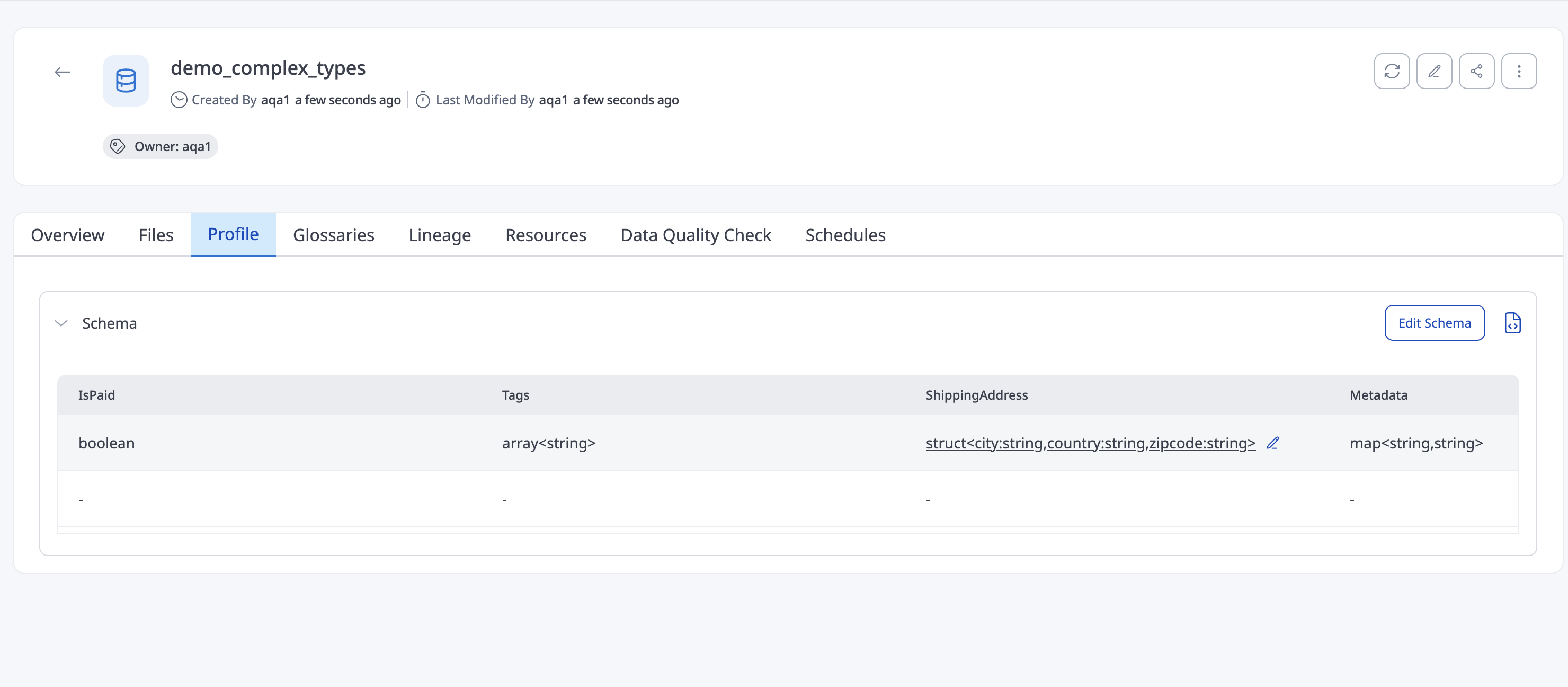
Table and SerDe Properties
For S3Athena and Lake Formation datasets, you can optionally set SerDe Properties and Table Properties when creating or updating a dataset under Advanced Configuration. These values are applied to the underlying Glue table used by Athena.
| Field | Description |
|---|---|
| SerDe | SerDe library for the dataset (for example, OpenCSVSerde, LazySimpleSerDe, RegexSerDe, OpenXJSONSerDe, ParquetHiveSerDe) |
| SerdeProperties | Key-value object of SerDe parameters allowed for the selected SerDe |
| TableProperties | Key-value object of Glue table parameters allowed for the selected SerDe |
| InputRegex | Required when SerDe is RegexSerDe. Applied to Glue as input.regex (not sent inside SerdeProperties) |
SerDe and file type compatibility
| SerDe | Supported file types |
|---|---|
| OpenCSVSerde | csv, tsv, xlsx |
| LazySimpleSerDe | csv, tsv, xlsx |
| RegexSerDe | csv, tsv, xlsx |
| OpenXJSONSerDe | json, ndjson, jsonl |
| ParquetHiveSerDe | parquet |
Allowed properties by SerDe
| SerDe | Allowed SerdeProperties | Allowed TableProperties |
|---|---|---|
| OpenCSVSerde | quoteChar, escapeChar | use.null.for.invalid.data |
| LazySimpleSerDe | escape.delim, serialization.null.format | — |
| RegexSerDe | input.regex.case.insensitive | — |
| OpenXJSONSerDe | case.insensitive, and keys starting with mapping. | use.null.for.invalid.data |
| ParquetHiveSerDe | parquet.column.index.access, parquet.ignore.statistics | — |
- Supported only for S3Athena and Lake Formation datasets. These Hive SerDe and table properties do not apply to Iceberg, Hudi, or Delta Lake datasets and are ignored on create and update.
- After create, SerDe cannot be changed.
SerdeProperties,TableProperties, andInputRegexcan be updated.
S3-Athena Datasets use case
An example of how to use Athena Datasets for an e-commerce company that wants to look at customer purchase data.
The company keeps customer purchase details within CSV files stored in Amazon S3. They use Athena Datasets to register the data as a dataset and use SQL queries to find out useful information, such as the most popular products, the average order value, and the places customers are from. Before looking at the data, they use the data validation feature to check for any bad or wrong data in the files. This helps them quickly find and fix any problems in the data. Once the data is checked, they can use the playground to analyze the data and make decisions based on the results.
Athena Datasets enables companies to store, validate, and analyze structured data in Amazon S3, aiding them to make better decisions based on data insights.