
View Type Datasets
View Type Datasets in Amorphic are a specialized type of dataset that allows users to create structured representations of data. These view-type datasets can be shared with other authorized users and tags within the organization, providing a flexible way to interact with data.
Creating New View-Type Datasets
To create new view-type datasets in Amorphic, set the 'DatasetType' attribute to 'view' during dataset creation.
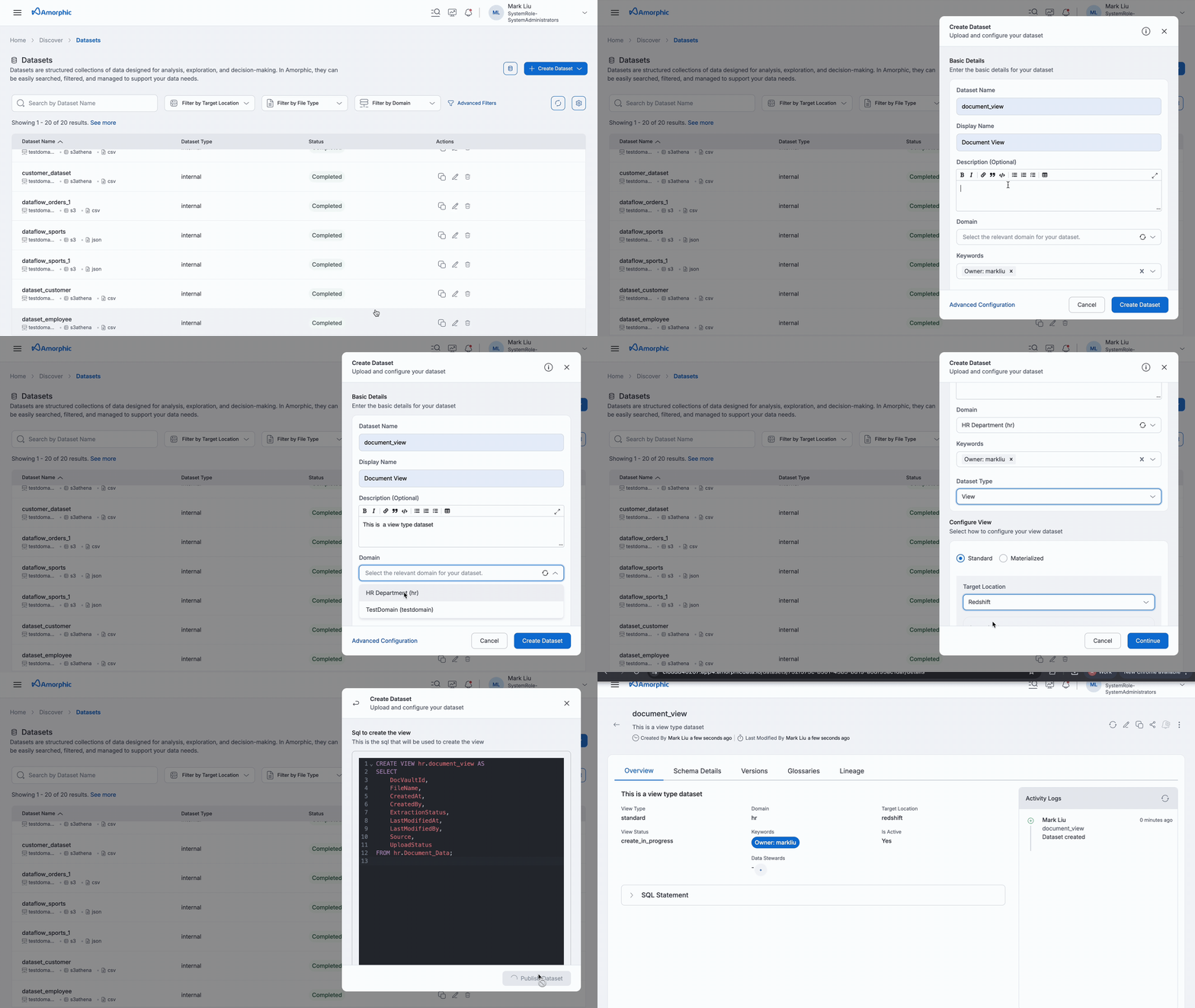
When creating a new view-type dataset, several key details must be provided, including the Domain, Target Location, and View Type, among others. This process is exclusively applicable to structured datasets, and appropriate permissions are required to access these datasets.
The following additional information is required to create a new view-type dataset:
| Properties | Details |
|---|---|
| View Type | Type of view. Eg: Standard, Materialized. |
| Assume Role | Enable to utilize user IAM role for query execution during view creation; this functionality is only relevant for views intended for Athena as their target location. This feature is not available for generating views on system datasets or when there are more than 220 datasets and views. |
| Auto Refresh | Materialized views are the only type of view for which the auto-refresh feature is available in Redshift. Users can either activate or deactivate auto-refresh, or manually refresh the view at their discretion. |
| SQL Statement | SQL statement used to create or edit a view. Eg: CREATE VIEW domain.viewname AS SELECT * FROM domain.datasetname; |
For a multi-tenancy deployment, Amorphic can be used to run queries and create view-type datasets across different tenants or databases. To access an object from another tenant or database, the complete path notation must be used for referencing datasets, which includes the tenant name, schema name, and object name. (e.g. tenant.schema.object.)
For cross-tenant view creation, use 'with no schema binding' at the end of the query:
create view {domain1}.{viewName} as select * from {tenant2}.{domain_2}.{datasetName} with no schema binding
To access a particular column, use tenant_name.schema_name.object_name.column_name.
View Details
Standard View-Type Datasets:
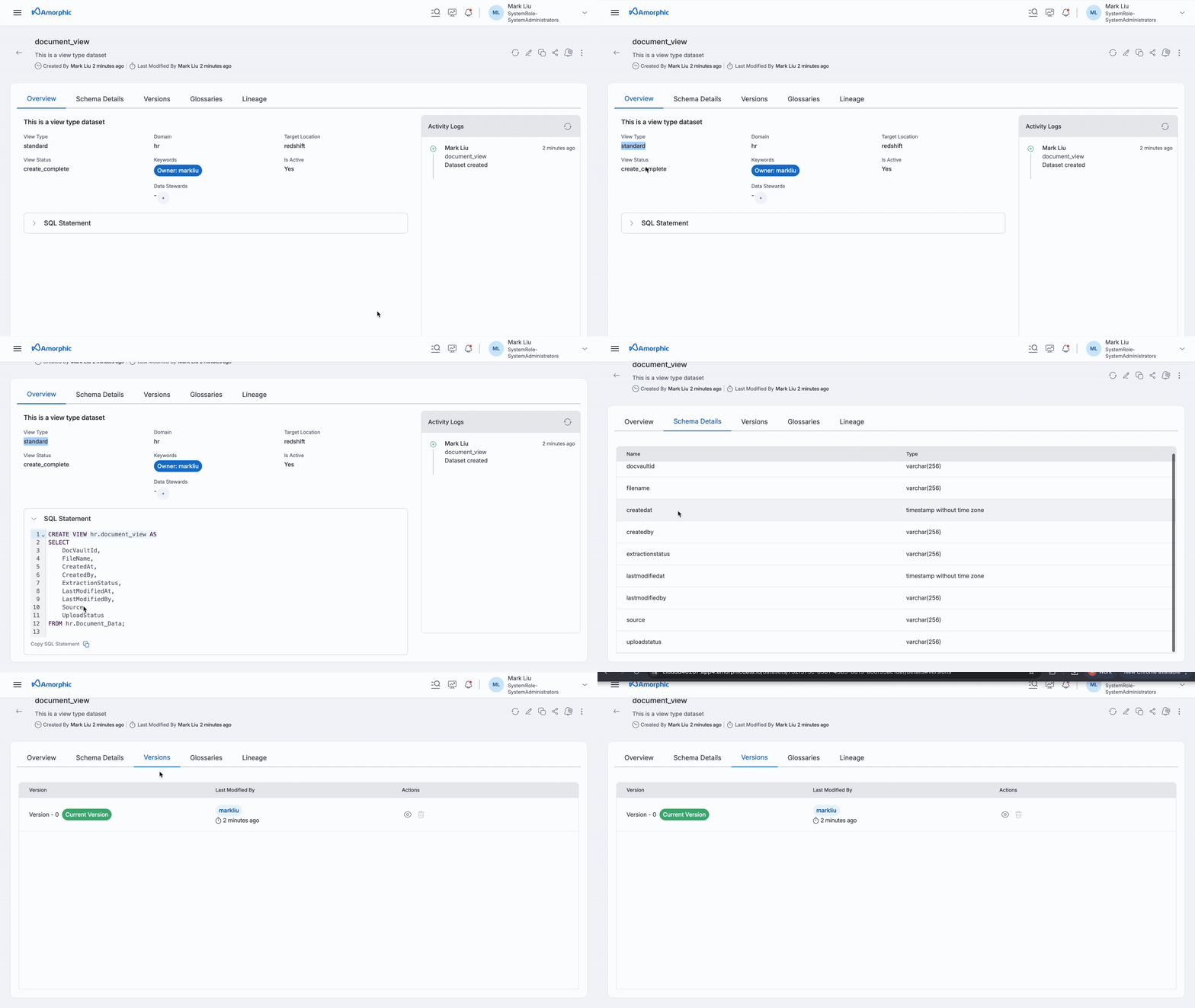
From the details tab, view details can be accessed. Some important fields to consider in view details are:
- IsActive: Determines if there is a valid view in the data warehouse that can be queried.
- View Status: Status can be create_complete, create_failed, update_rollback_complete, update_complete, create_in_progress, update_in_progress.
- Schema Details: Shows the underlying schema of the views.
During view creation:
- If a view is successfully created, IsActive is marked as yes and View Status will be shown as create_complete.
- If a view fails to get created, IsActive is marked as no, View Status will be shown as create_failed, and an Error Message will be displayed.
If the view has been deleted manually in the backend or using the AWS console, then the IsActive is marked no, ViewStatus will be deleted_from_backend, and the respective Error Message is displayed.
- For standard views created in Redshift, if views are created with the "WITH NO SCHEMA BINDING" option, the source view will not consider these views as dependent datasets.
SQL statement for creating a view with no schema binding:
    Create view DomainName.View2 as select * from DomainName.View1 WITH NO SCHEMA BINDING

    Here, View2 is not considered a dependent view of View1. However, if View1 is deleted, View2 cannot be queried.
Materialized View-Type Datasets:
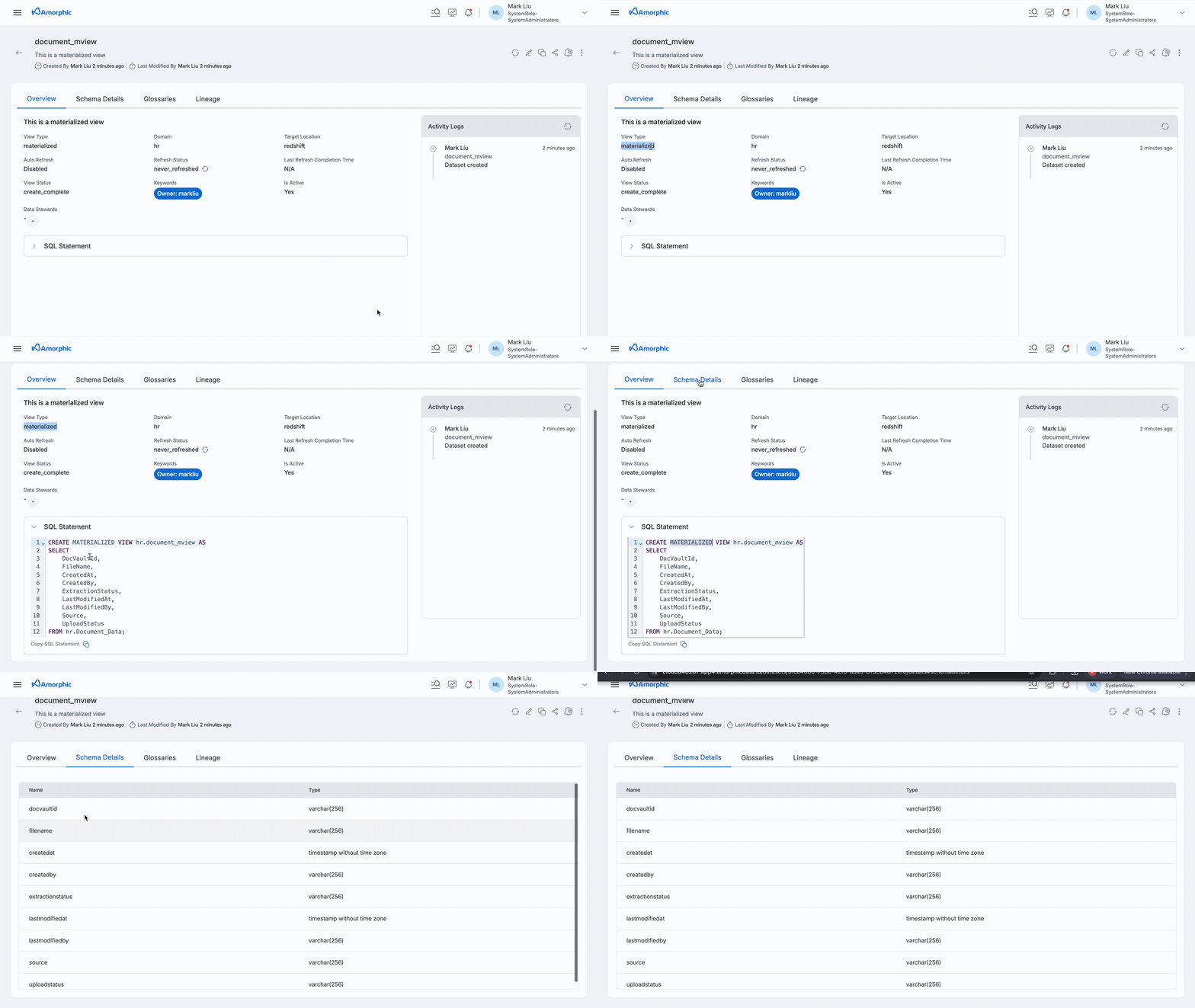
In addition to the fundamental view details, there are several critical fields to consider when dealing with materialized view details:
- AutoRefresh: This feature allows Redshift to automatically refresh the materialized views based on the current workload. Users have the flexibility to enable or disable this option as needed. Additionally, manual refreshes can still be performed at any time.
- RefreshStatus: This field indicates the current status of the refresh operation. For a comprehensive list of possible statuses, please refer to the Refresh Status documentation.
- LastRefreshCompletionTime: This timestamp records when the materialized view last completed a refresh operation, providing insight into the recency of the data.
Editing View-Type Datasets
Standard View-Type Datasets:
To edit a view, use statements beginning with CREATE OR REPLACE VIEW.
When updating a view, the following outcomes may occur:
- If the update fails on a view that was already in a failed state, the IsActive status will stay as no, and the View Status will indicate create_failed along with an Error Message explaining the issue.
- If the update is successful on a previously failed view, the IsActive status will change to yes, and the View Status will be updated to create_complete.
- If the update fails on a view that was successfully created before, the IsActive status will still be yes, but the View Status will change to update_rollback_complete, and an Error Message will be provided.
- If the update is successful on a view that was successfully created, the IsActive status will remain yes, and the View Status will be marked as update_complete.
- A view cannot be edited or deleted when the View Status is create_in_progress or update_in_progress. Additionally, any modifications to the view are prohibited during these states to ensure data integrity and consistency.
Materialized View-Type Datasets:
A materialized view is a specialized type of database view that not only stores the results of a query but also allows for efficient data retrieval.
To modify a materialized view, it is essential that the view is not currently in an active state.
Begin the editing process by issuing the command to create materialized view, followed by the necessary changes to the view's definition.
If the materialized view is in an active state, users will be limited to updating only the metadata fields associated with it, ensuring that the integrity of the data remains intact during the editing process.
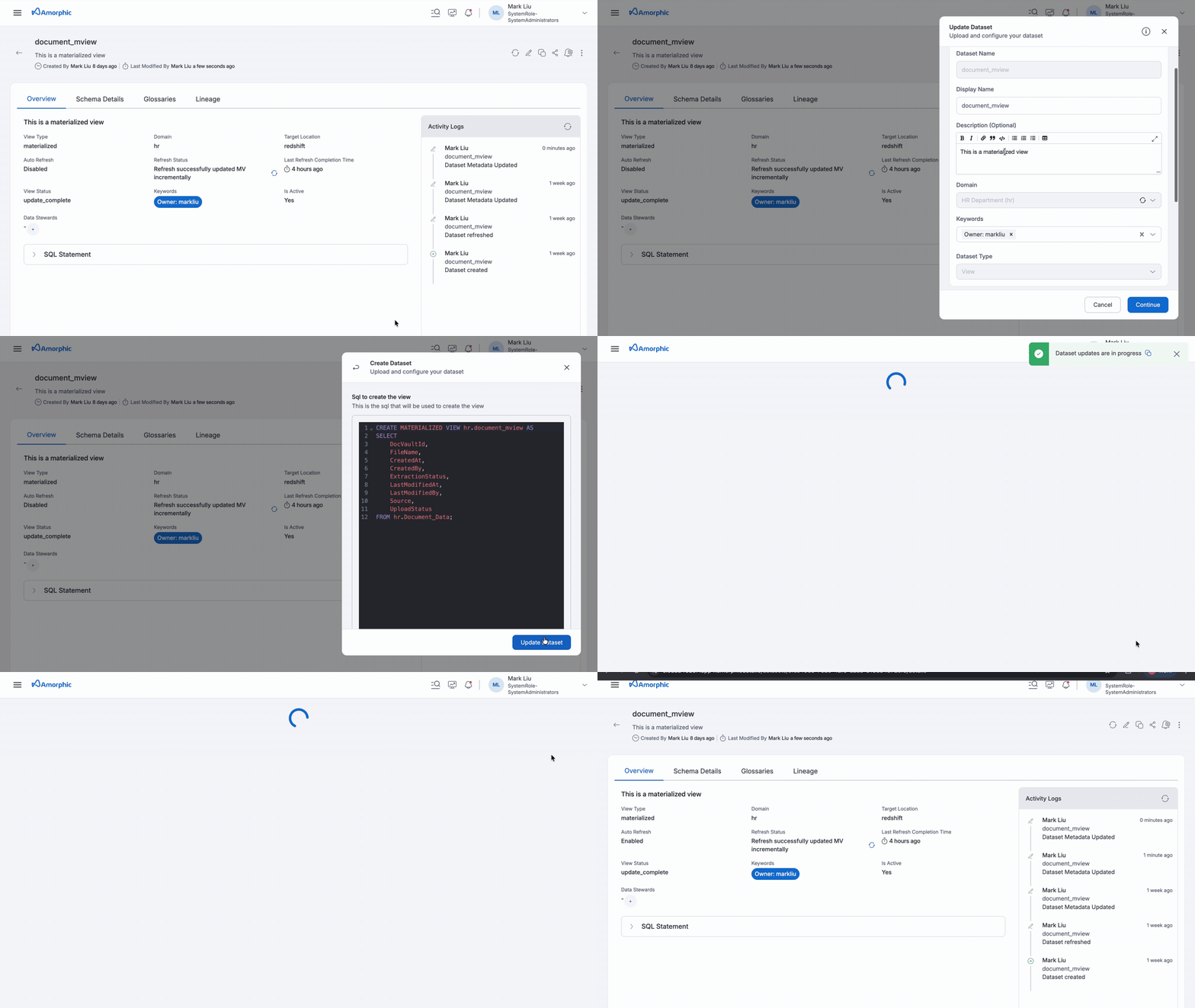
When updating a view, the following outcomes may occur:
- If an update fails on a view that was previously in a failed state, the IsActive status will remain no, and the View Status will indicate create_failed, accompanied by an Error Message.
- If an update is successful on a view that was previously failed, the IsActive status will change to yes, and the View Status will be updated to create_complete.
- If an update is successful on a view that was already successfully created, the IsActive status will remain yes, and the View Status will be marked as update_complete.
- A materialized view is restricted from being edited or deleted while its View Status is either create_in_progress or update_in_progress. This ensures that any ongoing operations are completed successfully before any modifications can be made, thereby maintaining data integrity and consistency.
If an action, such as creating or updating a view, is not completed within 15 minutes, it will result in a failure accompanied by an error message that states "Request Timed Out." In these situations, it is important to resolve the underlying issue before attempting the action again. For instance, if the process of creating a view takes too long and leads to a timeout error, it is advisable to optimize the query before trying to create the view once more.
Refreshing Materialized Views
Materialized views provide flexible refresh options:
- Manual Refresh: Users can manually refresh the view as needed
- Auto-Refresh: The system can automatically refresh the view based on workload
Important considerations:
- Auto-refresh can be enabled through both SQL statements and UI selection
- When both methods are used, auto-refresh from the UI takes precedence
- This ensures consistent refresh behavior across all configuration methods
View Versions
This section maintains a record of all SQL statements utilized for creating or updating standard views, organized by version. Versioning is exclusively available for standard views and not supported for materialized views. Users have the ability to:
- Delete specific versions
- Switch between different versions
- Create new versions when SQL statements change
The system intelligently manages versions by:
- Creating a new version only when there's a change in the SQL statement
- Reverting to an existing version if the SQL statement matches a previous version
- Preventing duplicate versions for identical SQL statements
This version control system provides a comprehensive audit trail and enables users to easily track and manage changes to their standard views over time.
- Materialized views do not support versioning, as their SQL statements are immutable.
- For newly created views, versioning will be enabled automatically.
- Existing views created prior to version 2.4.1 will have their first version generated upon updating with a new SQL statement.
View Use Case Example
A large healthcare network utilizes Amorphic View-Type Datasets to effectively manage patient data across multiple facilities. The same underlying patient information is accessed by various departments, each creating specialized views tailored to their needs:
-
Physicians create clinical views that focus on:
- Medical history
- Test results
- Treatment plans
-
Billing Department uses financial views to highlight:
- Insurance coverage
- Payment status
-
Research Team applies anonymized views for:
- Statistical aggregations
- Population health studies
-
Administrative Staff maintains operational views that track:
- Bed utilization
- Staff scheduling
Each department shares these specialized views within their teams, applying relevant filters and calculations without duplicating the core dataset. The domain naming convention ensures appropriate access controls while maintaining data consistency across the organization.
Creating Views Using Redshift External Schemas
When a Domain has Redshift Spectrum external schemas enabled, Redshift target location views can be created using supported non-Redshift datasets exposed through _ext_<domain_name> and _exts3_<domain_name>.
| Source dataset | Reference in the view SELECT |
|---|---|
| Glue Data Catalog-backed datasets - Lake Formation, S3 Athena, DynamoDB, and HealthLake | _ext_<domain_name>.<dataset_name> |
| S3 Tables catalog datasets | _exts3_<domain_name>.<dataset_name> |
Prerequisites
- Domain
<domain_name>must have external schemas enabled. - The user must have Dataset Level Access (DLA) on
<domain_name>to use_ext_<domain_name>or_exts3_<domain_name>. DLA may be granted directly or through a tag.
External schemas expose all supported datasets in the Domain to Redshift. There is no table-level restriction within an external schema - any supported dataset under that Domain can be accessed through _ext_<domain_name> or _exts3_<domain_name>.
For security consistency, the user must have DLA on the Domain. That means they already have access to all datasets in the Domain, so referencing external schemas in a view does not grant access to data they would not otherwise be allowed to see. See External Schemas and DLA Sharing for details.
Unsupported: creating views in an external schema
External schemas are read-only. Views can only be created in a regular Redshift Domain, not in an external schema. For example, the following statement is not supported:
CREATE VIEW _ext_domname.viewname AS
SELECT * FROM _ext_domname.ds1;
In this example, the user is trying to create a view viewname in _ext_domname. Create the view in a regular Redshift Domain such as rsdomain, and reference _ext_domname only in the SELECT.
Eligible source datasets
In the SELECT statement, reference the source dataset as _ext_<domain_name>.<dataset_name> or _exts3_<domain_name>.<dataset_name>. The dataset name stays the same; only the schema prefix changes.
The source dataset (<dataset_name>) must be a supported dataset exposed through the Domain's external schema. The following cannot be used as the source:
- Datasets with External as the dataset type
- View-type datasets (including views created in a non-Redshift target location)
- Datasets with Redshift as the target location - use
domain.datasetinstead - Datasets with S3 as the target location
See Redshift Spectrum External Schemas for the full list of supported and unsupported datasets.
Sample SQL
Assume ds1 is an eligible Lake Formation dataset in Domain domname, and rsdomain is the Redshift Domain where the view will be stored.
CREATE VIEW rsdomain.viewname AS
SELECT * FROM _ext_domname.ds1
WITH NO SCHEMA BINDING;
If ds1 is present in the S3 Tables catalog, use _exts3_domname instead of _ext_domname in the SELECT - sql looks like:
CREATE VIEW rsdomain.viewname AS
SELECT * FROM _exts3_domname.ds1
WITH NO SCHEMA BINDING;
The resulting view is stored in Redshift under rsdomain and reads its data from ds1 through the Domain's external schema.
ds1is an eligible Lake Formation dataset in Domaindomname.- The view is created in Redshift Domain
rsdomain.
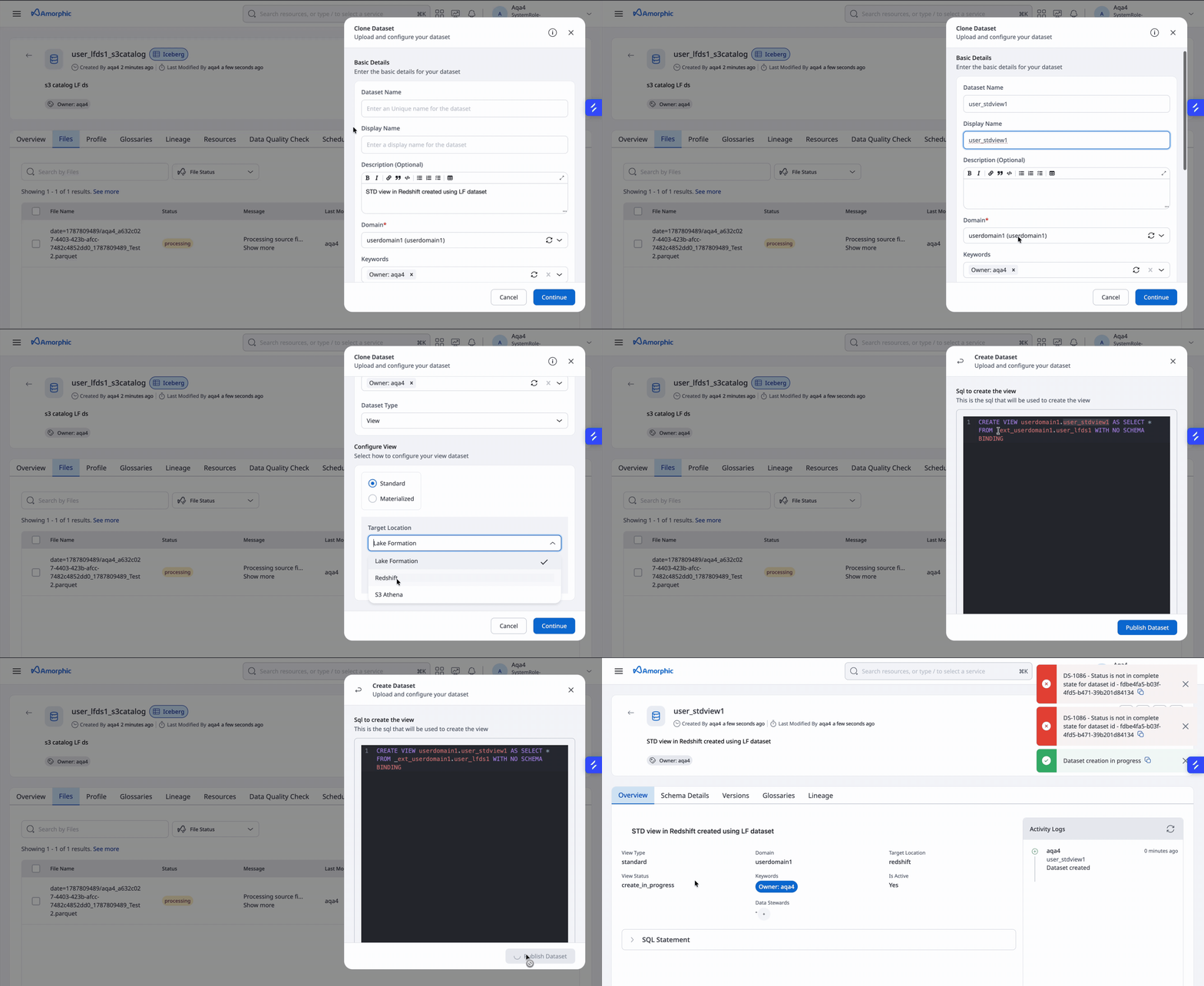
A standard view that references a table through Redshift Spectrum must include WITH NO SCHEMA BINDING. View creation will fail if this clause is omitted.
The video below shows the creation of a standard view user_stdview1 in Redshift from a Lake Formation dataset user_lfds1
- Materialized views can also be created in a regular Redshift Domain using datasets exposed through an external schema.
- Auto Refresh is not supported for Redshift materialized views that reference external schemas.
AutoRefreshcannot be submitted astruewhen creating the materialized view. - After the materialized view is created, it cannot be updated to enable Auto Refresh.
- A Redshift view that references
_ext_<domain_name>or_exts3_<domain_name>(like the one created above) must be deleted before the external schemas can be disabled or the source Domain can be deleted.