
Domains
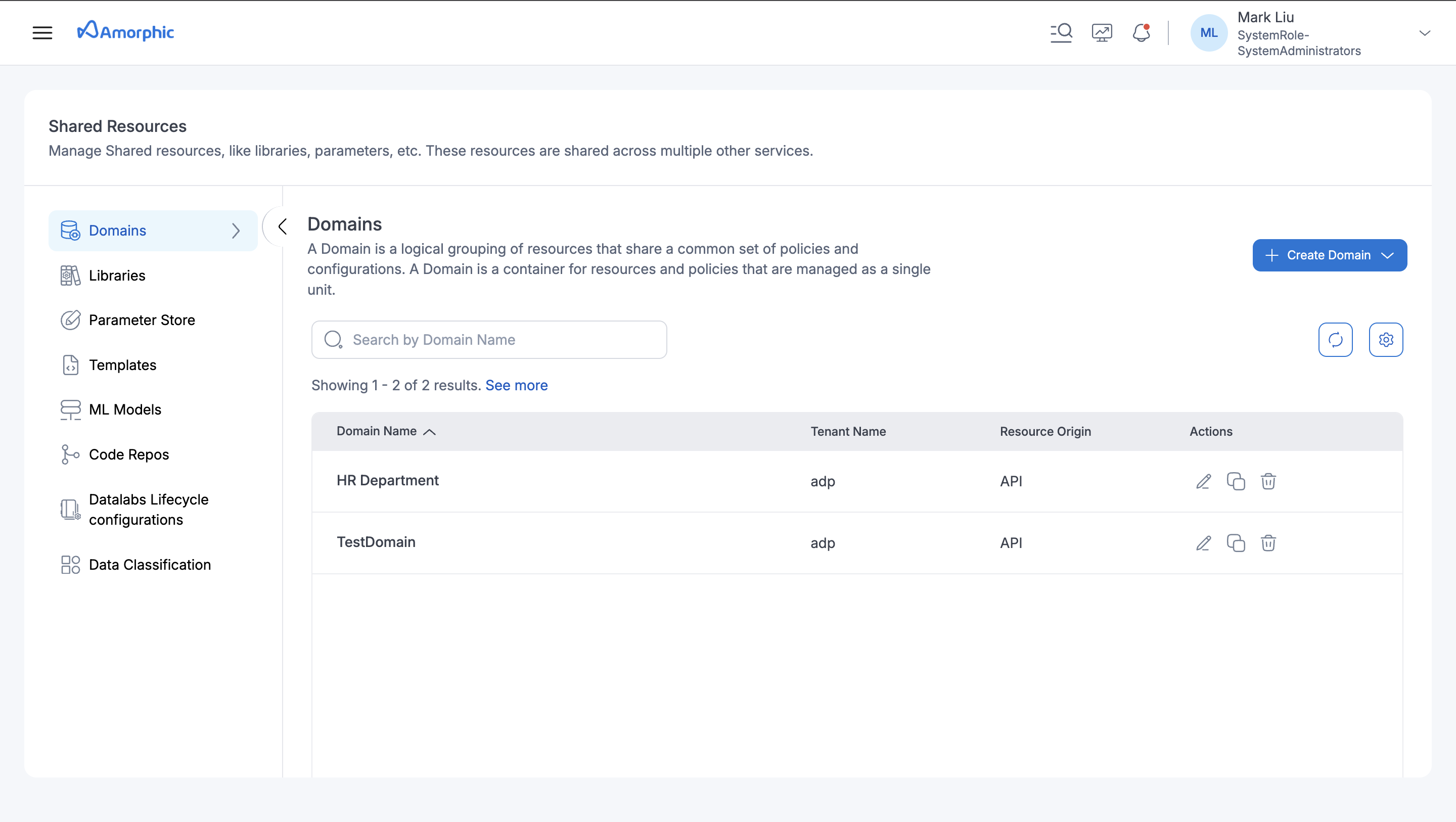
Every Dataset is registered to a Domain. This Domain can be referred as a type of Business/Industry/Purpose or some other type of specification, this helps to maintain and segregate data between different Datasets.
When creating a Dataset, users must have a Domain. For example, if users have two Datasets that hold medical and infrastructure data, it would be useful to have two separate Domains, one for medical and one for infrastructure.
Users can Find this feature in the Data Management And Governance -> Data Domains
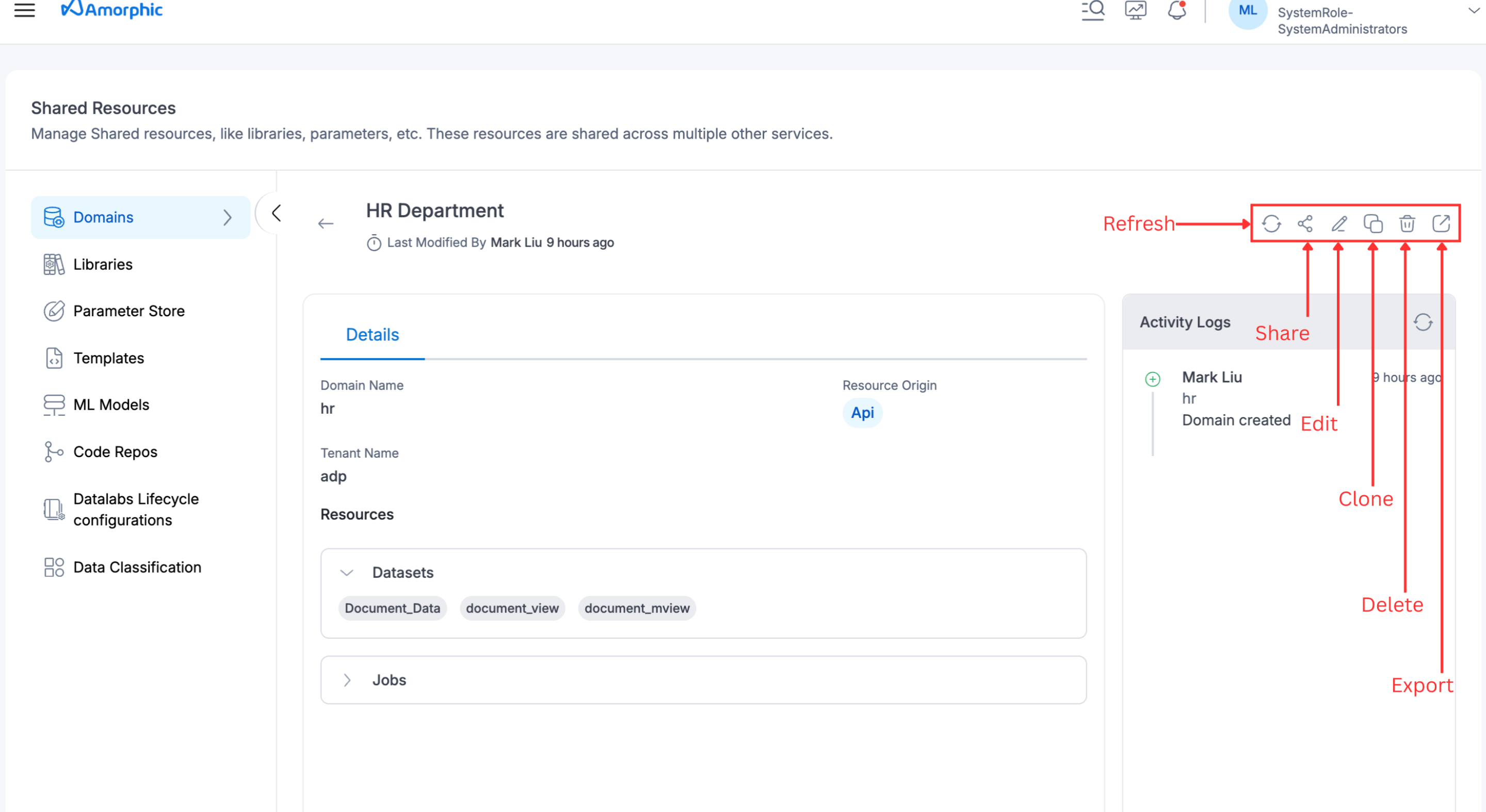
Domain Details
The Domain Details page offers a detailed overview of the domain, including its description, associated resources like datasets and jobs, and activity logs. Users have various management options such as refreshing domain details, sharing access with other users and tags, editing domain information, deleting the domain, and cloning existing domains to create new ones with similar settings.
How to add a Domain?
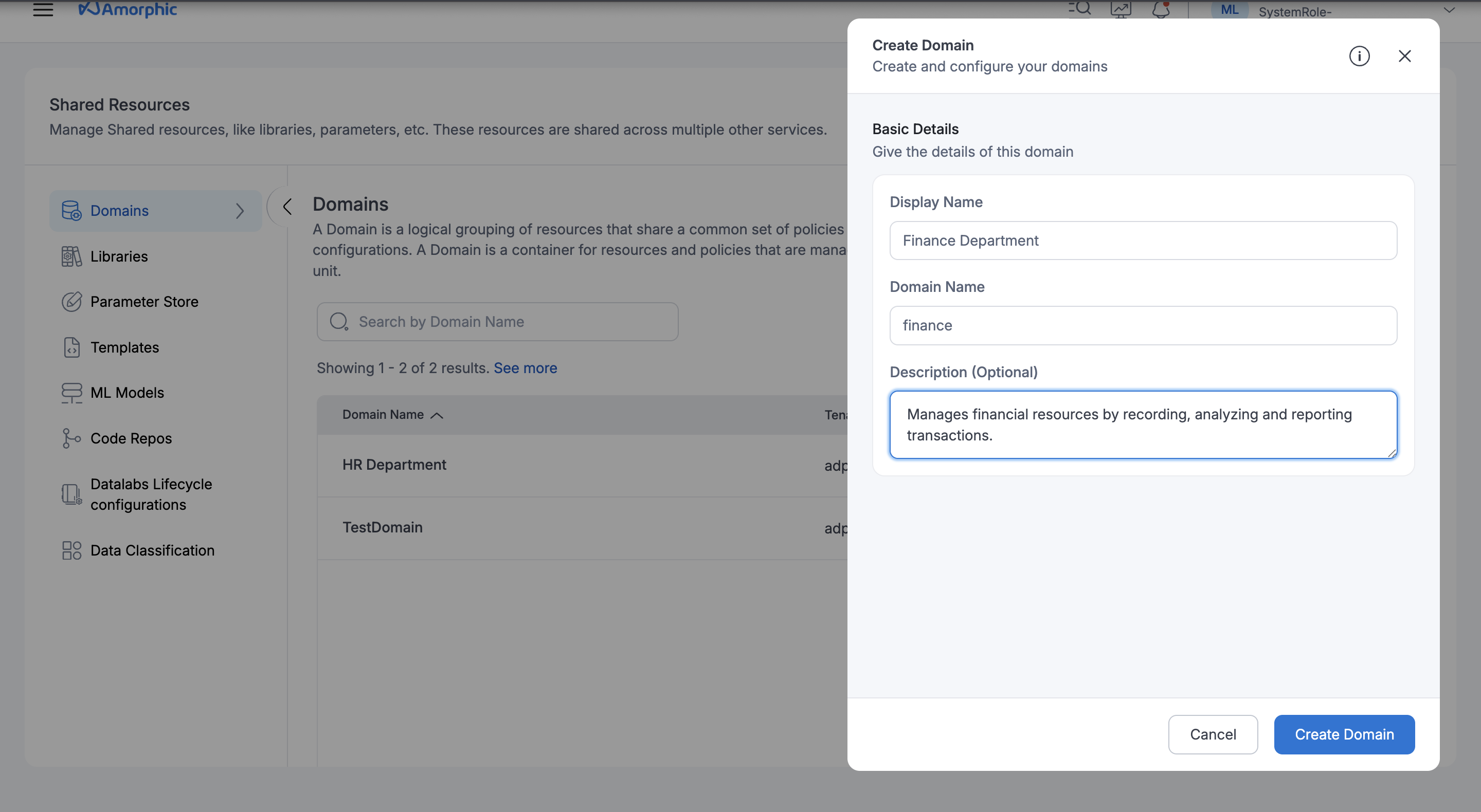
To create a domain:
- Click on
+ Create Domainbutton - Fill in the below information:
| Type | Description |
|---|---|
| Domain Name | A unique identifier assigned to the domain, used for distinguishing it within the system. |
| Display Name | The name displayed in the Amorphic, helping users easily recognize and reference the domain. |
| Description | A brief summary outlining the purpose of the domain |
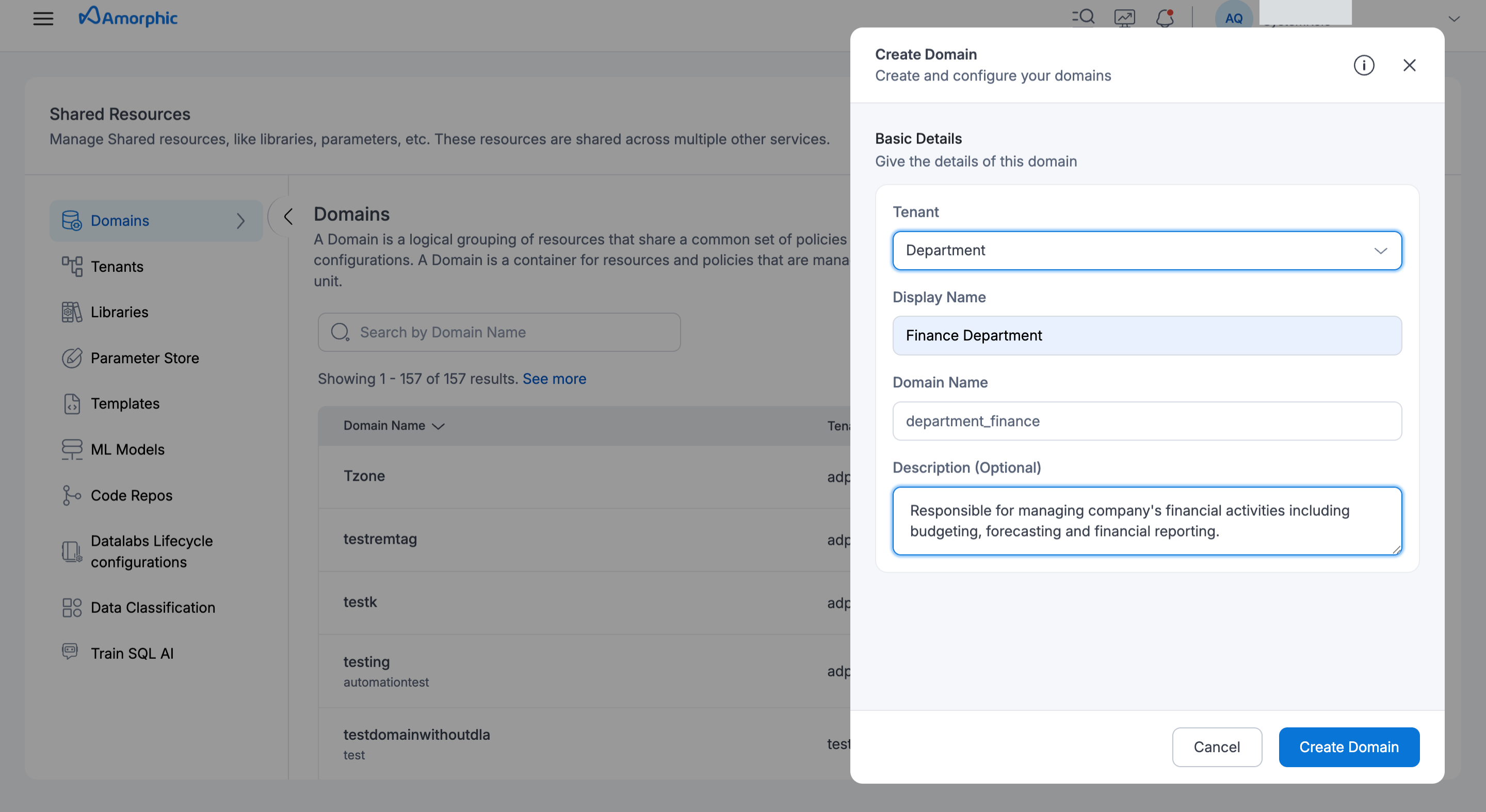
| Tenant Name | The name of the tenant - Only required for Multi-tenancy enabled environments |
For a Multi-tenancy enabled environments, Domains are considered as a part of tenants. Users can decide which Domain belongs to a given tenant. The Domains made for a tenant should have the tenant's name in front, except for the standard tenant. To learn more, refer Tenants documentation.
For example, to create a Domain "finance" under a tenant "department", the Domain Name should be "department_finance". However, in the case of a default tenant. if users want to create a Domain "finance" under the default tenant, the Domain Name will be simply "finance".
Access Control
To create a dataset, access to the Domain is required. Access control is similar to other features, meaning that if users create a Domain, they will get owner access and can provide or revoke access using authorized users and tags.
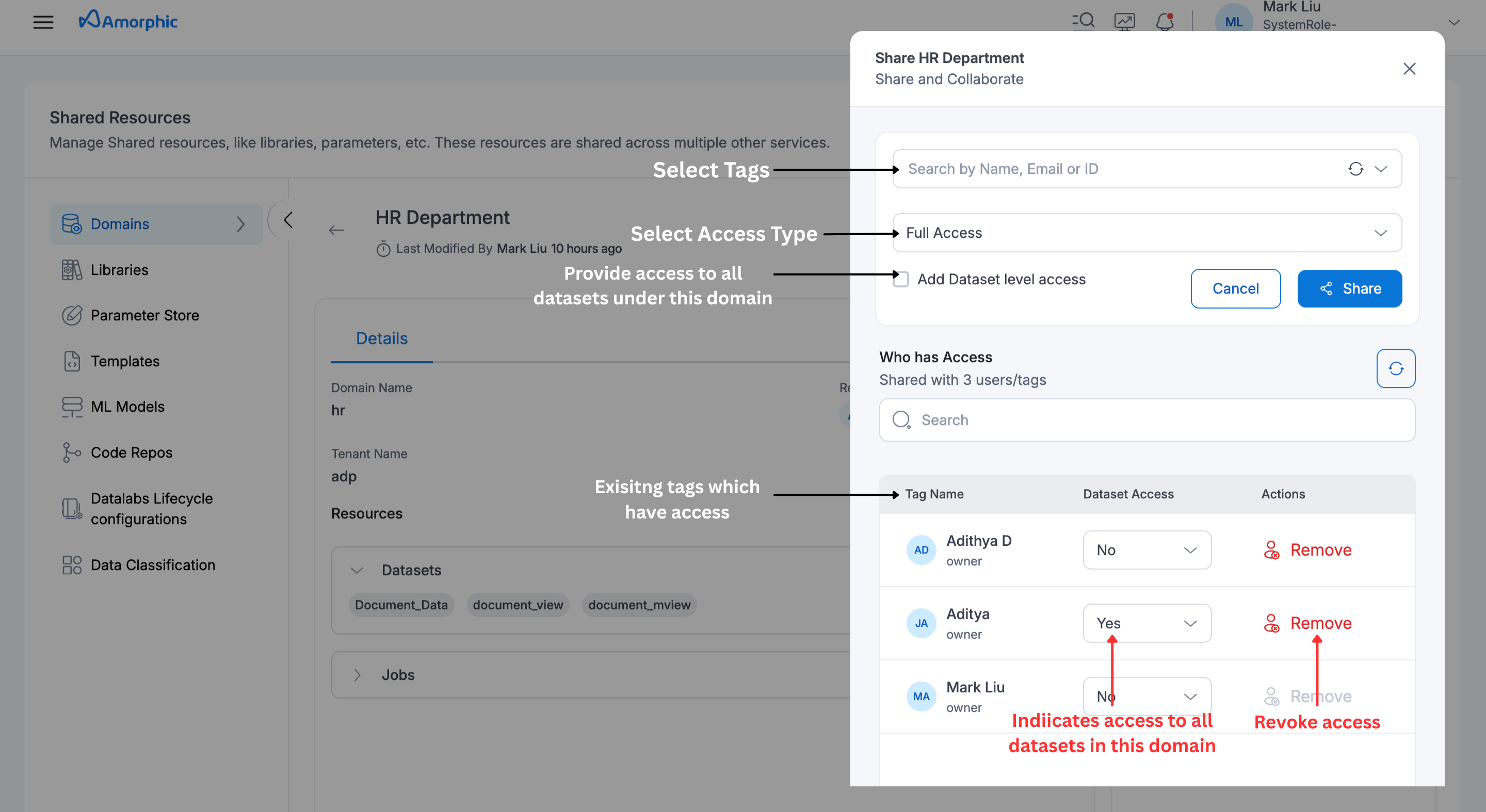
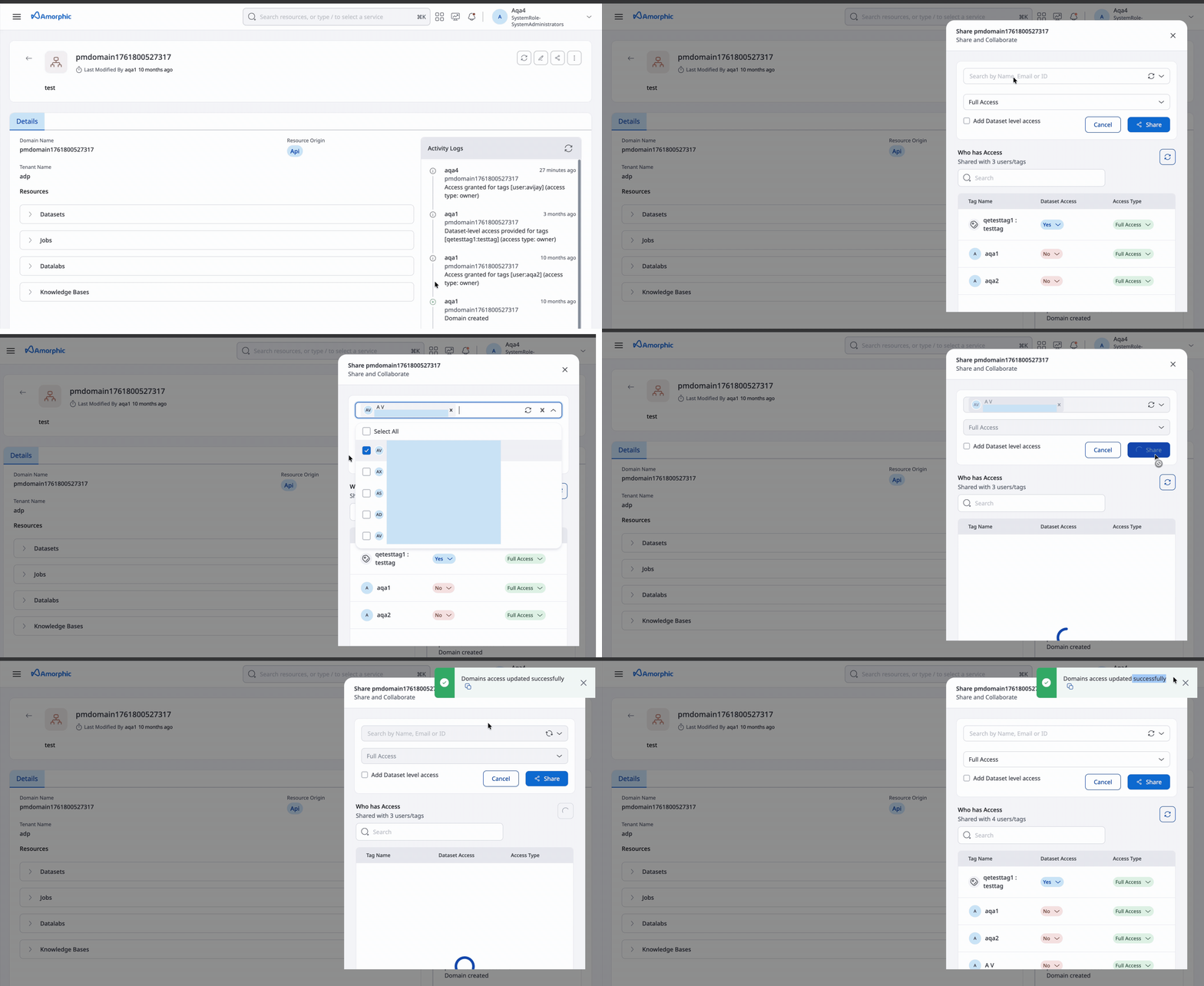
- Sharing or revoking a single Domain to or from users or tags is processed synchronously.
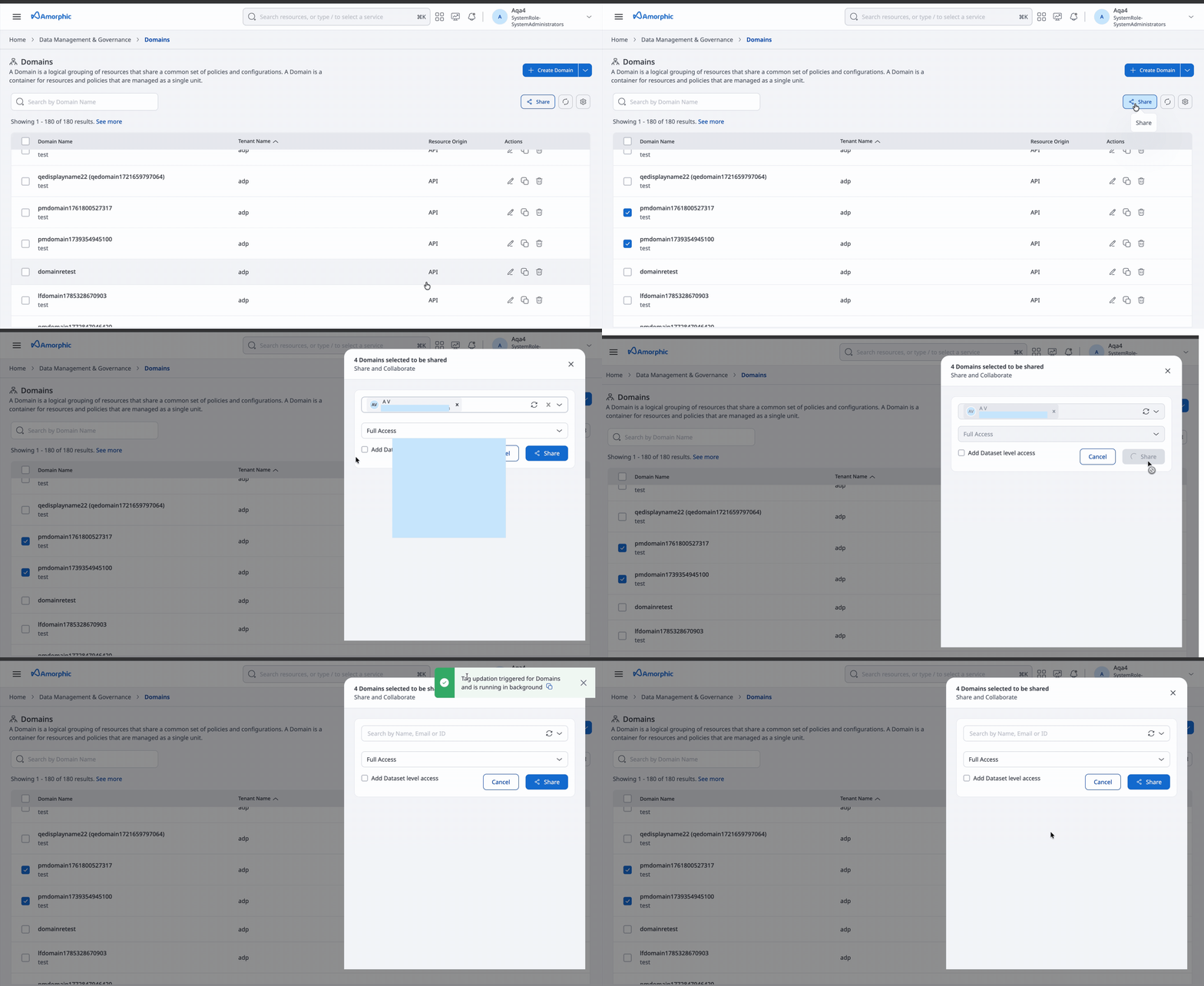
- Sharing or revoking multiple Domains continues to be processed asynchronously.
The video below shows sharing single Domain to user/tag (synchronous operation).
The video below shows sharing multiple Domains to user/tag (asynchronous operation).
Enable or Disable Domain Dataset Level Access
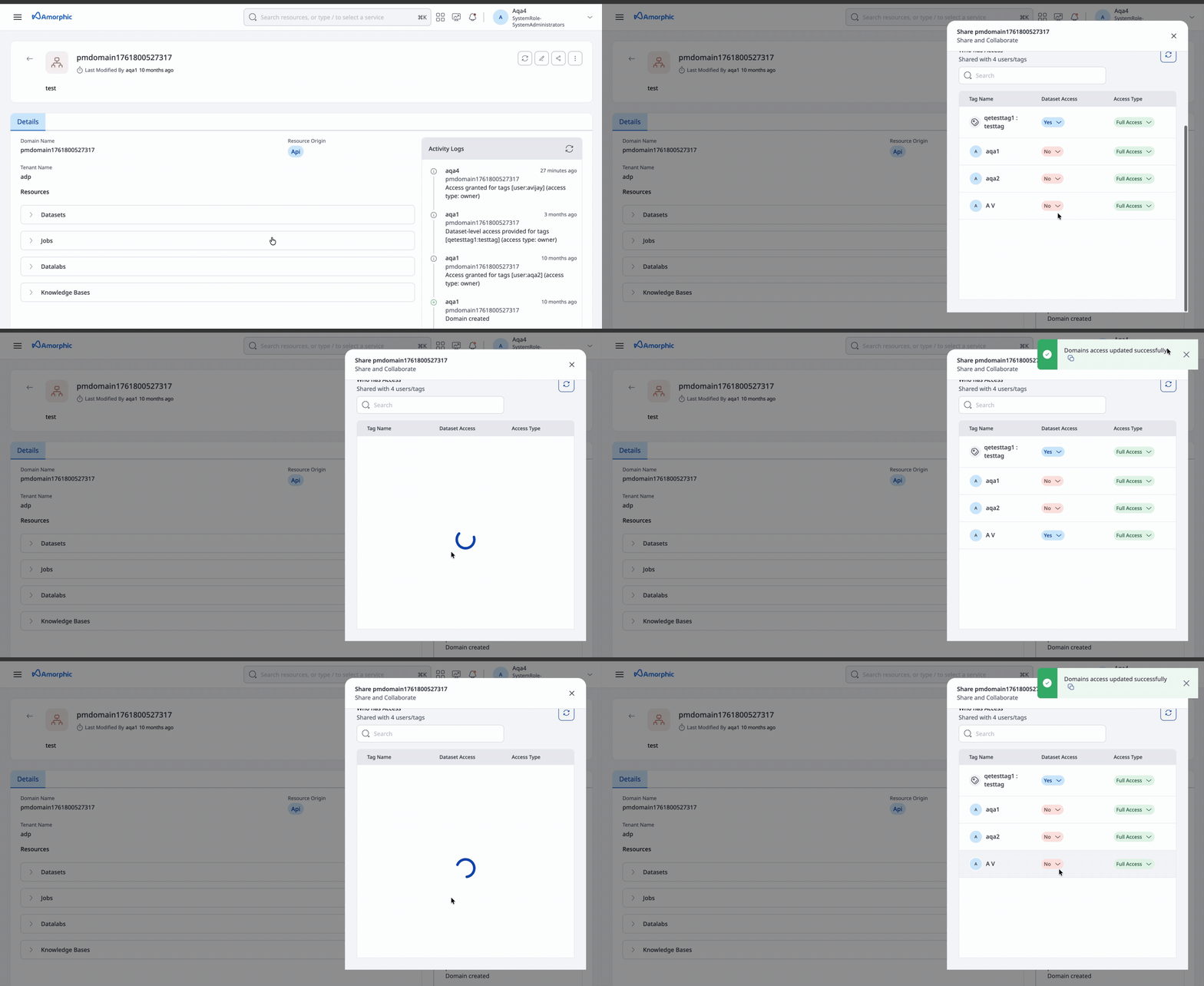
Dataset Level Access (DLA) can be enabled or disabled for users and tags when managing Domain access. This provides the user/tag access to all the datasets present under the domain.
The video below shows enabling and disabling Dataset Level Access for a Domain.
Granting Tenant Access When Sharing Domain (API Only)
To grant both Domain and Tenant access simultaneously, include IsTenantAccessRequested: true in the AdditionalMetadata field.
Path: /share/domains
Method: POST

Request Body:
{
    "AccessType": "owner"/"read-only"/"editor",
    "ResourceIds": [
        "domainname"
    ],
    "AccessTags": [
        {
            "TagKey": "tagkey",
            "TagValue": "tagvalue"
        }
    ],
    "AdditionalMetadata": {
        "IsDatasetLevelAccessProvided": false,
        "IsTenantAccessRequested": true
    }
}
- Only users with at least read-only access to the domain can be granted access to its datasets.
- A domain with attached datasets cannot be deleted; users must first remove all associated datasets. Full access is required to delete a dataset.
- If the Domain has external schemas that are referenced by Redshift views, those views must be deleted before the Domain can be deleted.
Redshift Spectrum External Schemas
Amorphic can expose supported non-Redshift datasets present in a domain to Amazon Redshift using Redshift Spectrum external schemas. This allows users to query eligible Lake Formation, S3 Athena, DynamoDB Tables datasets directly from the Redshift target location in the Playground without moving the source data into Redshift.
External schemas expose only some supported datasets. They do not expose every dataset or view associated with the Domain.
What are External Schemas?
An External Schema is a metadata mapping layer that links Redshift to an external data catalog - such as the AWS Glue Data Catalog, allowing you to use non-redshift datasets in redshift without ingesting data into local Redshift storage.
When external schemas are enabled on a Domain, Amorphic creates two external schemas in Redshift: _ext_<domain_name> and _exts3_<domain_name>.
| Schema | Datasets exposed in Redshift |
|---|---|
_ext_<domain_name> | Supported Glue Data Catalog-backed datasets present in the Domain, including Lake Formation, S3 Athena, DynamoDB datasets |
_exts3_<domain_name> | Lake Formation datasets present in the Domain that are present in the S3 Tables catalog |
The following resources are not exposed through _ext_<domain_name> or _exts3_<domain_name> and cannot be used in the Redshift target location:
- Datasets created with S3 as the target location,
- Datasets created with External as the dataset type.
- Views are not exposed in Redshift through external schemas.
Enabling External Schemas
External schemas for a Domain can be created via the API using the create-external-schema action.
Path: /domains/{domain_name}?action=create-external-schema
Method: PUT
The video below shows enabling external schemas on a Domain.
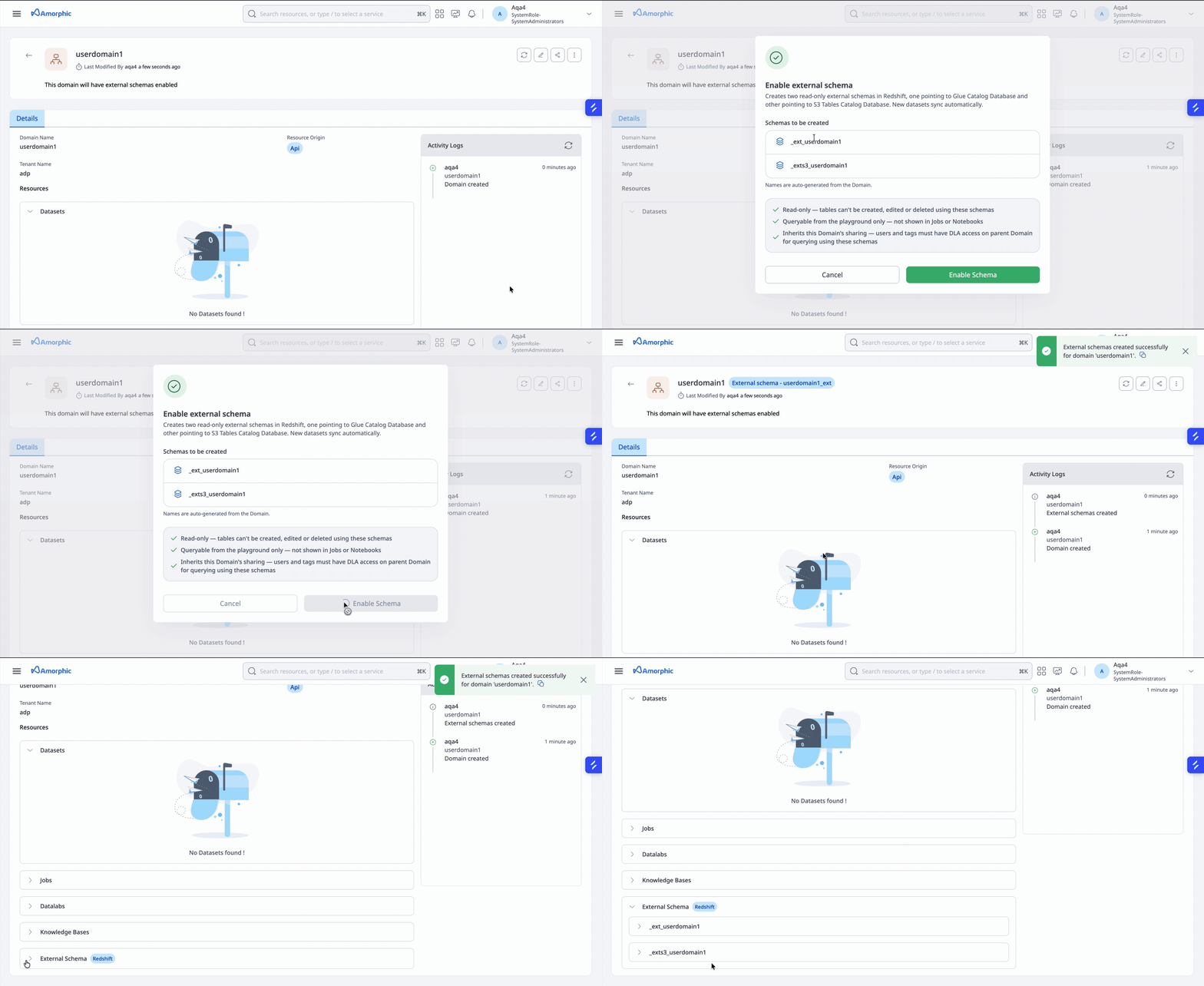
If the Domain has external schemas, sharing it with DLA (Dataset Level Access) to a tag or user also gives them access to those schemas.
Disabling External Schemas
External schemas can be dropped via the drop-external-schema action.
Path: /domains/{domain_name}?action=drop-external-schema
Method: PUT
Any tag or user that had access to the external schemas through DLA loses that access.
External schemas cannot be disabled while a Redshift view references a dataset through _ext_<domain_name> or _exts3_<domain_name>. Delete all referencing Redshift views before disabling the external schemas.
The video below shows that external schemas on a Domain cannot be disabled while a Redshift view still references a dataset through _ext_<domain_name> or _exts3_<domain_name>.
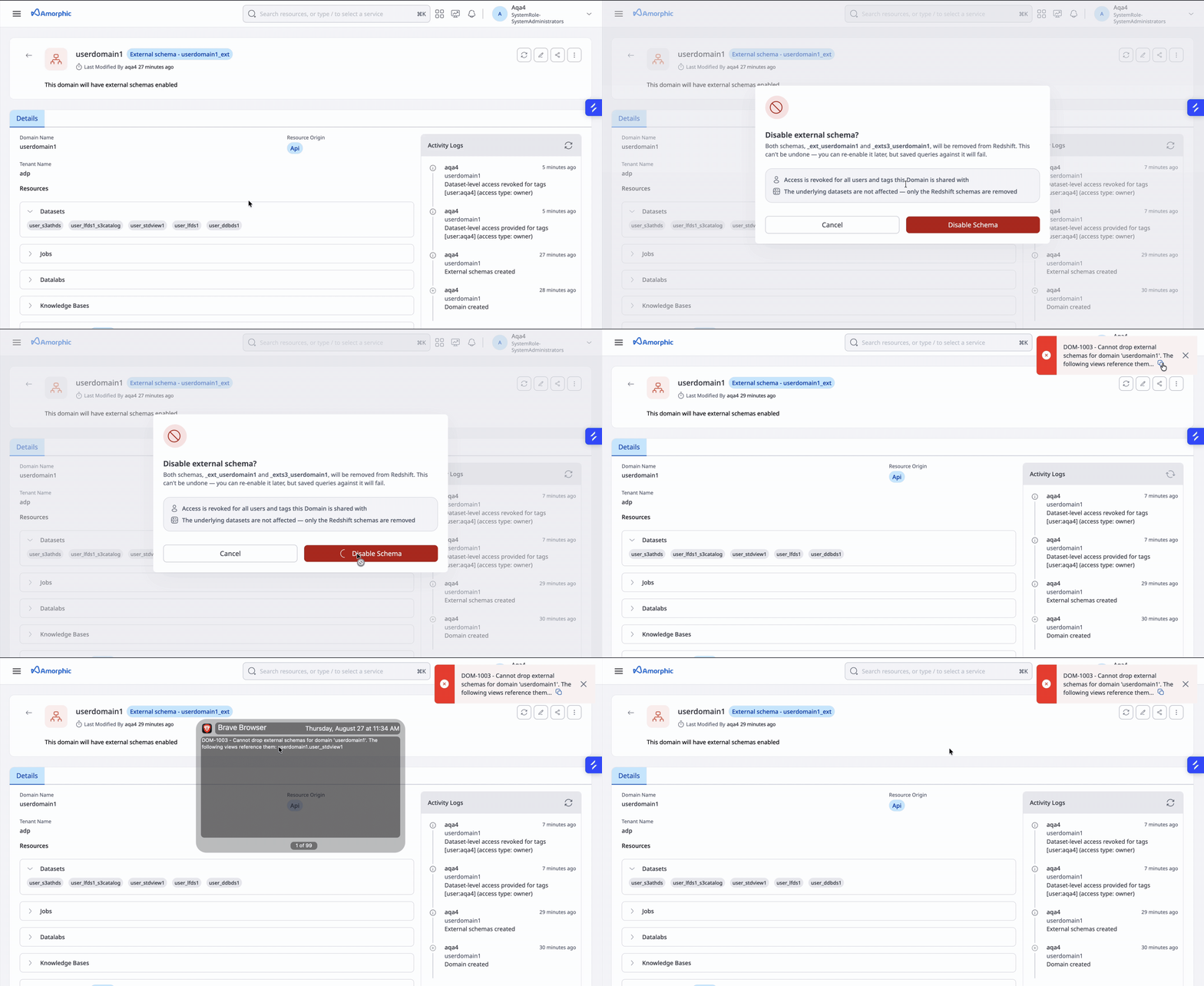
In the above video, domain userdomain1 has external schemas enabled, and its external schema _ext_userdomain1 was used to create a Redshift view user_stdview1. External schemas on userdomain1 cannot be disabled until user_stdview1 is deleted.
To use external schemas in the Playground, the user must have Dataset Level Access (DLA) on the Domain.
External schemas expose all supported datasets in the Domain to Redshift. There is no table-level restriction within an external schema — any supported dataset under that Domain can be accessed through _ext_<domain_name> or _exts3_<domain_name>.
For security consistency, the user must have DLA on the Domain. That means they already have access to all datasets in the Domain, so using the external schemas in the Playground does not grant access to data they would not otherwise be allowed to see.
External Schemas and DLA Sharing
When a Domain has external schemas enabled, sharing the Domain with DLA (to a tag or user) also grants that tag or user access to _ext_<domain_name> and _exts3_<domain_name>. Revoking DLA from user or tag revokes access from the external schemas as well.