
Tags Management
Tag-Based Access Control in Amorphic is a feature that helps users to efficiently share and manage Amorphic resources at scale. This control system co-exists with existing Role-Based Access Control (RBAC).
Amorphic Tag-Based Access Control provides the following capabilities:
- By sharing Tags with users, administrators can grant users access to specific Amorphic resources to which the tag is attached. This provides a dynamic and scalable access control mechanism.
Migration from Groups to Tags ( v2.7)
Starting with v2.7 release, the Groups feature is deprecated and will be automatically migrated to the new Tags-based access control system. This section outlines how existing group configurations will be mapped to their tag equivalents.
Migration Details
Tag Structure
- Each existing group will be converted to a tag using the following format:
- TagKey: "group"
- TagValue: The original group name
- Example: A group named "developers" becomes a tag
group:developers
Access Rights Migration
- Admin Access
- Previous group administrators will receive owner-level access to the corresponding tag
- Member Access
- Former group members will be granted read-only access to the tag
Resource Access
- All resources previously associated with the group will be automatically linked to the new tag
- Access levels to these resources will be preserved based on the original Group Type:
- Full Access permissions will maintain full access capabilities
- Read Only permissions will maintain read-only capabilities
Example Migration
- Original: "Group - developers"
- New: "Tag - group:developers"
- Group Admins → Owner Access to the tag
- Group Members → Read Only Access to the tag
- Resources maintain their original access levels as defined by the Group Type

What is a Tag?
In Amorphic, each tag consists of a Tag Key and Tag Value pair, representing a unique resource. Other Amorphic resources can be shared with these tags, similar to how we share resources with users with an access types. Anyone granted access to a tag can utilize the associated resource according to the defined access type. An access type: owner, editor or read-only must be specified when sharing any resource(including Tags) with users or Tags.
Example
Suppose user has the following Tag Key and Tag Value combinations:
Tag Key: department
Tag Value: sales
These combinations can be shared with users in the system, while other Amorphic resources can be shared with these Tags. This allows all users with whom the tags have been shared to access the Amorphic resources associated with those tags. Sharing a dataset with the tag department: sales and the access type owner associates the dataset with the sales department. When this tag is shared with users, it grants them owner access to that dataset.
Tags can only be shared with users and cannot be shared with other Tags.
Amorphic Acecss Tags contains the following information:
Tag Metadata Information
| Type | Description |
|---|---|
| Tag Key | The key identifying the tag. Can be a maximum of 24 characters. Allowed characters are lowercase letters, numbers and _ |
| Tag Value | Unique value for the tag key. Tag value can be a maximum of 24 characters and allowed characters are lowercase letters, numbers and _ |
| Tag Description | A brief explanation of the tag's purpose. |
| Resources | The list of resources attached to the tag. |
Tag Operations
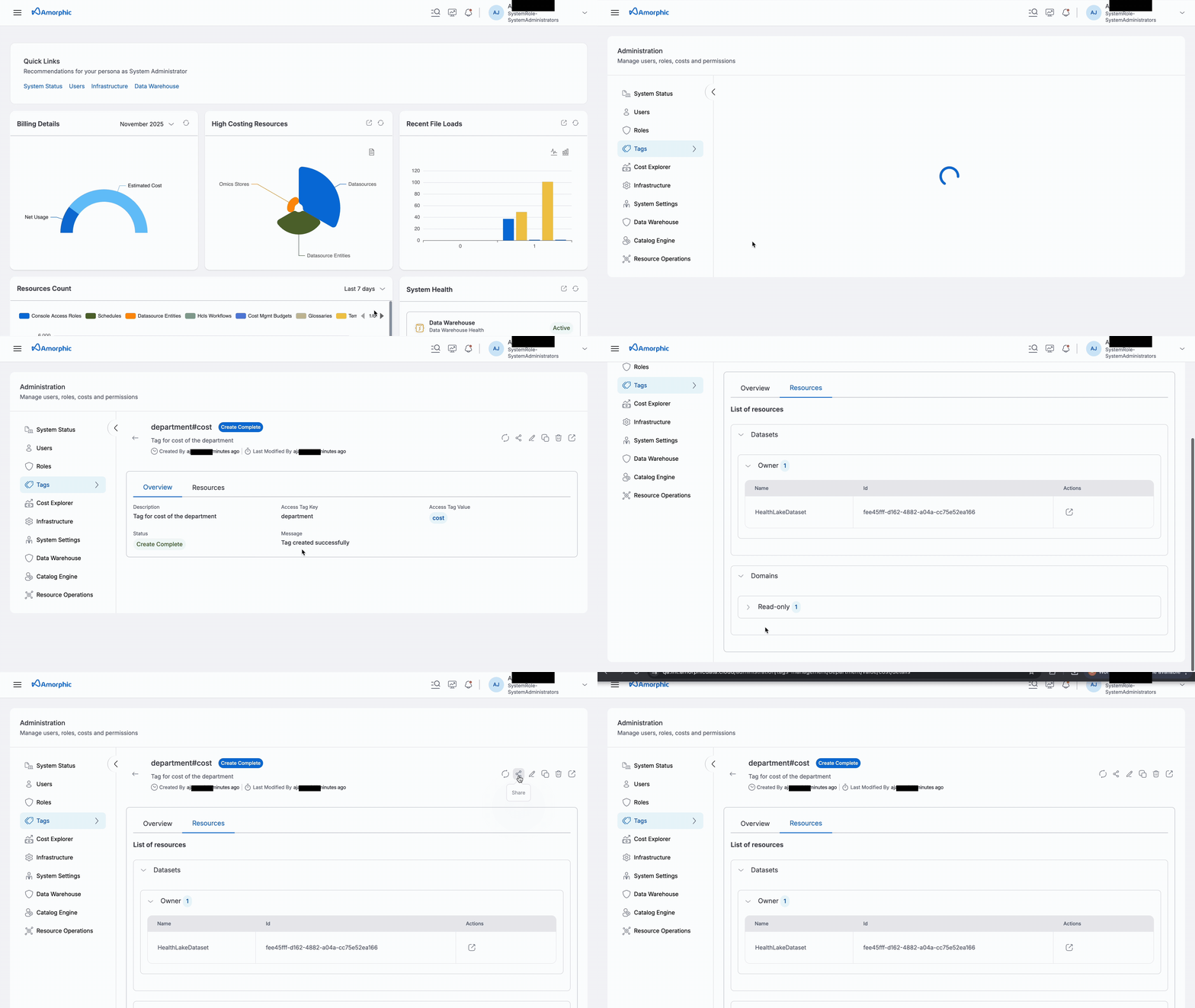
User can perform basic CRUD operations (shown in the below table) on a tag if user has sufficient permissions.
| Functionality | Description |
|---|---|
| Create Tag | Create a Tag by specifying Key & Value |
| View Tag | View existing Tag Metadata Information |
| Update Tag | Updates can only be made to the description of a tag, and this is permitted only for users who have editor or owner access to that tag |
| Delete Tag | Delete an existing Tag; this action is only permitted for users who have owner access to that tag |
| Share Tag | Share the Tag with users in the system |
If any resources are attached to the tag, it cannot be deleted. Please remove all resources from the tag before attempting to delete it.
How to create a Tag?
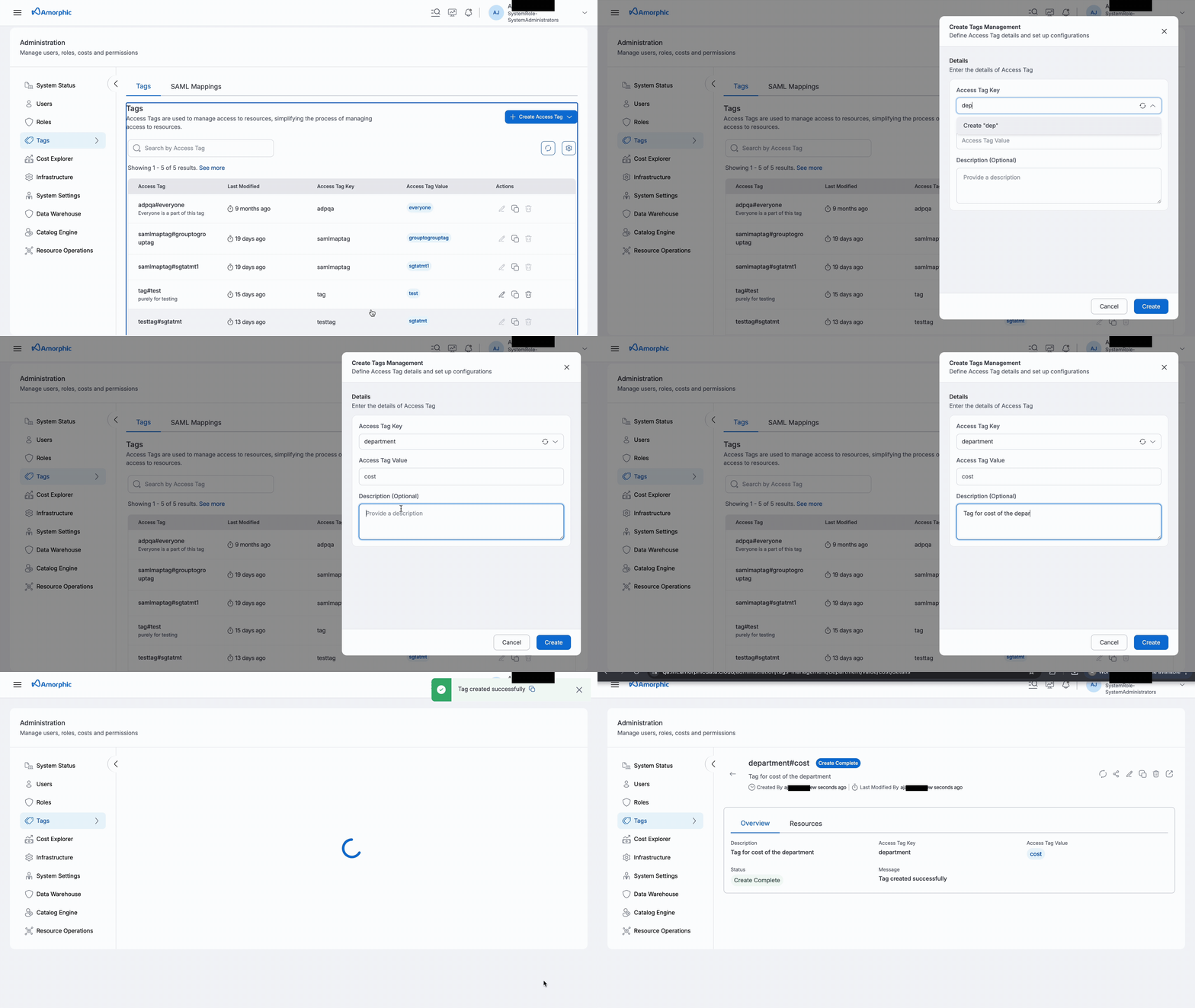
To create a new tag in Amorphic, follow these steps:
- Go to
Tagstab underUser Access - > Data Management and Governance. - Click on the
Create Access Tagbutton. - Fill in the information required, such as Tag Key & Tag Value
- Click on
Createto create the new Tag.
Creation of Amorphic tag creates 3 corresponding tags in Lake Formation required for internal Amorphic operations and deleting an Amorphic tag deletes those 3 corresponding tags present in Lake Formation as well.
How to attach users to a Tag?
This process is same as how we share other Resources to users
- Click the
Sharebutton for the Tag - Select the
UserandAccess Typefrom the drop down list - Click on
Share
When sharing the resources with a tag:
- All users in the Tags must have domain access for all datasets attached to the tag.
- If a resource has only 1 tag with owner access attached to it, it cannot be removed.
SAML Mapping
SAML (Security Assertion Markup Language) is an XML-based standard for exchanging authentication and authorization data between an identity provider (IdP) such as Okta or Microsoft Entra ID, and a service provider (SP) such as Amorphic. In Amorphic, users are authenticated via Cognito, and the SAML assertion carries the groups the user belongs to in the IdP. Amorphic uses those groups to automatically grant or revoke tag access on every login.
SAML Group Tag Mappings link an IdP group to one or more Amorphic tags. Users within the group are automatically granted read-only access to the mapped tags upon sign-in via SSO. When a user is removed from a group or the mapping is deleted, tag access is revoked on their next login.
SAML groups can also be mapped to Amorphic roles for permission-based access. Role mappings are managed separately — see SAML Mapping in Role Management.
What is a SAML Tag Mapping?
A SAML tag mapping links an IdP group to one or more Amorphic tags. An administrator creates and manages these mappings. When a user logs in via SSO, their tag access is automatically synced — tags are granted for groups the user has joined and revoked for groups they have left.
If a user belongs to multiple SAML groups, they receive read-only access to the combined set of all tags mapped across all their groups.
SAML Tag Mapping Metadata
| Field | Description |
|---|---|
| SamlGroupId | The group name from the IdP, entered exactly as defined there (case-sensitive). |
| Tags | One or more Amorphic tags attached to this group. Up to 50 tags per group. |
| CreationTime | Timestamp when the mapping was created. |
| CreatedBy | Administrator who created the mapping. |
| LastModifiedTime | Timestamp of the most recent update. |
| LastModifiedBy | Administrator who last modified the mapping. |
SAML Mapping Operations
An Amorphic administrator can create, edit, or delete tag mappings for SAML groups.
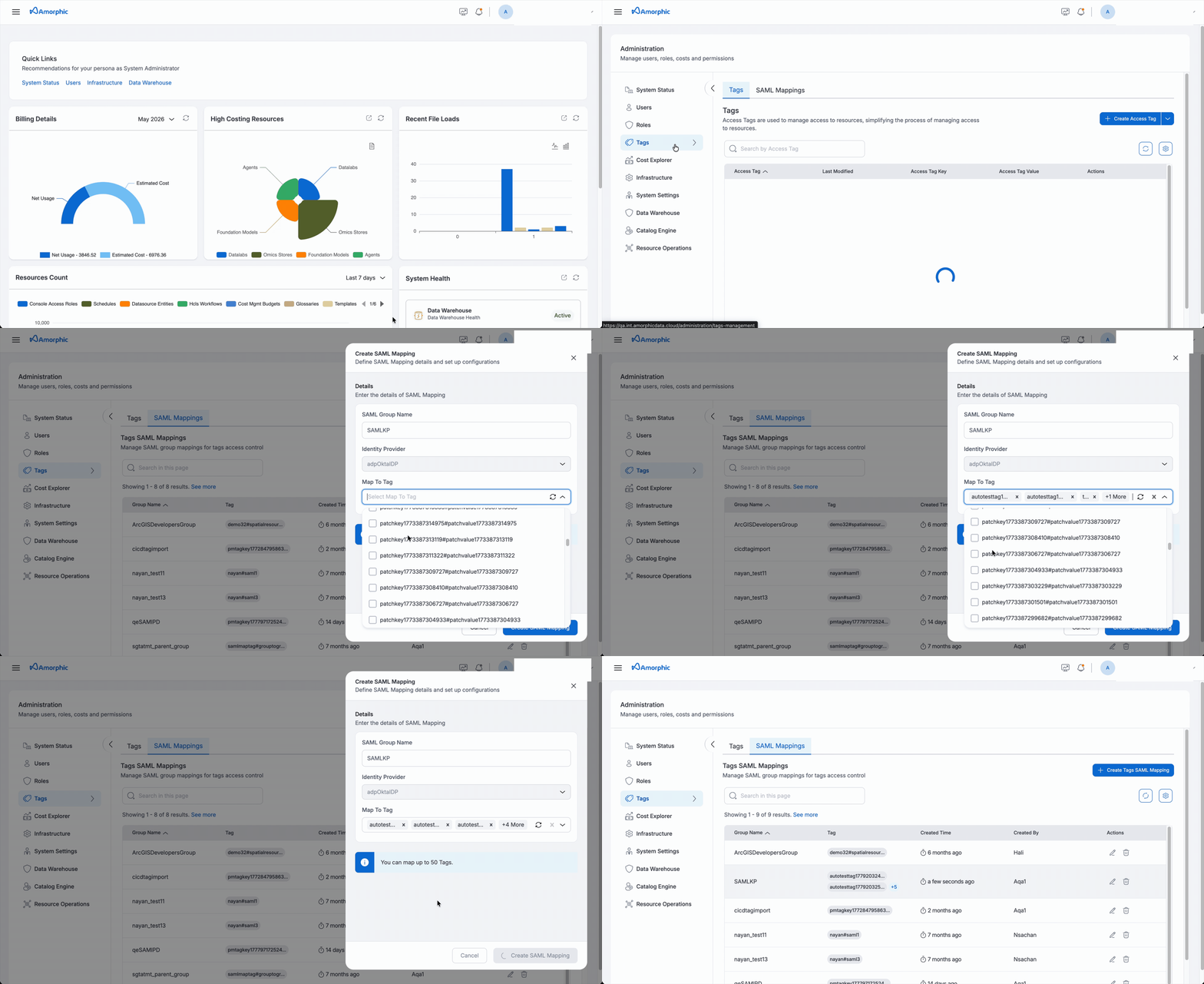
- Add New Mapping — Create a new tag mapping by entering a SAML group name and selecting one or more tags.
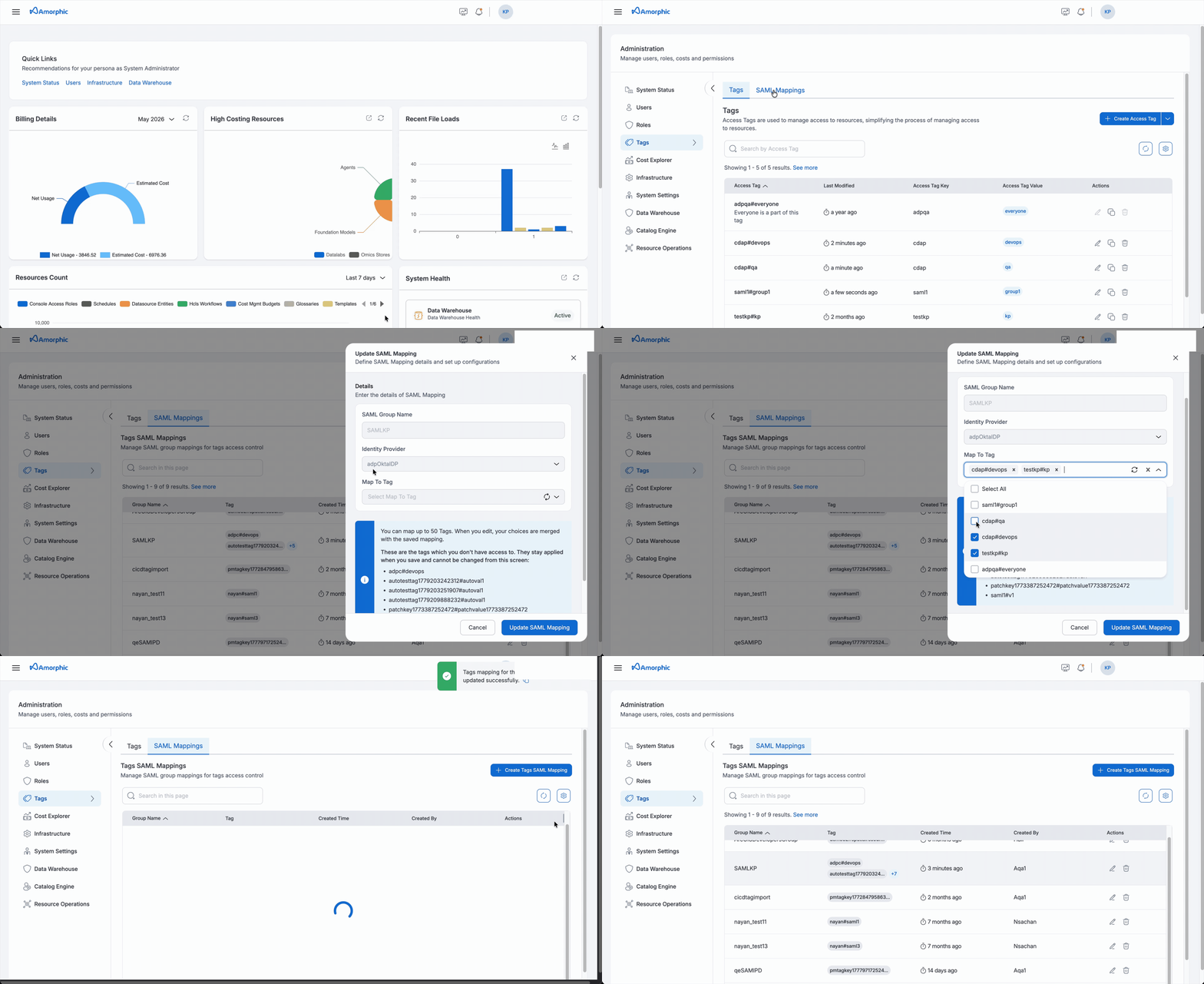
- Edit Mapping — Update the list of tags attached to an existing mapping.
- Delete Mapping — Remove all tag mappings for a SAML group.
Add New Mapping
Enter the SAML group name exactly as defined in the IdP and select one or more Amorphic tags to attach — up to 50 tags per mapping.
Edit Mapping
An administrator can update the list of tags attached to an existing mapping. The update is applied as a diff — tags added to the list are granted to the group’s users (read-only), and tags removed from the list are revoked. The group name itself cannot be changed; to rename a group, delete the existing mapping and create a new one.
Delete Mapping
An administrator can delete all tag mappings for a SAML group. Deleting a mapping revokes the corresponding tag access from all users who had it solely through that group, effective on their next login.
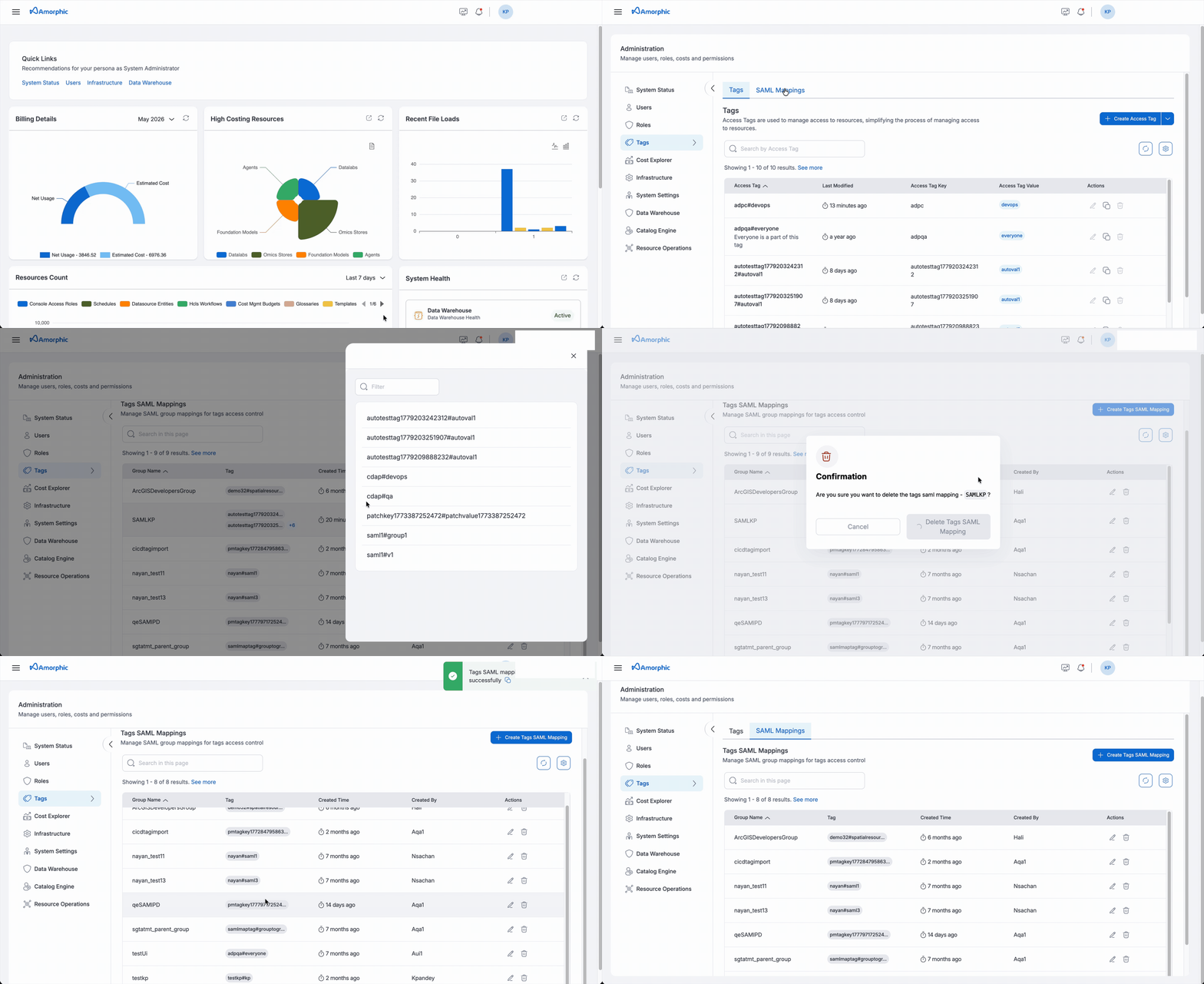
Below are some important points the Amorphic administrator needs to keep in mind when a mapping is added, edited, or deleted.
- Tag access granted through a SAML group mapping is read-only. Users cannot be granted higher access levels via SAML group mappings.
- If a user is removed from a SAML group in the IdP, or the group’s tag mapping is deleted, the user’s access to those tags is automatically revoked on their next login.
- If a user belongs to multiple SAML groups, their tag access reflects the union of all tag mappings across all their groups. Removing one group’s mapping only revokes the tags that were exclusively granted by that group.
- Each group mapping supports a maximum of 50 tags.