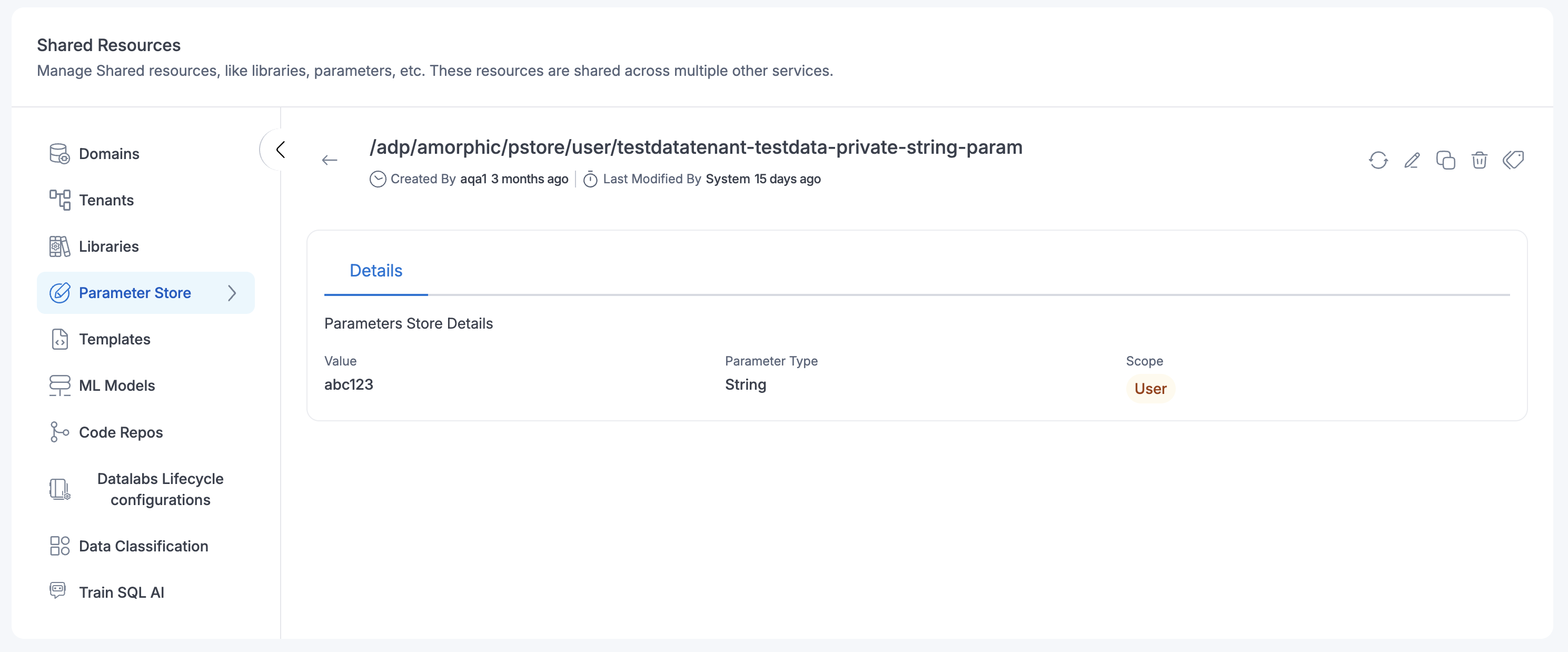
Parameter Store
Parameters Store is used to create parameters that user can utilize in Amorphic Jobs, just like environment variables. They can store data such as database strings, passwords, & more. To learn more, refer to AWS System manager parameter store
Starting with Amorphic version v3.3, the parameter naming convention has been updated to improve consistency and long-term manageability.
System Parameters
System parameters now follow this format: /adp/amorphic/system/{system_parameter_name}
Example: SYSTEM.DWH.HOST -> /adp/amorphic/system/dwh/host
User Parameters
User parameters now follow this format: /adp/amorphic/pstore/{scope}/{user_parameter_name}
Backward Compatibility Maintained
For every existing parameter, the Parameter Store will contain:
- The original parameter (existing naming format)
- A new parameter following the updated naming convention, with the same value
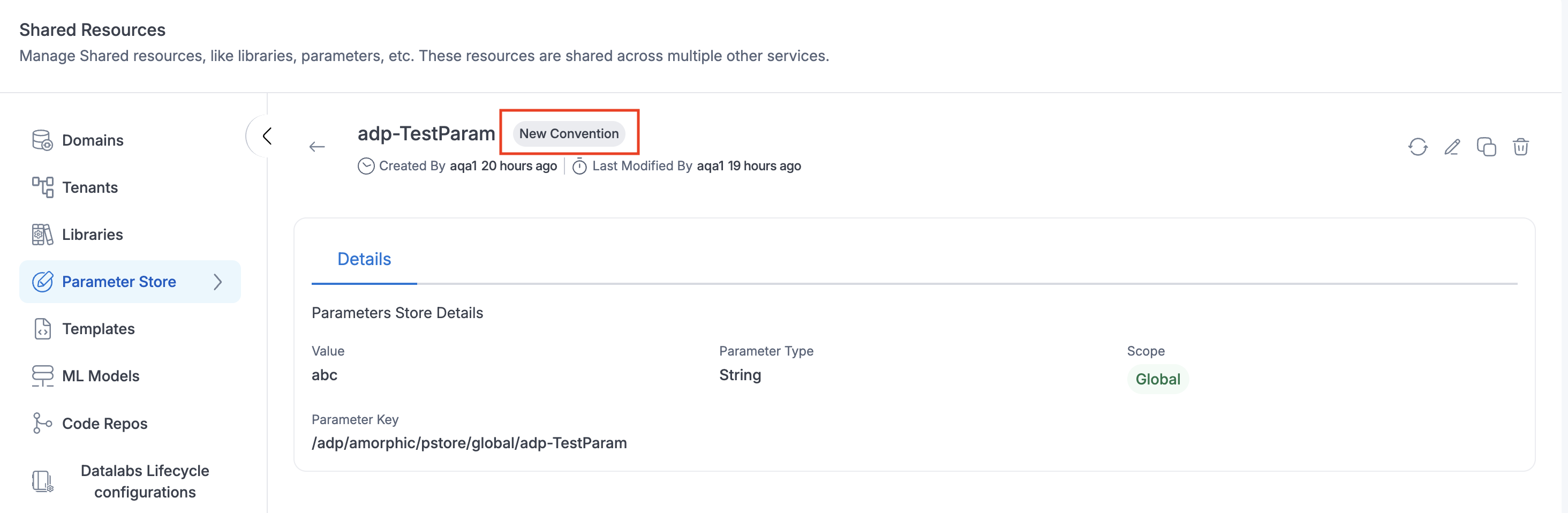
Since parameters are duplicated, the parameter names themselves may appear similar. To help users distinguish them, the Amorphic UI provides a (New Convention) marker next to parameters that follow the updated naming structure.
No Impact to Existing Workloads
Jobs and Data Labs scripts referencing the original parameter names will continue to function as expected. No user action is required.
New Parameters
Any new parameters created from v3.3 onward will follow the new naming convention.
Managing Older Parameters
Users will continue to be able to edit or delete parameters that follow the older naming format.
Recommendation
While older parameters remain supported, we strongly recommend that all new or updated Jobs and Data Labs scripts begin referencing parameters using the new naming convention to align with the standardized structure going forward.
Parameter
A Parameter is a key-value pair that can be used in Amorphic ETL jobs or Data Labs. It can be used to store sensitive information like passwords, API keys, etc. To access these parameters in aforementioned resources, user needs to update the resource access for these resources and add the parameter key in the resource.

Parameter Store Operations
The following operations are available in the Parameter Store:
- Create parameter: Create a new parameter in the Parameter Store
- Edit/Delete parameter: Edit or delete an existing parameter
- Parameter Managers: Control who, besides the creator, can manage a global parameter
- Sharing a Private Parameter: Share a private parameter with other users
Create parameter
- Click on
+ Create Parameter - Fill in the required inputs (Details shown in the table below)
| Attribute | Description |
|---|---|
| Parameter Key | Name of the parameter |
| Description | Description of the parameter |
| Parameter Type | There are three types of parameter
|
| Parameter Value | Values for the parameter. In this case, values should be separated by comma (,) For example, abc, string, list, values |
| Parameter Scope | Scope of the parameter like Global or Private
|
| Parameter Managers (optional, Global scope only) | Other users, besides you, who can manage this parameter going forward. See Parameter Managers. |
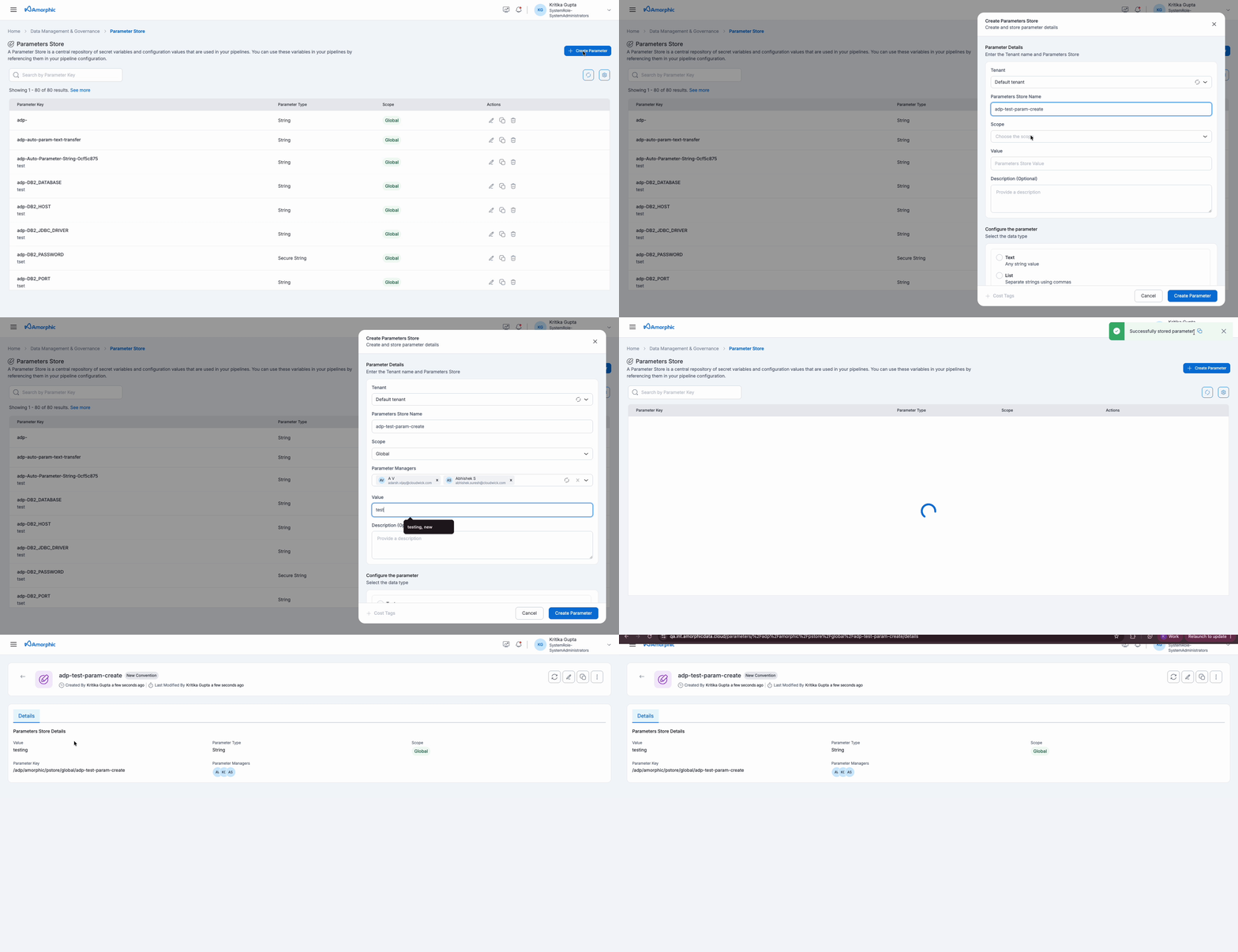
Use Case: Creating a parameter
The below is an example of how to create a parameter.
- Create a parameter in Parameter Store. There are three types of parameters: String, String List, and Secure String.
- Set the parameter scope to either Global or Private.
- View, update, or delete the parameter as needed. Updating allows user to change the value and description, while deleting removes the parameter completely.
- Create the parameter with either the default tenant or user-created tenants.
- In an ETL job, use the following code to retrieve the parameter's value:
from amorphicutils.common import read_param_store
param_value = read_param_store("/adp/amorphic/pstore/global/adp-string_param", secure=False)
This code retrieves the value of the parameter with the key name "/adp/amorphic/pstore/global/adp-string_param" and stores it in the variable "param_value". The "secure" argument is set to "False" because the parameter is not a Secure String. These can then be utilized "param_value" by user in their ETL job as needed.
Currently, the parameter store supports the following three types of parameters:
String
String type parameter is a parameter with key value pair like a general variable.

String List
String List type parameter is a parameter with key values pair where one key contains list of values separated by commas.

Secure String
A SecureString parameter is any sensitive data that needs to be stored and referenced in a secure manner. If user have data that they don't want other users to alter or reference in plaintext, such as passwords or license keys, create those parameters using the SecureString data type.

Editing/Deleting a parameter
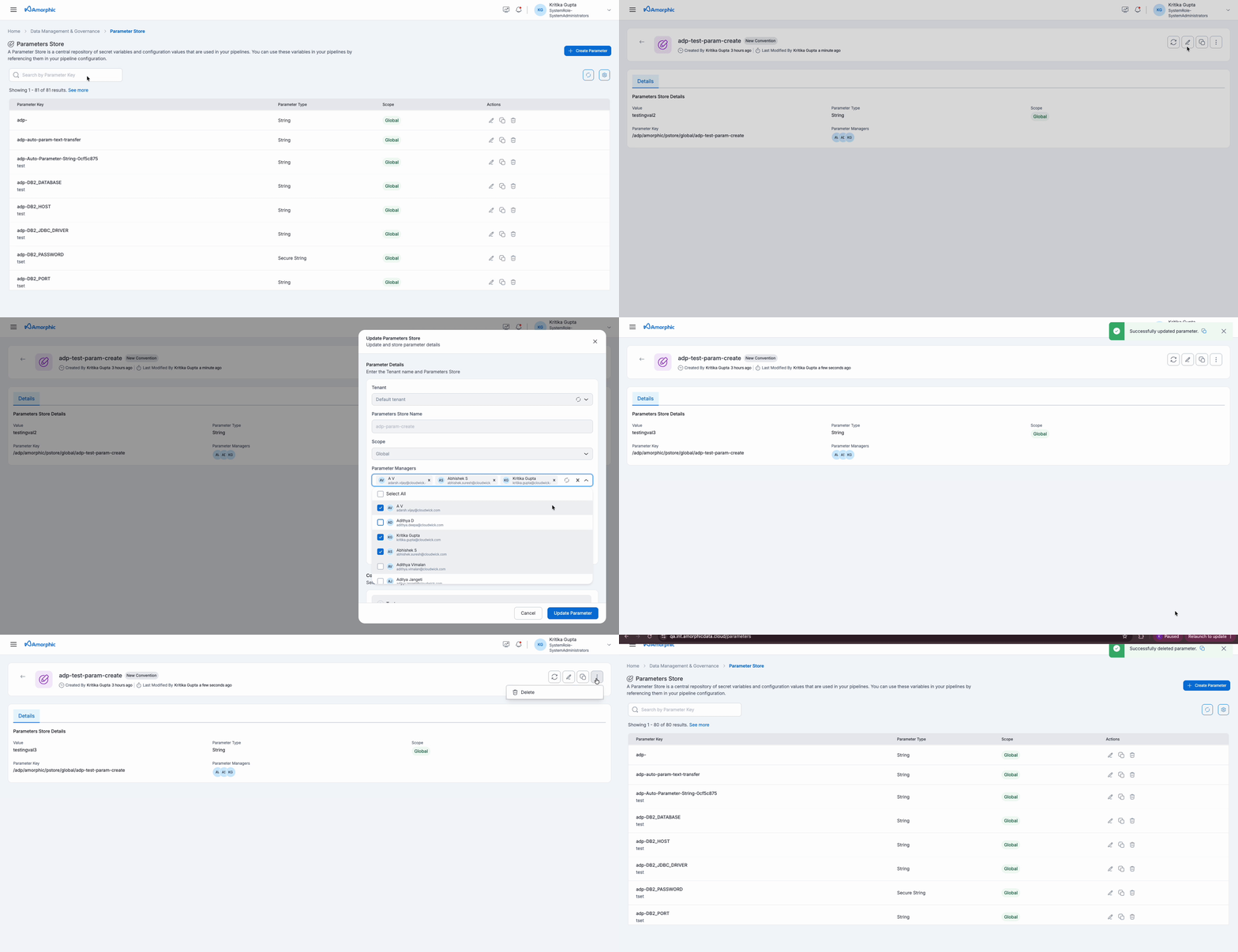
To edit or delete a parameter, open the parameter information and click on the respective buttons in the top right corner.
While deleting a parameter, a point to be noted is that once the parameter is deleted, then all the resources which are using this parameter will be affected. If user wishes to continue, they need to make sure to remove this parameter from all resources.
Parameter Managers (Global Parameters)
Starting with Amorphic version v3.4, global parameters support Parameter Managers — a list of users, besides the creator, who are allowed to update the parameter's value, description, and the managers list itself.
The user who creates a global parameter is always a manager and cannot be removed from the list.
Setting managers on creation
- While creating a Global-scope parameter, add one or more users under Parameter Managers (optional).
- Those users, along with you, can now update the parameter and change who else can manage it.
Updating managers later
- Open the global parameter's details page.
- Use the manager controls to add or remove users from Parameter Managers.
- Save your changes.
The parameter details page indicates the list of user added as Paramater Managers for the parameter.
| Action | Who can perform it |
|---|---|
| Update value / description | Any user in Parameter Managers, or a super admin |
| Update the Parameter Managers list | Any user already in Parameter Managers, or a super admin |
| Delete the parameter | Only the original creator, or a super admin |
- Parameter Managers only applies to Global-scope parameters.
- Existing (pre-v3.4) global parameters have no Parameter Managers list yet. They remain open for update by any user — exactly as before — so no existing workflow breaks.
- Bootstrapping managers on such a parameter is restricted to its original creator. The first time a Parameter Managers list is set on a legacy open parameter, only the creator can perform that initial set — this prevents another user from unilaterally claiming manager access on a parameter that was previously open to everyone.
- Once a Parameter Managers list exists (whether bootstrapped on a legacy parameter or set at creation from v3.4 onward), only the users on that list — or a super admin — can update the parameter or its managers list going forward.
- Deletion is unaffected by Parameter Managers. Only the original creator (or a super admin) can delete a global parameter, whether or not a managers list is set — managers can update but not delete.
Sharing a Private Parameter
Starting with Amorphic version v3.4, private (user-scoped) parameters can be shared with other users, similar to sharing other resources in Amorphic.
- Access Management Panel: Navigate to the private parameter and click the Share icon. This opens the access management panel.
- Add Users: Add the users you want to share the parameter with.
- Set Access Type: Assign an access type — Read Only, Editor, or Owner.
- Review and Confirm: Confirm to apply the changes.
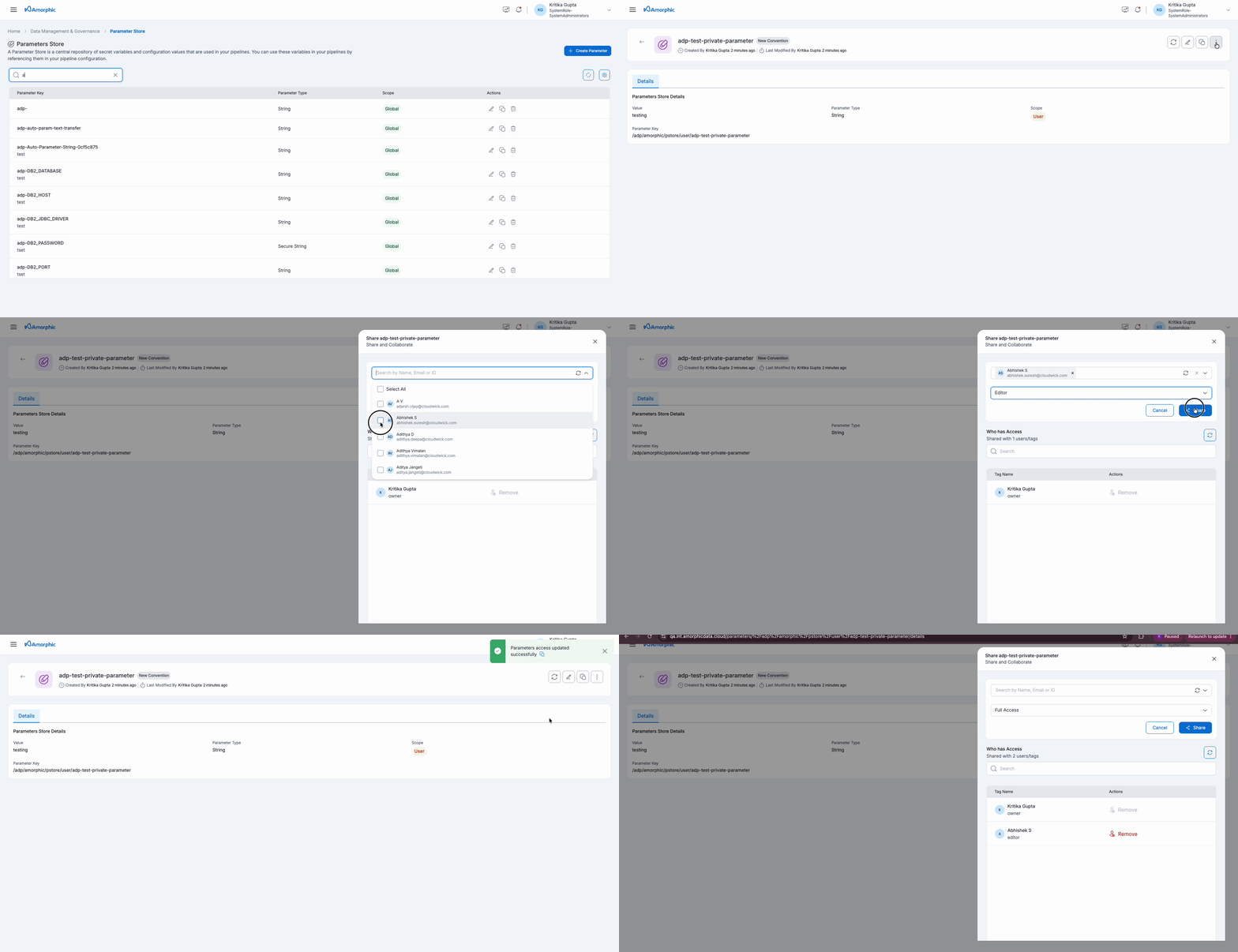
- Read Only access lets a user view the parameter and use it in Jobs/Data Labs, but not modify it.
- Editor access additionally allows updating the parameter's value and description.
- Owner access additionally allows deleting the parameter.
- This changes who can delete a private parameter. Previously only the original creator could ever delete it. Now, anyone granted Owner access via sharing can delete it too.
- A parameter shared with you appears in your parameters list alongside your own private and global parameters.
Default System Parameters
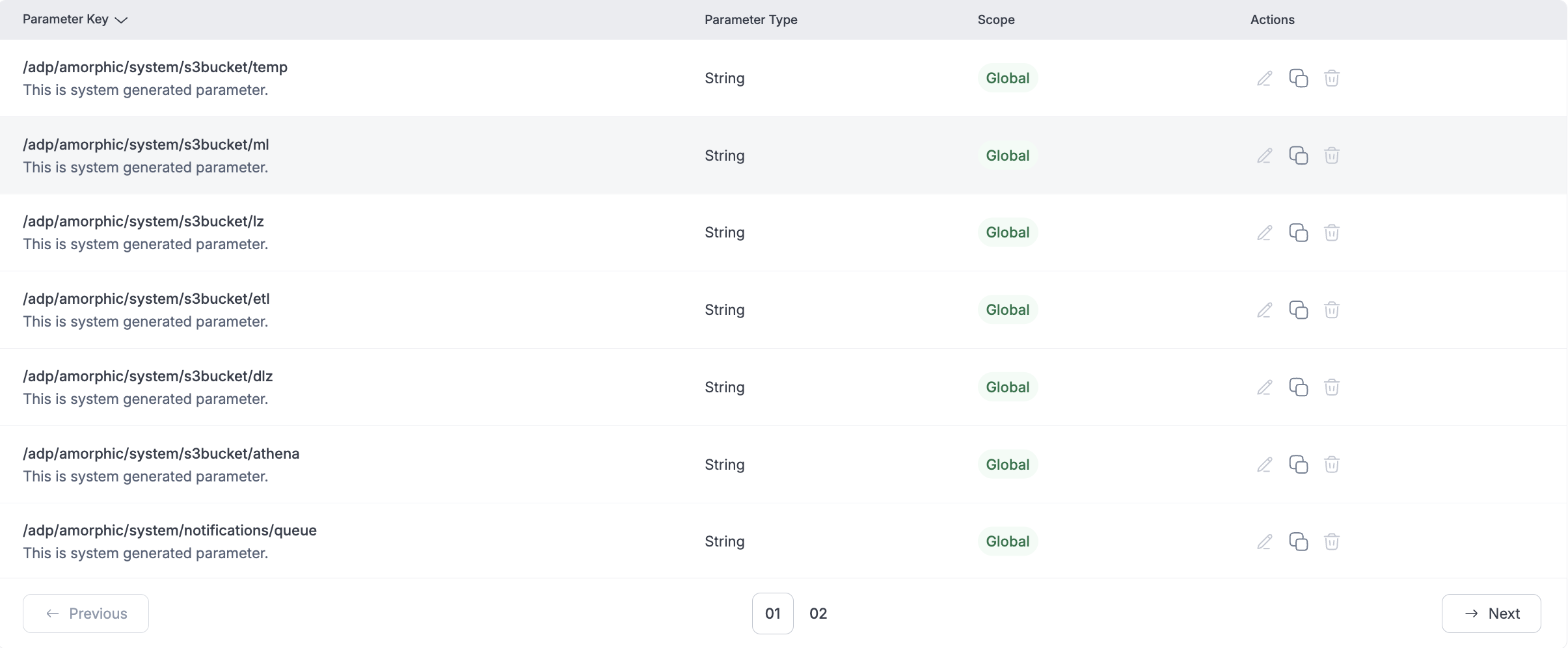
Amorphic default system parameters are used for system level configurations in jobs. For example below image shows Datalake Zone (DLZ) bucket name, ETL bucket name etc. which can be used in glue jobs.
Multi-Tenancy Operations:
Users can even create a parameter within a tenant that they can access. Also, when multi tenancy is enabled, they can only perform tenant-level operations. For more details on Tenants, read�How are tenants associated to an user
System parameters are tenant independent, so they can be accessed by anyone within the Amorphic application.
Create Parameter in Tenant
User must select the tenant under which they want to create the parameter. They will see the list of tenants which can accessed by them. When user selects Default Tenant then they prefix the parameter with project shortname of the environment. If the parameter is created on any other tenant then they prefix with the tenant name.

View Parameter in Tenant
Users can view the details of the parameter along with the tenant name under which the parameter was created.