
AI Flow Nodes
This page describes the nodes you can use in an AI Data Pipeline. For create, run, and monitoring, see AI Data Pipelines.
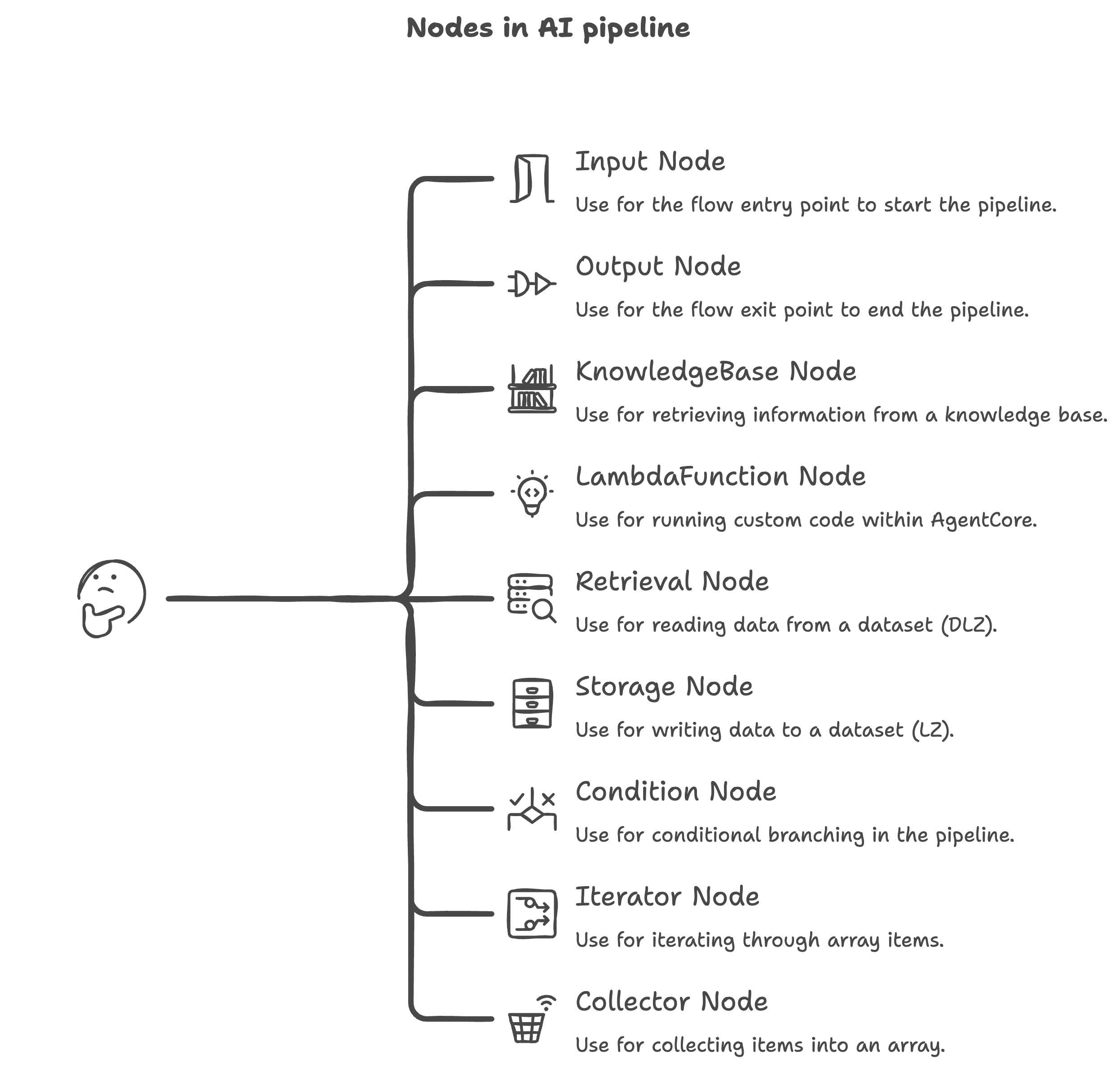
Traditional pipeline nodes (ETL Job, ML Model, Email, Textract, LLM, BDA, and similar) are not available here. Use a Traditional Data Pipeline for those modules.
Supported module types
| Node | Purpose |
|---|---|
| Input | Starts the flow; exposes the run’s InputString as a typed document output |
| Output | Ends the flow; accepts a single document input as the pipeline result |
| KnowledgeBase | Queries an accessible Amorphic knowledge base and returns retrieval results as an array |
| LambdaFunction | Runs your custom Python (lambda_handler) in a managed AgentCore Code Interpreter sandbox |
| Retrieval | Reads UTF-8 object content from a dataset in the DLZ bucket by object key |
| Storage | Writes content to a dataset in the LZ bucket and returns the resulting S3 URI |
| Condition | Evaluates expressions in order and routes the graph to a named branch (or default) |
| Iterator | Walks an input array and emits each arrayItem plus arraySize (often with Collector) |
| Collector | Gathers items from an Iterator loop back into a single collectedArray |
See also Expressions for wiring input paths and Building conditions for branching.
Common data types for typed ports: String, Number, Boolean, Object, Array.
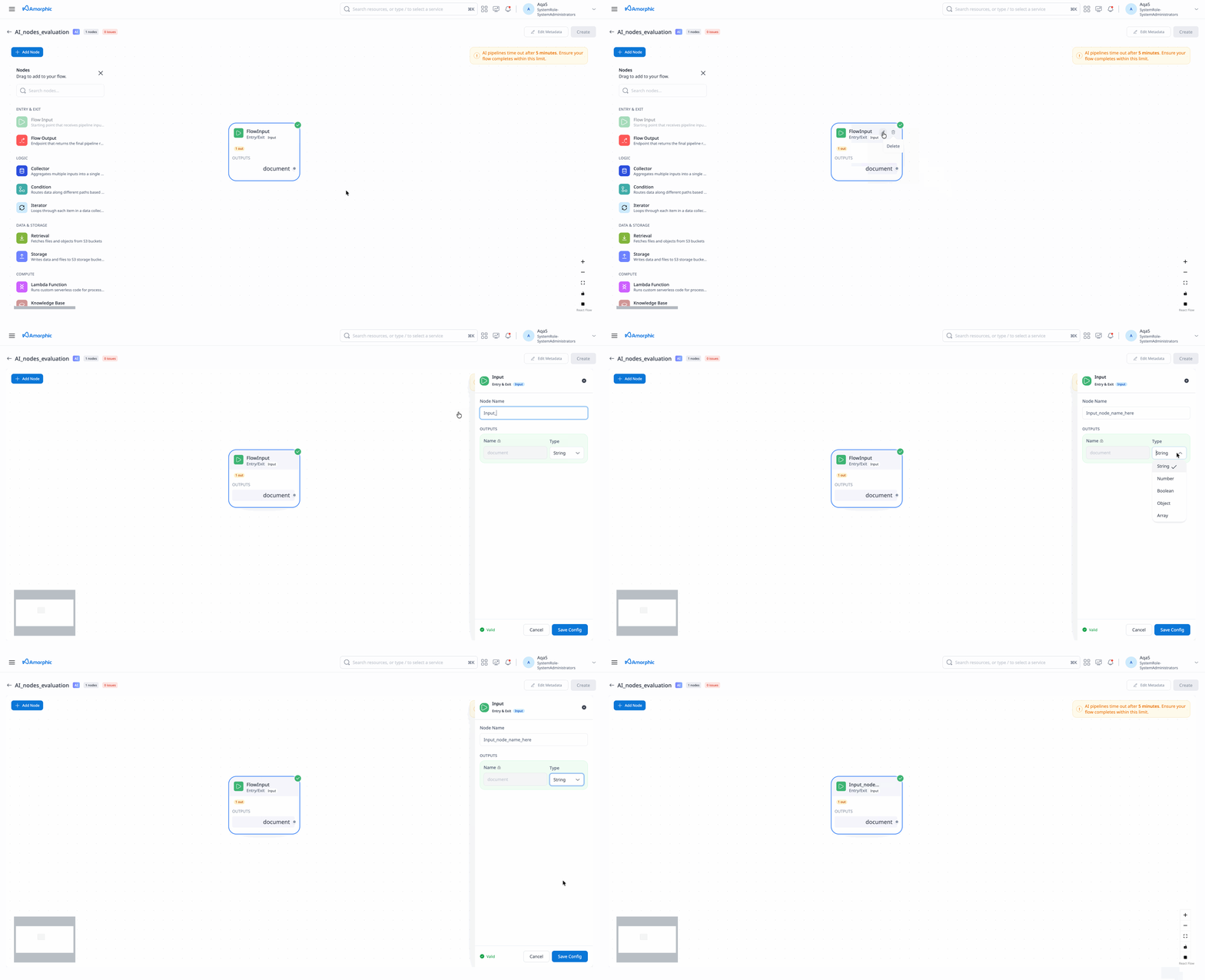
Input Node
Starts the flow. Has no Input configurations. Produces a single document output whose type is one of the common data types. The run input comes from InputString (the only execution property AI Data Pipelines support today) and must match this type.
| Attribute | Description |
|---|---|
| Node Name | Unique name for the node |
| Outputs | Exactly one output named document with Type ∈ String, Number, Boolean, Object, Array |
Output Node
Ends the flow. Has no Output configurations. Accepts a single document input.
| Attribute | Description |
|---|---|
| Node Name | Unique name for the node |
| Inputs | Exactly one input named document with a valid Type and Expression (defaults to $.data if omitted) |
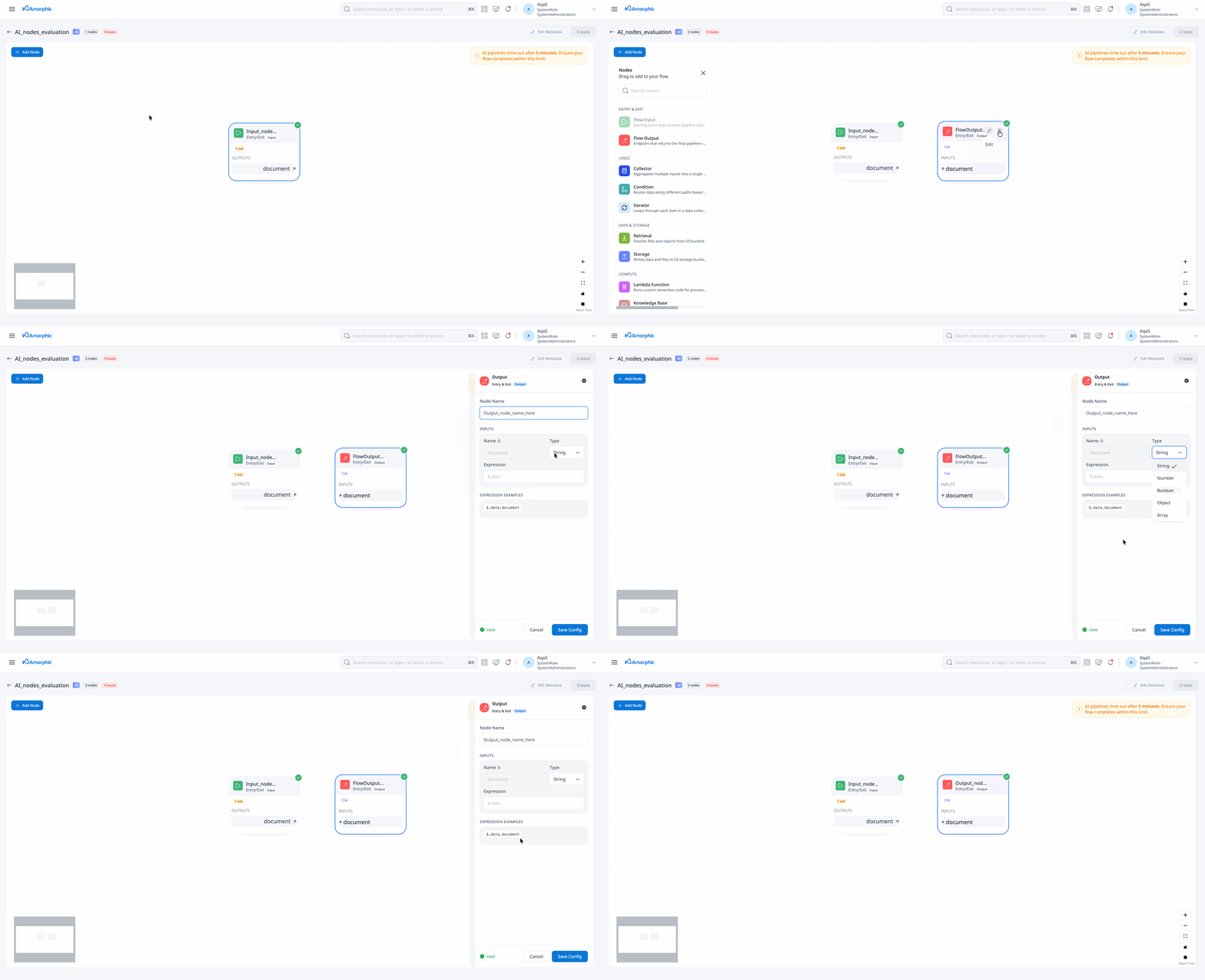
See Using expressions for path syntax.
KnowledgeBase Node
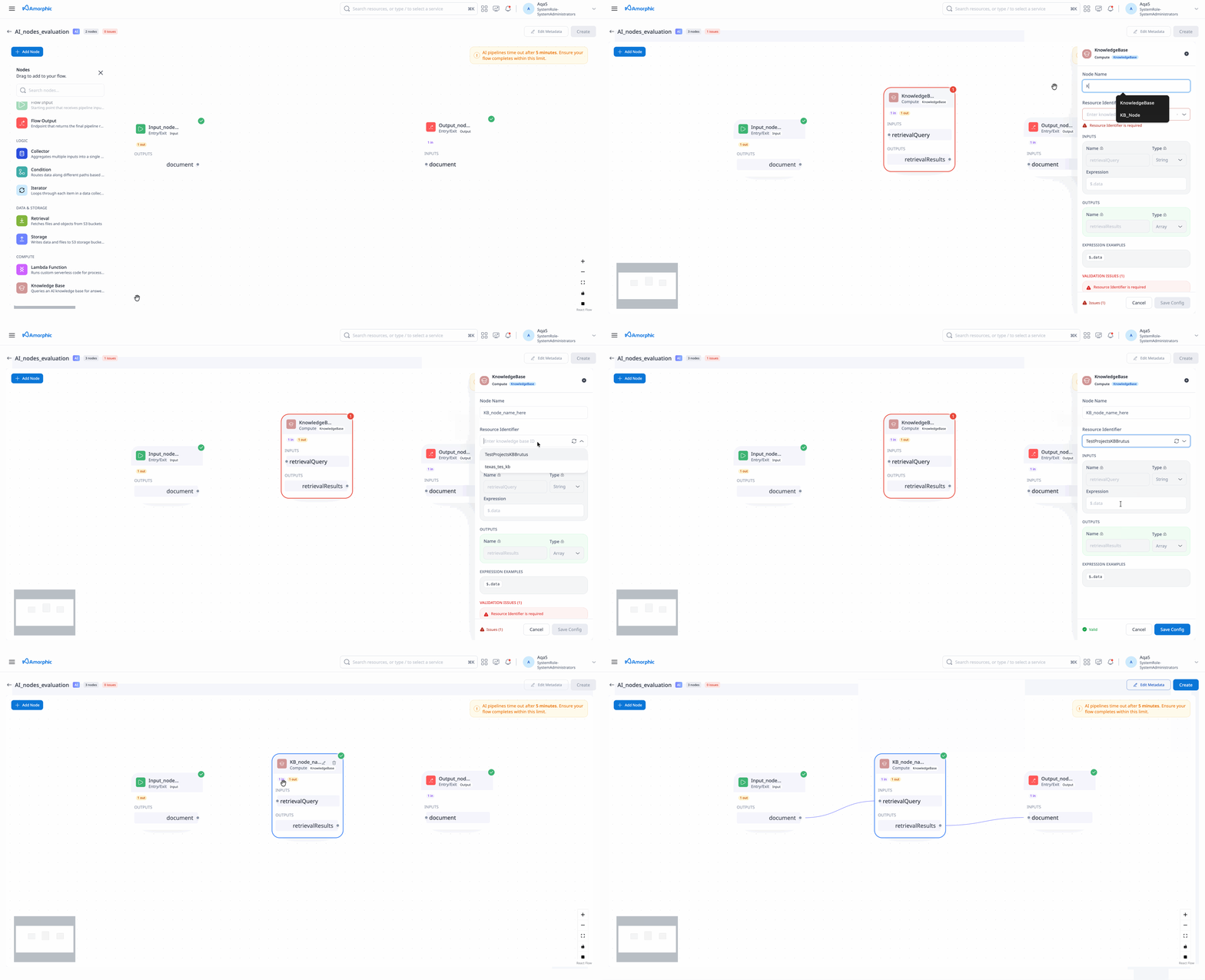
Retrieves content from an Amorphic knowledge base you can access.
| Attribute | Description |
|---|---|
| Node Name | Unique name for the node |
| Resource Identifier | Select one of the accessible user Amorphic Knowledge Base to connect. |
| Inputs | One input named retrievalQuery (Type String) |
| Outputs | One output named retrievalResults (Type Array) |
LambdaFunction Node
Runs your custom Python in a managed AgentCore Code Interpreter sandbox.
| Attribute | Description |
|---|---|
| Node Name | Unique name; must not contain _ |
| Inputs | One or more inputs (any Name; Type ∈ common data types) with Expressions as needed |
| Outputs | Exactly one output named functionResponse with a valid Type |
| Shared Libraries Access | Optional list of shared library ids the code may use |
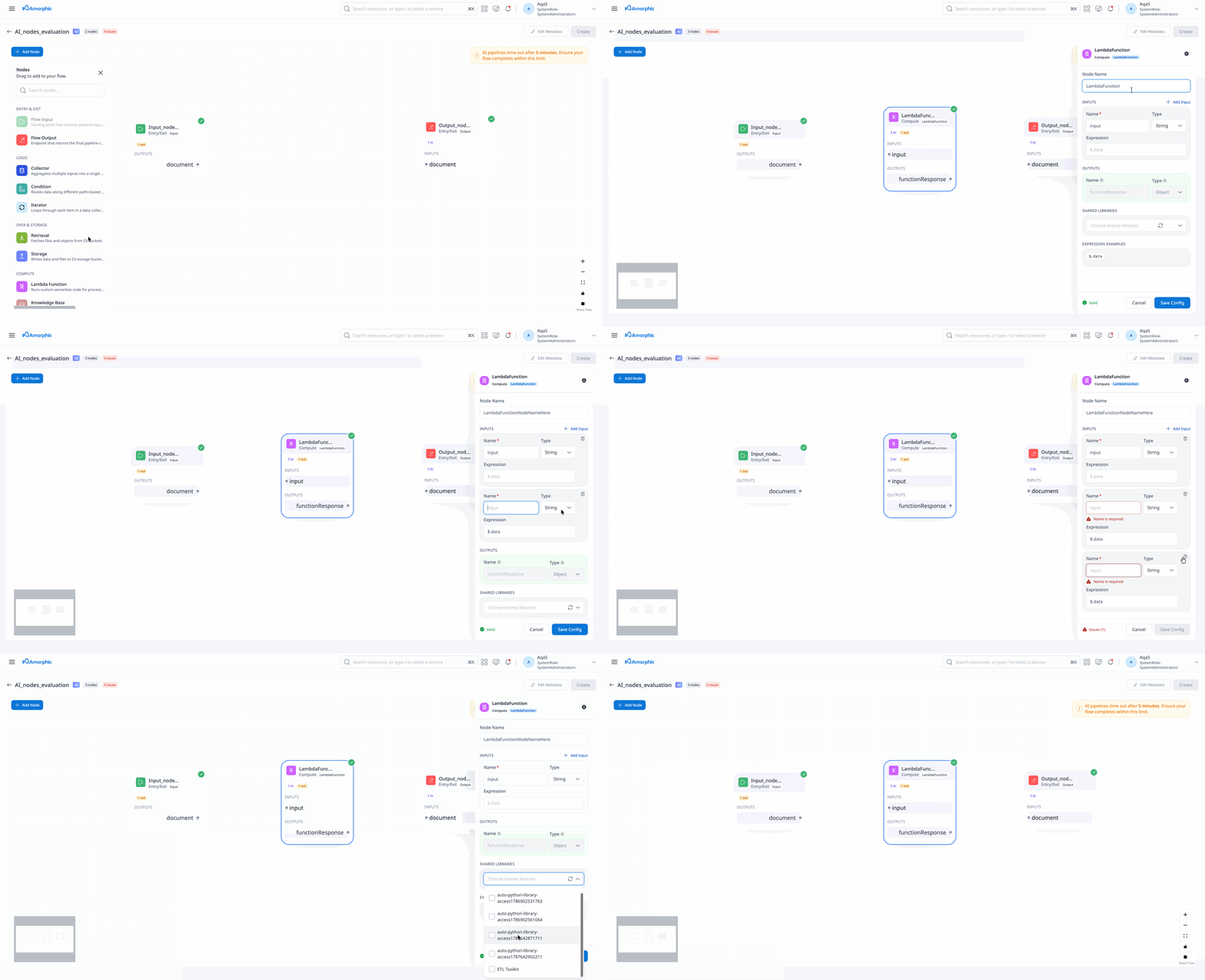
Wire each input with an expression so the handler receives the correct field from the parent node.
User code will not run inside the platform service process. Authors must implement the standard lambda_handler(event, context) entry point. Code will be executed in a secure Agentcore Code Interpreter environment.
Handler contract
- Define
lambda_handler(event, context)in your script - Return a JSON-serializable value (typically including
functionResponse) - Do not rely on stdout as the flow result
- Do not manually adjust
sys.pathfor shared libraries — the platform injects them when configured
A sample template is available below:
Sample code template Python Script
"""
AI Flow LambdaFunction node code (stored as function.py).

AI Data Pipeline invokes this script in the secure AgentCore Code Interpreter sandbox.
Implement lambda_handler, read node inputs from the event, and return
functionResponse so the node's output port is populated.
"""
import json
import logging

LOGGER = logging.getLogger()
LOGGER.setLevel(logging.INFO)


def _get_input_by_name(event, input_name="input"):
    """
    Read a named input value from a Bedrock flow Lambda event.

    Key steps:
    1. Accept a plain {"name", "value"} body (common in simple test payloads)
    2. Otherwise walk event["node"]["inputs"] for an entry whose name matches
    3. Unwrap nested {"name", "value"} objects when present
    4. Fall back to the full event if no matching input is found

    Args:
        event (dict): Bedrock flow Lambda event, or a plain {"name", "value"} body
        input_name (str): Input port name configured on the LambdaFunction node
            (default ``input``)

    Returns:
        object: The resolved input value for downstream logic
    """
    if isinstance(event, dict) and "value" in event and "node" not in event:
        return event["value"]

    inputs = event.get("node", {}).get("inputs", []) if isinstance(event, dict) else []
    for item in inputs:
        if item.get("name") != input_name:
            continue
        value = item.get("value")
        if isinstance(value, dict) and "value" in value:
            return value["value"]
        return value

    return event


def lambda_handler(event, context):
    """
    Entry point for an AI Flow LambdaFunction node.

    Key steps:
    1. Log the incoming event (useful when debugging runs)
    2. Resolve the value from the configured input port name
    3. Apply your business logic (replace the passthrough below)
    4. Return {"functionResponse": <result>} for the node output

    Sample event structure (Bedrock Flows → LambdaFunction node):

        {
            "node": {
                "name": "MyLambdaNode",
                "inputs": [
                    {
                        "name": "input",
                        "expression": "$.data",
                        "value": "hello world",
                        "source": {
                            "nodeName": "FlowInputNode",
                            "outputFieldName": "document",
                            "expression": "$.data"
                        },
                        "type": "STRING"
                    }
                ]
            },
            "flow": {
                "arn": "arn:aws:bedrock:us-east-1:123456789012:flow/EXAMPLEFLOW",
                "aliasId": "EXAMPLEALIAS"
            },
            "messageVersion": "1.0"
        }

    Match ``inputs[].name`` to the Input Name on your node (``input`` in this
    template). ``value`` may be a primitive, object, array, or a nested
    ``{"name": "...", "value": ...}`` body — use ``_get_input_by_name`` to unwrap it.

    Args:
        event (dict): Full Bedrock flow Lambda event as above, or a plain body such as
            ``{"name": "example", "value": 42}``
        context: Unused in Code Interpreter; kept for a Lambda-style signature

    Returns:
        dict: ``{"functionResponse": <JSON-serializable value>}`` — must match
            the Type of the node's ``functionResponse`` output
    """
    LOGGER.info("lambda_handler event=%s context=%s", event, context)

    # Change "input" to match an Input Name on your LambdaFunction node
    payload = _get_input_by_name(event, input_name="input")

    # Replace this passthrough with your transformation / enrichment logic
    result = payload

    response = {"functionResponse": result}
    LOGGER.info("lambda_handler response=%s", json.dumps(response, default=str))
    return response
Upload and storage
- After create (or from pipeline details), upload code for the LambdaFunction node
- You may select any local filename
- The platform always stores the object as
function.pyfor that node - You can re-upload later; download retrieves the stored
function.py
Upload custom code via the presigned upload flow after create/update. The S3 object will exist as function.py before the LambdaFunction node runs successfully.
Shared libraries and timeouts
- Attach accessible shared libraries on the LambdaFunction node when needed
- Your custom code can run for up to 14 minutes (840 seconds). About 1 extra minute is reserved for platform setup and teardown, so the overall run budget is 15 minutes (900 seconds)
Retrieval Node
Reads object content from a dataset in the DLZ bucket.
| Attribute | Description |
|---|---|
| Node Name | Unique name for the node |
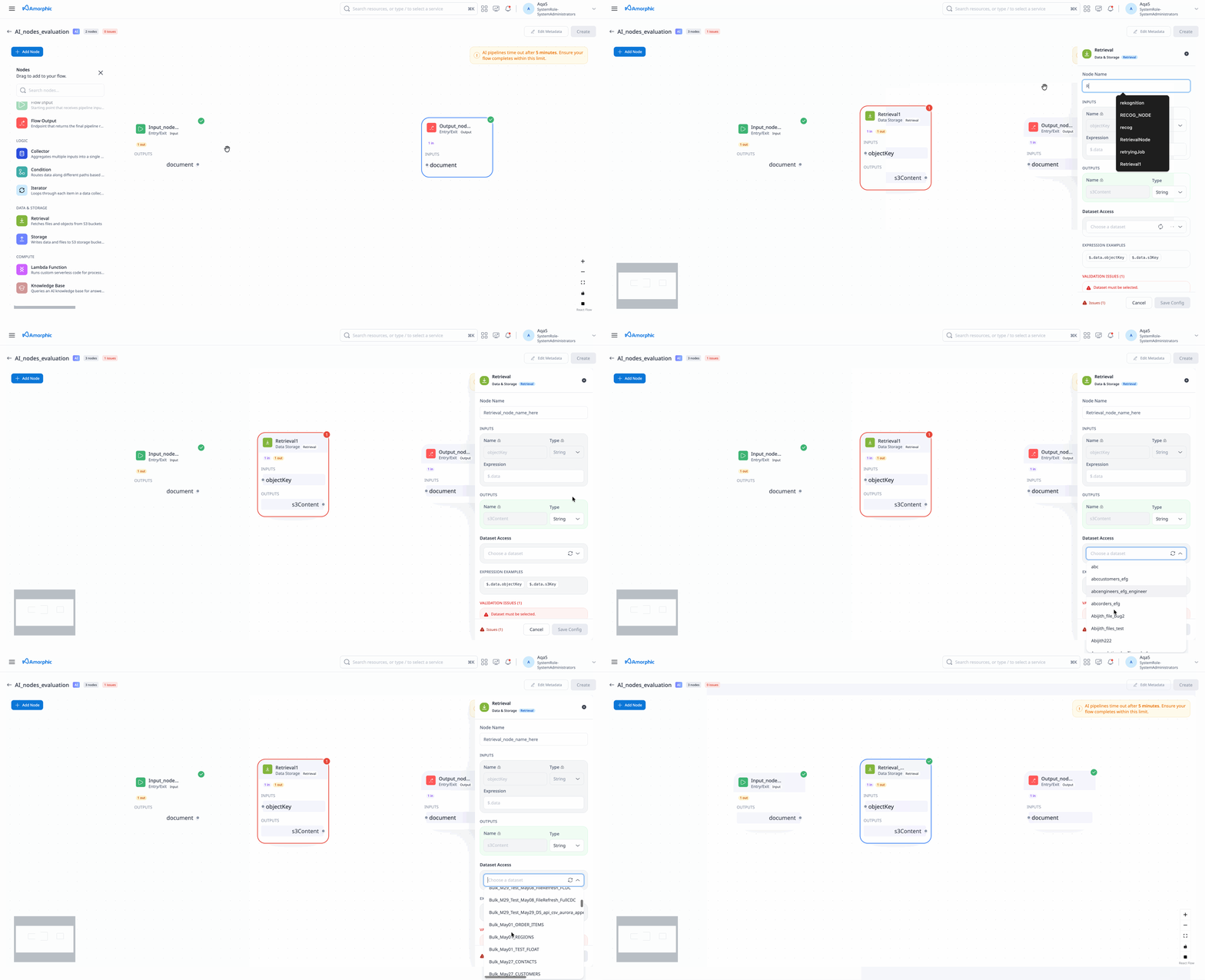
| Dataset Access | Dataset id the node may read |
| Inputs | One input named objectKey (Type String) |
| Outputs | One output named s3Content (content retrieved from storage) |
You need read access to the dataset. Retrieved content is expected to be UTF-8 text suitable for the flow.
Storage Node
Writes content to a dataset in the LZ bucket.
| Attribute | Description |
|---|---|
| Node Name | Unique name for the node |
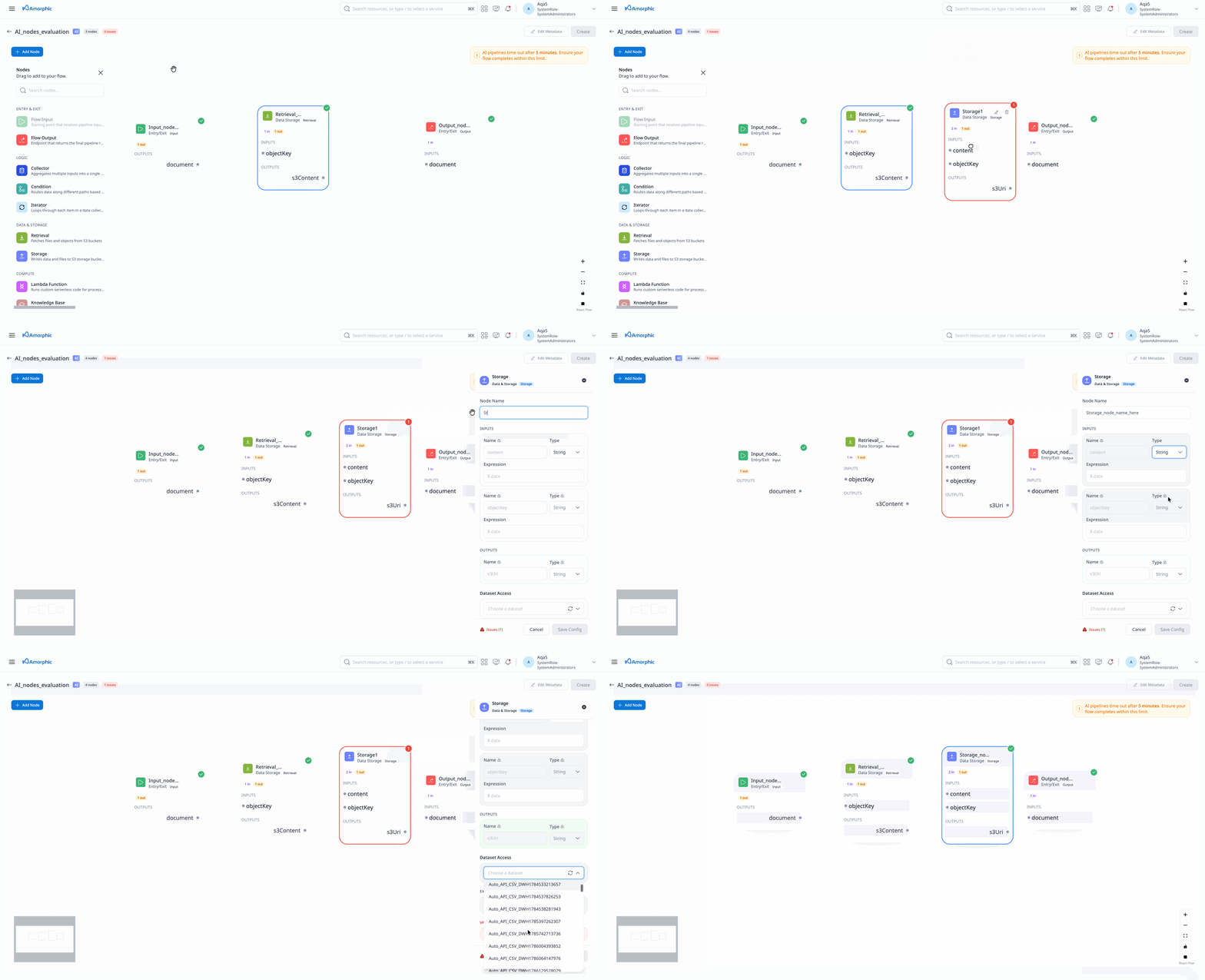
| Dataset Access | Dataset id the node may write |
| Inputs | content and objectKey |
| Outputs | One output named s3Uri (Type String) |
Storage requires OWNER access on the target dataset.
Condition Node
Routes the pipeline to different branches based on condition evaluation.
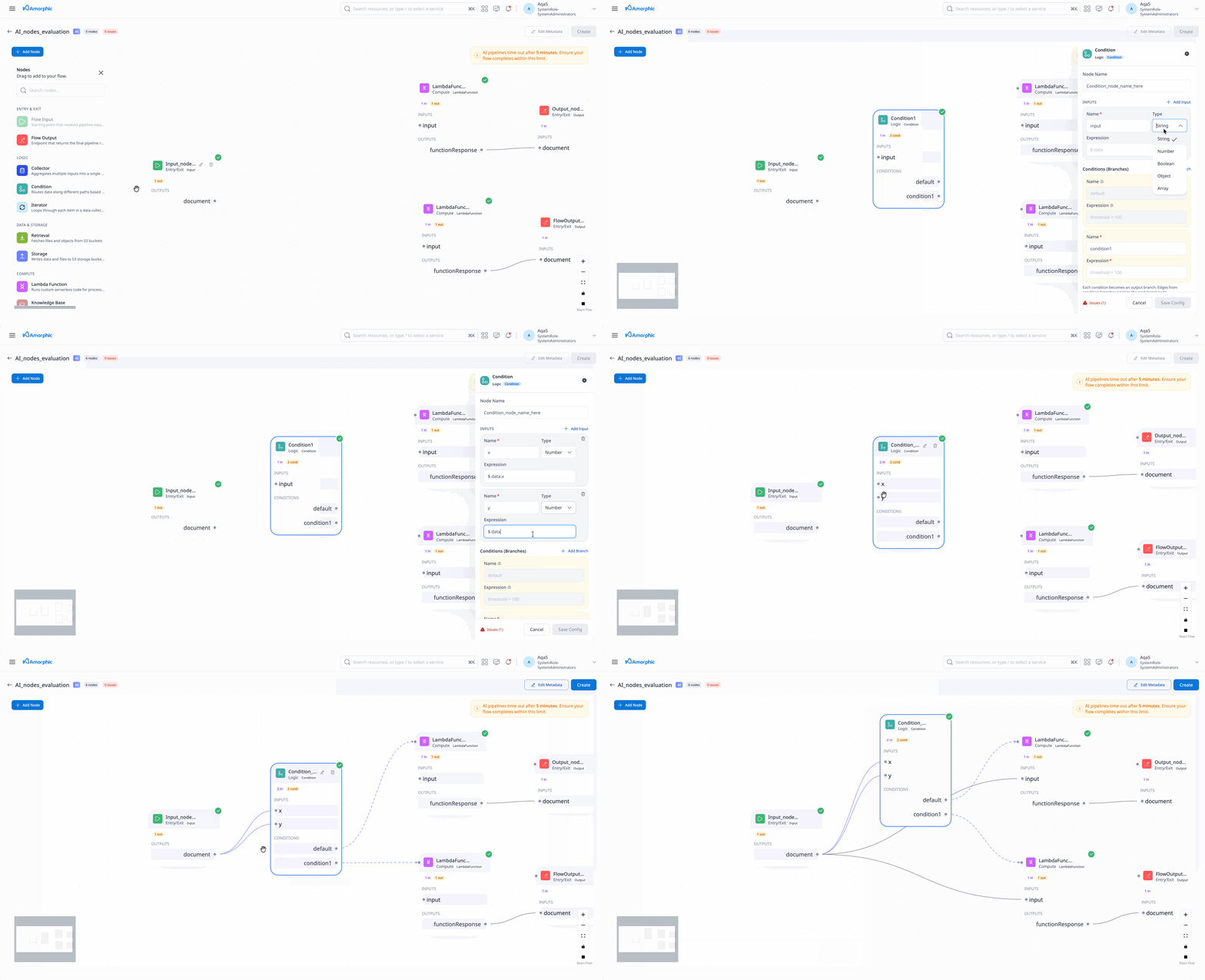
Condition nodes have no Output configurations. Named condition paths (and success/failure style routing) are drawn as connections in the graph, not as typed output ports.
| Attribute | Description |
|---|---|
| Node Name | Unique name for the node |
| Inputs | At least one input with Type and Expression for evaluation |
| Conditions | Array of conditions; each has Name; Expression required unless Name is default |
Building conditions
- Add a Condition node and connect the upstream node that produces the value you want to evaluate.
- Configure at least one Input with a Type and an expression (for example
$.dataor$.data.status) so the condition has data to test. - Add one or more Conditions:
- Give each condition a Name (this name is used when you draw the branch in the graph).
- Set an Expression that evaluates to true/false for that branch (Bedrock condition syntax).
- Optionally add a condition named
defaultwith no expression — this is the fallback when no other condition matches. - In the graph, connect each condition name to the next node on that path.
Conditions are evaluated in order. If more than one condition matches, the earlier condition takes precedence.
A Condition node does not pass data on those connections. It only chooses which branch runs next. Downstream nodes still receive data from the upstream (parent) node, so wire those data connections accordingly.
Iterator Node
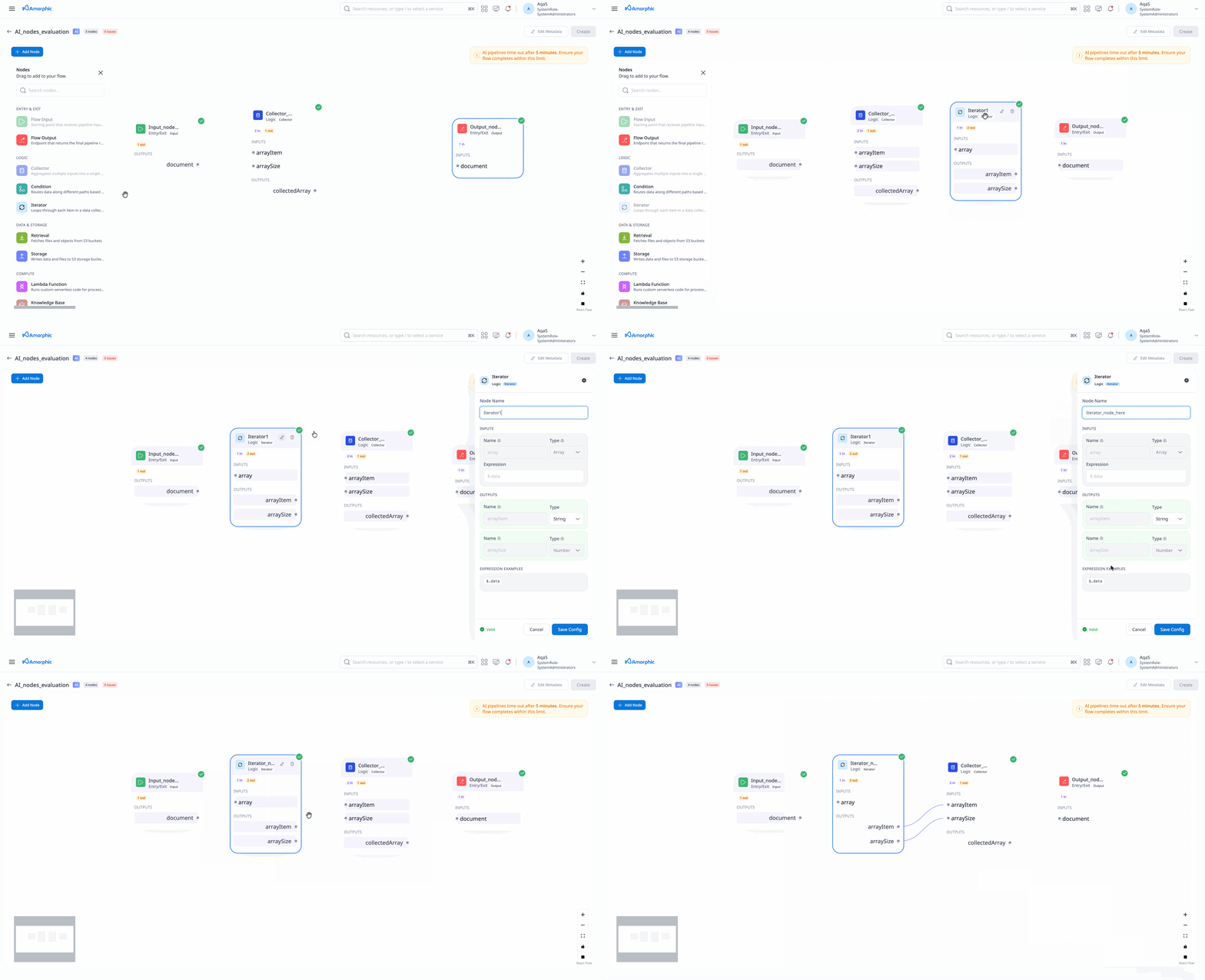
Iterates over an array and emits the current item and array size (typically paired with a Collector).
| Attribute | Description |
|---|---|
| Node Name | Unique name for the node |
| Inputs | Exactly one input named array (Type Array) |
| Outputs | arrayItem (typed item) and arraySize (Type Number) |
Collector Node
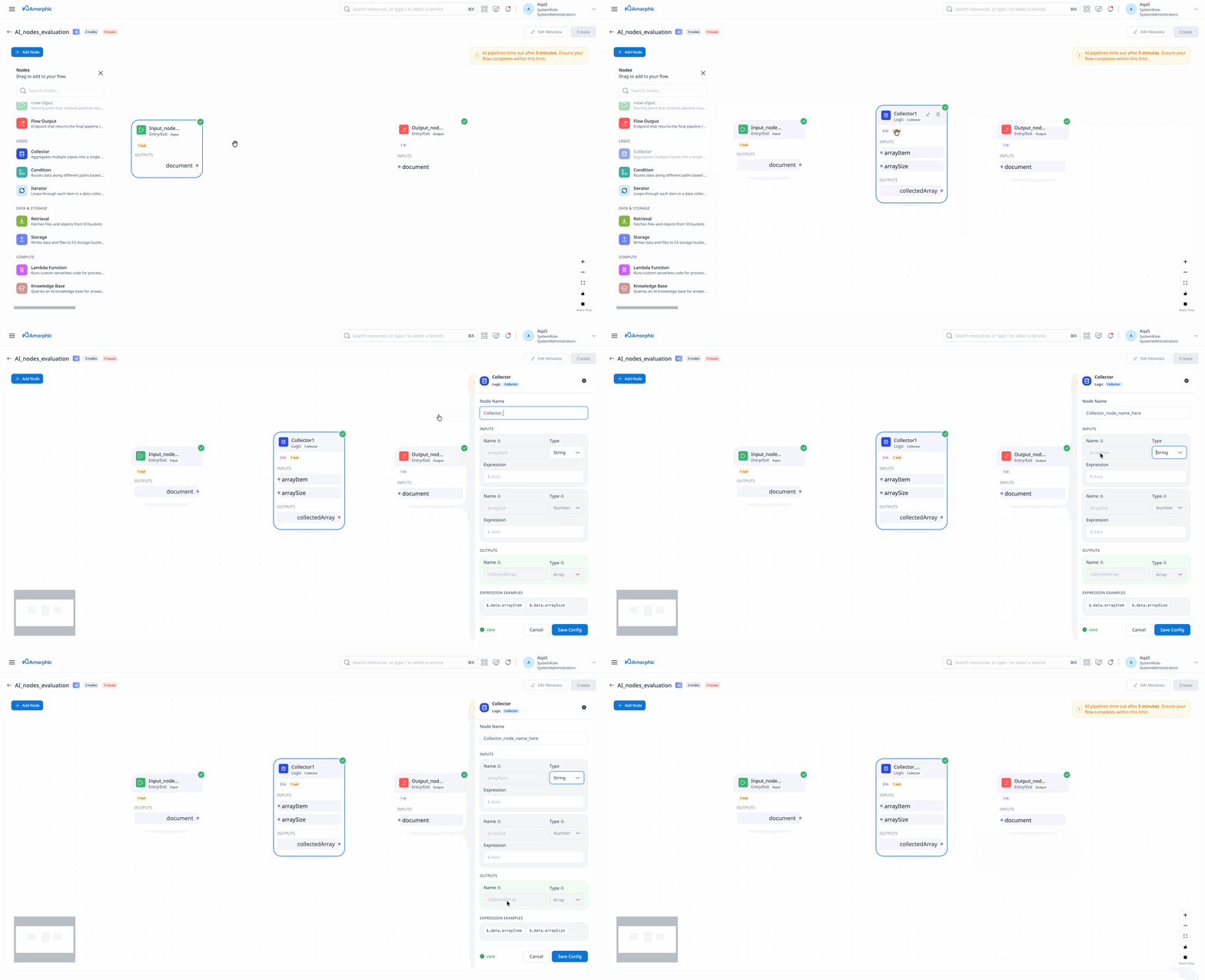
Collects items produced during iteration back into an array.
| Attribute | Description |
|---|---|
| Node Name | Unique name for the node |
| Inputs | arrayItem and arraySize |
| Outputs | One output named collectedArray (Type Array) |
Expressions
Node inputs (and Condition branch rules) use Bedrock Flows–style expressions to select or test data from the upstream node.
Using expressions
- On a node input, set Expression to the path of the value you need from the parent node’s data.
- Every input expression must start with
$.data. - If you omit the expression on an input that requires one, Amorphic defaults it to
$.data(the full upstream payload). - Do not put expressions on output ports — only inputs (and Condition rules) use them.
- Keep the Type of the input aligned with the value the expression resolves to.
| Example | Meaning |
|---|---|
$.data | Entire upstream value |
$.data.field | Named field on an object |
$.data.array[0] | First item in an array |
$.data.array[0, 2] | Selected array indices |
$.data.array[0:2] | Array slice |
$.data.*.field / $.data.array[*] | Wildcard access |
Invalid expression formats are rejected when you create or update the pipeline. For operators and full syntax (including condition comparisons), see Amazon Bedrock Flows expressions.