
Data Pipeline Nodes
This document provides a detailed overview of the various nodes that can be utilized within a data pipeline. Each node type is designed to perform specific tasks, enabling the integration and execution of complex data workflows. Below, you will find the necessary fields required to create each type of node.
ETL Job Node
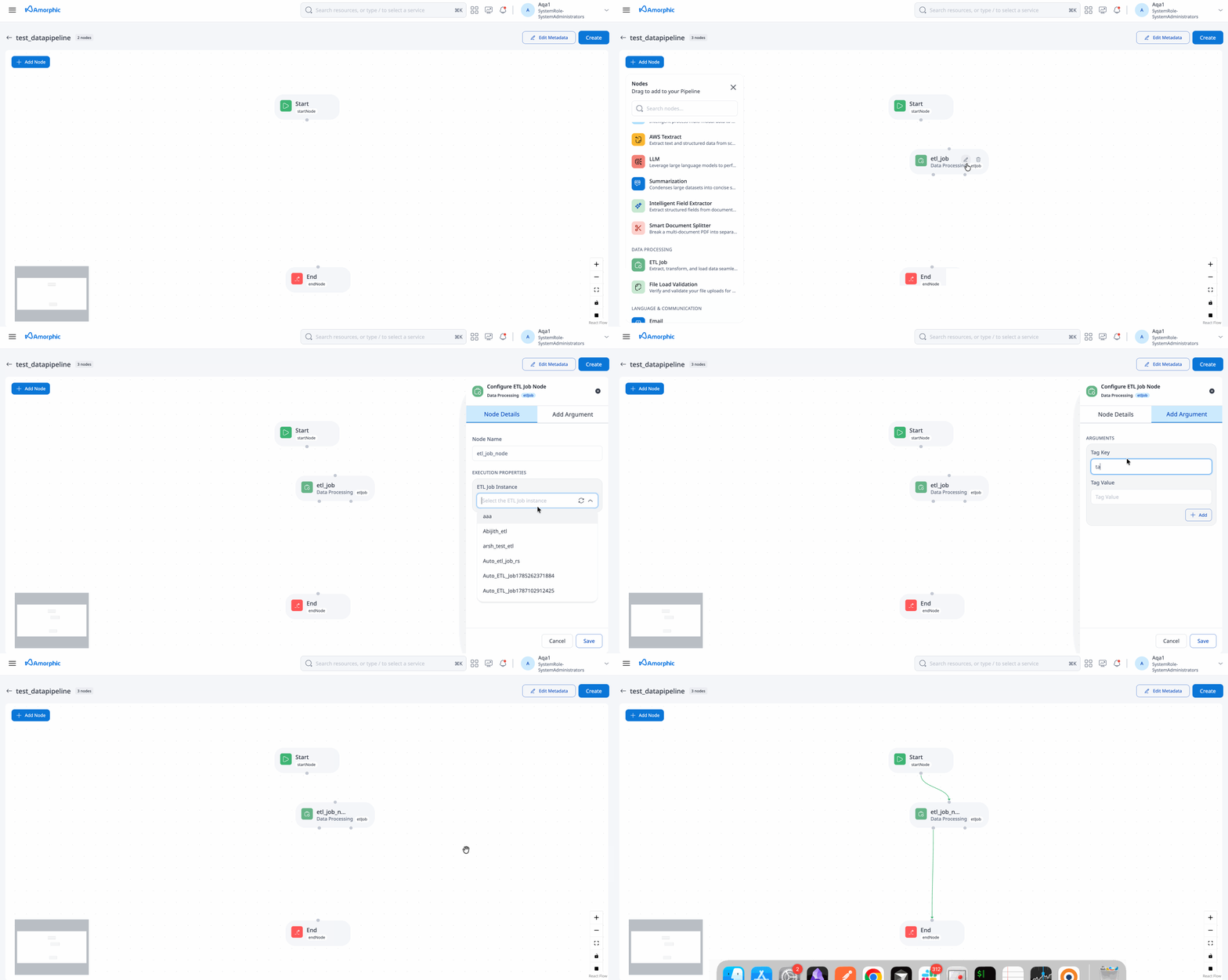
The ETL Job Node facilitates the execution of ETL jobs, allowing for the inclusion of arguments to be utilized within the job. For instance, this node can be employed to execute an ETL job that identifies the highest paying job and its corresponding salary, as well as to trigger subsequent jobs based on the output of the initial job.
| Attribute | Description |
|---|---|
| Resource | Select an ETL job from the dropdown list of available jobs. |
| Node Name | A unique identifier for the node. |
| Input Configurations | Arguments that can be used within the job. |
ML Model Inference Node
The ML Model Inference Node is designed to run machine learning models using input arguments to make predictions or decisions. For example, this node can process customer data to predict churn probabilities, with the results forwarded to the next node in the pipeline.
| Attribute | Description |
|---|---|
| Resource | Choose a machine learning model from the list of accessible models. |
| Node Name | A unique identifier for the node. |
| Input Dataset | The dataset containing files for ML model inference. |
| Select Latest File | Automatically selects the latest file for inference if set to 'Yes'. |
| File Name Execution Property Key | Required if 'Select Latest File' is set to 'No'; specifies the file name from the dataset. (must be an execution property key) |
| Target Dataset | The dataset where inference results are saved. |
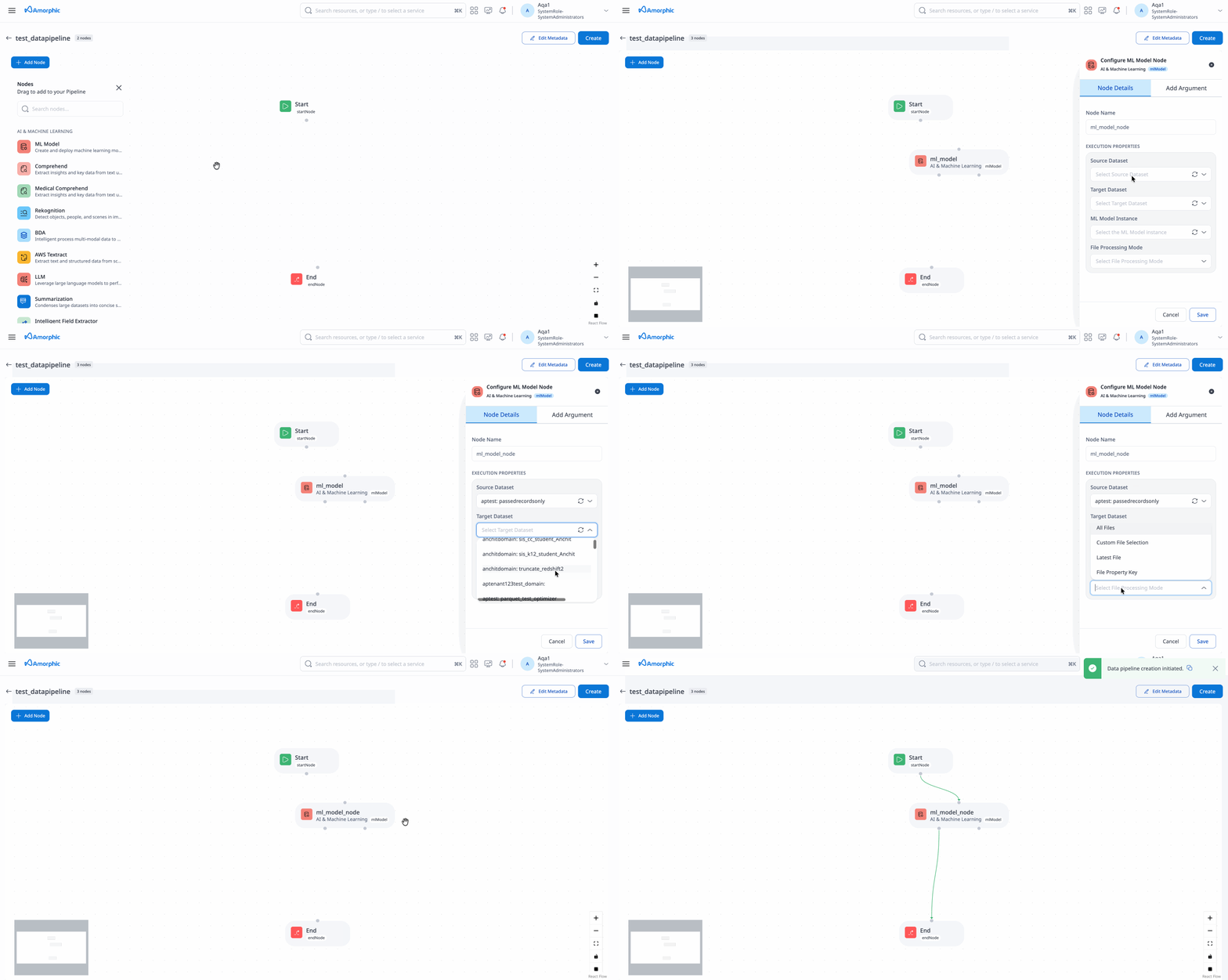
Users can perform inference on the input dataset (with a soft limit of 10,000 files) or on up to 100 selected files.
Email Node
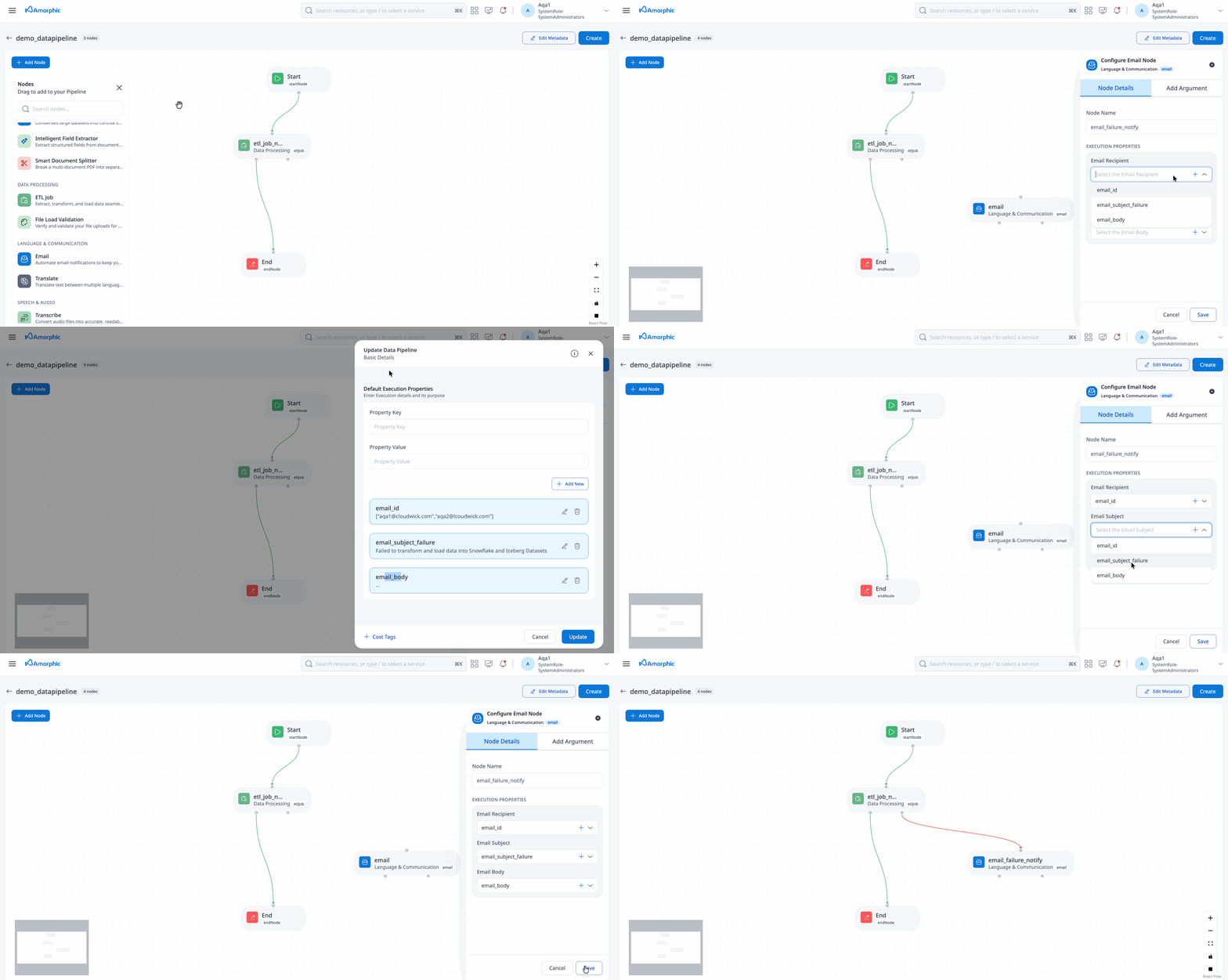
The Email Node enables automated email notifications within data pipelines. It can be used to send alerts, reports, or status updates to stakeholders when specific pipeline events occur. This node is particularly useful for monitoring pipeline execution, notifying about job completions, or alerting on failures.
Use Cases
- Pipeline Status Notifications: Send alerts when pipelines complete successfully or fail
- Data Quality Alerts: Notify stakeholders about data validation issues
- Scheduled Reports: Automatically distribute processed data reports
- Error Notifications: Alert administrators about critical pipeline failures
| Attribute | Description | Required |
|---|---|---|
| Node Name | A unique identifier for the node. | Yes |
| Email Recipient | A list of email addresses to notify (must be an execution property key). Format: ['<email1@domain.com>','<email2@domain.com>']Example: ['<john.doe@amorphicdata.com>','<jane.doe@amorphicdata.com>']Note: Multiple recipients can be specified in a single array. | Yes |
| Email Subject | The subject line of the email (must be an execution property key). Best Practices: - Use descriptive subjects that indicate the pipeline context - Include pipeline name or job identifier - Example: "Data Pipeline Alert: Customer ETL Job Completed" | Yes |
| Email Body | The content of the email (must be an execution property key). Supported Content: - Plain text - HTML formatting - Pipeline execution details - Error messages and stack traces - Data processing summaries | Yes |
Configuration Examples
Basic Success Notification
{
  "email_recipient": ["<admin@company.com>"],
  "email_subject": "Pipeline Completed Successfully",
  "email_body": "The data pipeline has completed successfully. All data has been processed and loaded."
}
Detailed Error Alert
{
  "email_recipient": ["<admin@company.com>", "<dev-team@company.com>"],
  "email_subject": "Pipeline Failed: Customer Data Processing",
  "email_body": "The customer data processing pipeline has failed. Please check the logs for more details. Pipeline ID: ${pipeline_execution_id}"
}
Data Quality Report
{
  "email_recipient": ["<data-team@company.com>"],
  "email_subject": "Daily Data Quality Report",
  "email_body": "Daily data quality check completed. Records processed: ${total_records}, Valid records: ${valid_records}, Invalid records: ${invalid_records}"
}
Best Practices
-
Recipient Management:
- Use execution properties to dynamically set recipients based on pipeline context
- Consider different recipient lists for different types of notifications (success vs failure)
-
Subject Line Design:
- Include pipeline name or identifier for easy identification
- Use consistent prefixes like "Pipeline Alert:" or "Data Processing:"
- Include status indicators (Success/Failed/Pending)
-
Email Body Content:
- Include relevant pipeline execution details
- Provide actionable information when errors occur
- Use clear, concise language
- Include links to relevant dashboards or logs when possible
-
Error Handling:
- Always include error details in failure notifications
- Provide context about what the pipeline was trying to accomplish
- Include next steps or escalation procedures
- Emails are not delivered to external domains from SES by default. To remove this restriction, please raise a support ticket.
- Email delivery is asynchronous and may have slight delays depending on SES configuration.
- Large email bodies may be truncated based on SES limits.
- Ensure execution properties are properly configured before pipeline execution.
- Test email configurations in development environments before deploying to production
- Monitor email delivery rates and bounce rates to ensure notifications are reaching intended recipients
- Consider implementing email templates for consistent formatting across different pipeline notifications
Textract Node
The Textract Node extracts text from documents, images, and other file types.
| Attribute | Description |
|---|---|
| Node Name | A unique identifier for the node. |
| Input Dataset | The dataset containing files to extract text from (PDF, JPG, PNG supported). |
| File Processing Mode | Modes: All, Change Data Capture, Time Based. All: processes all documents in a source dataset Change Data Capture: processes the documents that have landed after the previous pipeline execution Time Based: processes the documents based on the custom time period chosen |
| Features | Choose features to extract: Text, Forms, Tables. Text: extracts all text from document Forms: extracts forms as key-value pairs Tables: extracts tables in csv format |
| Target Dataset | The dataset where extracted text is saved. |
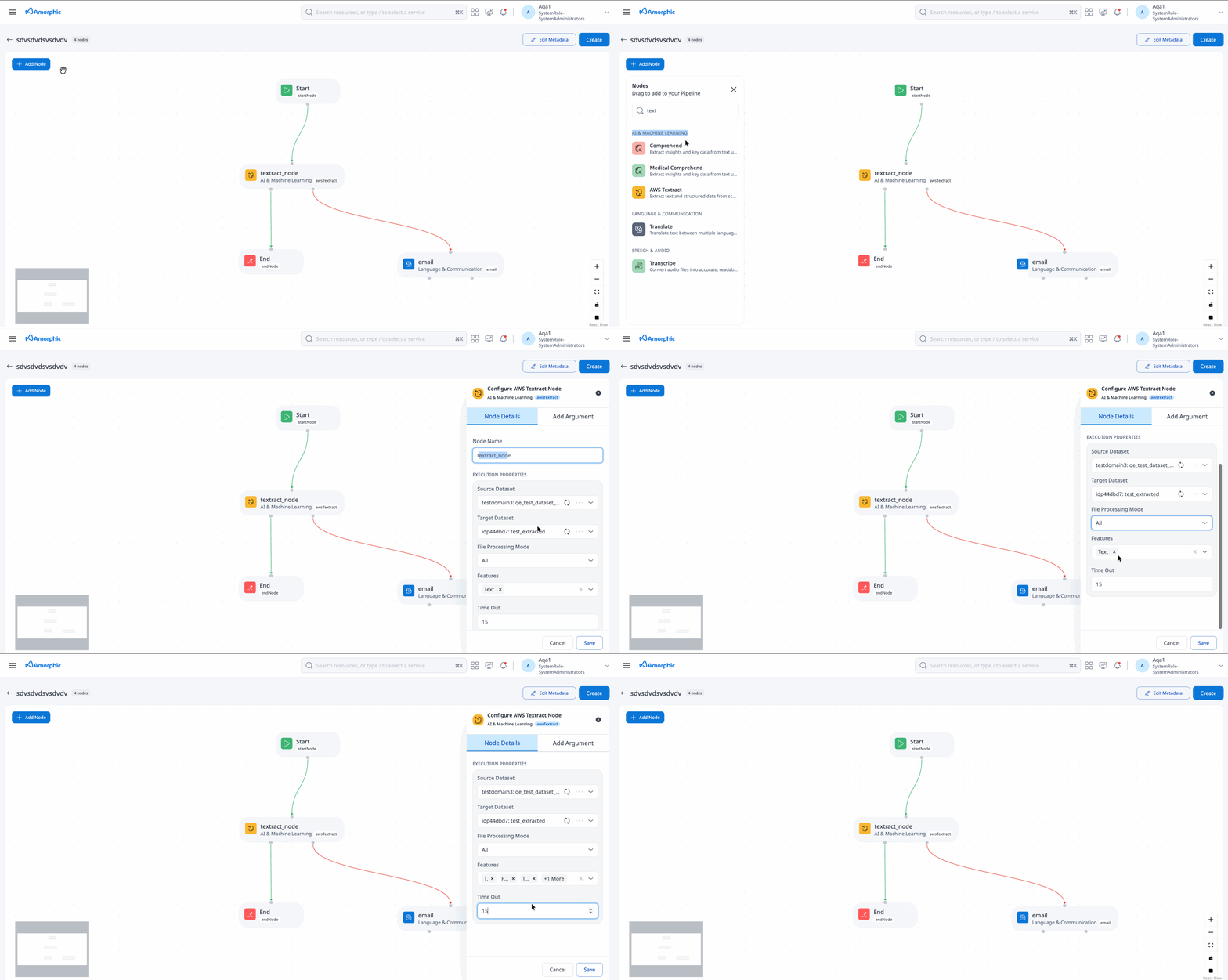
No two textract nodes can have the same input dataset within a pipeline.
Rekognition Node
The Rekognition Node analyzes images and videos to detect and identify objects, people, and text.
| Attribute | Description |
|---|---|
| Node Name | A unique identifier for the node. |
| Input Dataset | The dataset containing files for analysis (MP4, JPG, PNG supported). |
| File Processing Mode | Modes: All, Change Data Capture, Time Based. All: processes all documents in a source dataset Change Data Capture: processes the documents that have landed after the previous pipeline execution Time Based: processes the documents based on the custom time period chosen |
| Features | Choose features to extract: Text, Faces, Content Moderation, Celebrities, Labels. Text: extracts all text from document Faces: detects faces from image or video Content Moderation: extracts the inappropriate, unwanted, or offensive content analysis results Celebrities: extracts the name and additional information about a celebrity Labels: extracts label name, the percentage confidence in the accuracy of the detected label |
| Target Dataset | The dataset where extracted data is saved. |
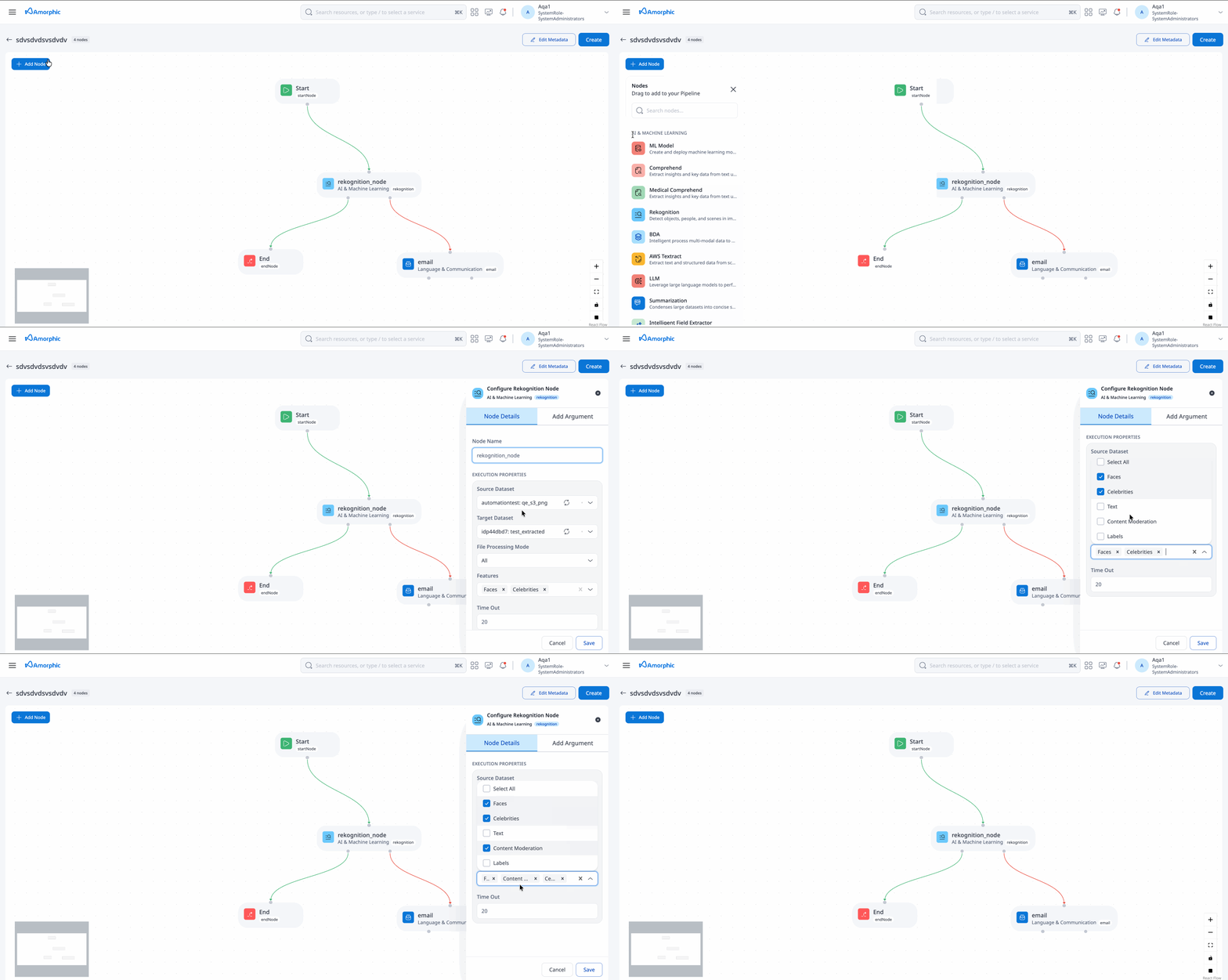
No two rekognition nodes can have the same input dataset within a pipeline.
Translate Node
The Translate Node translates text from one language to another.
| Attribute | Description |
|---|---|
| Node Name | A unique identifier for the node. |
| Source Dataset | The dataset containing files for translation (TXT supported). |
| File Processing Mode | Modes: All, Change Data Capture, Time Based. All: processes all documents in a source dataset Change Data Capture: processes the documents that have landed after the previous pipeline execution Time Based: processes the documents based on the custom time period chosen |
| Source Language | The language of the source text. |
| Target Language | The language to translate the text into. |
| Target Dataset | The dataset where translated text is saved (TXT supported). |
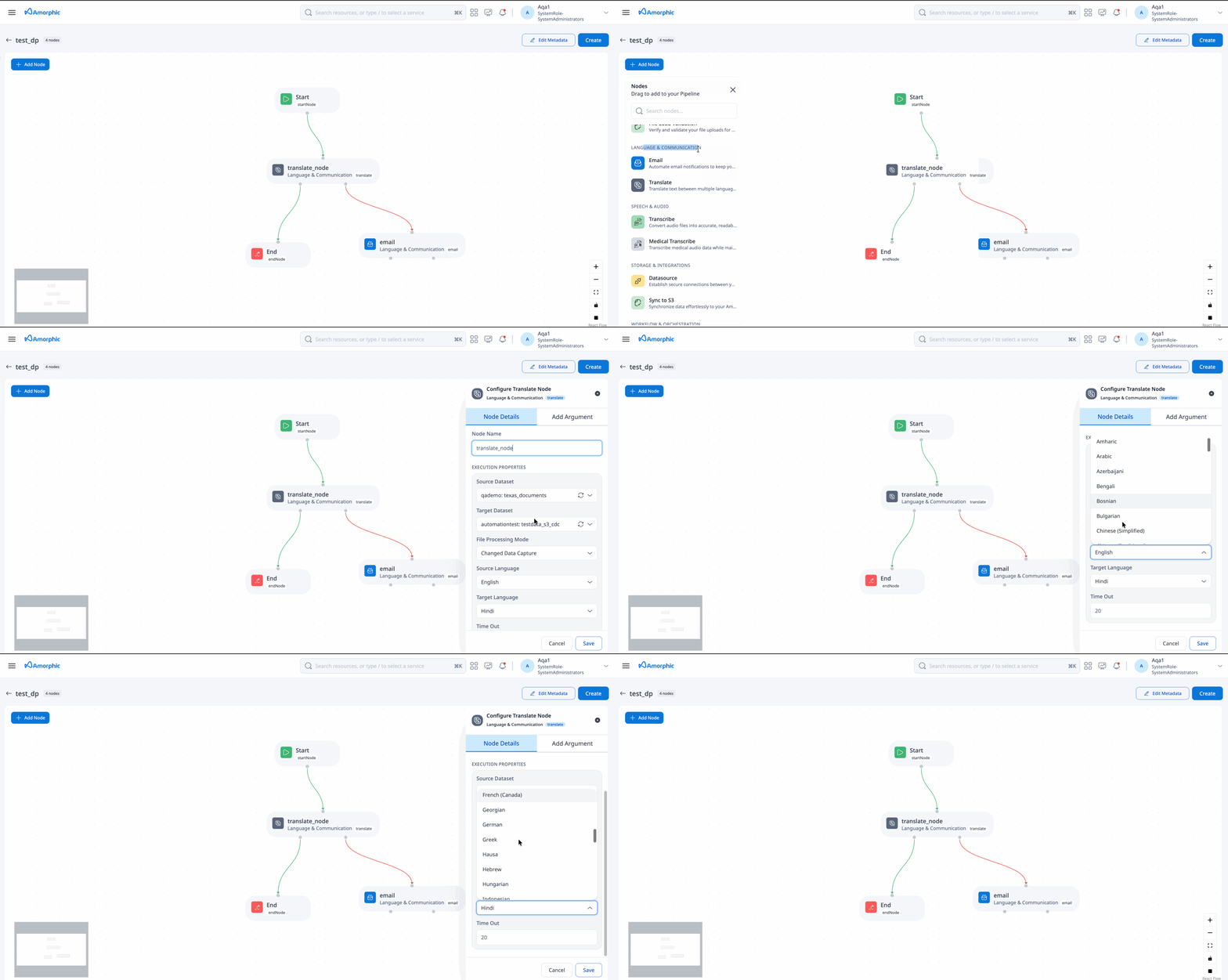
- No two translate nodes can have the same input dataset within a pipeline.
- The node only translates the first 5000 characters of the text.
Comprehend Node
The Comprehend Node extracts insights and relationships from text.
| Attribute | Description |
|---|---|
| Node Name | A unique identifier for the node. |
| Input Dataset | The dataset containing files for analysis (TXT supported). |
| File Processing Mode | Modes: All, Change Data Capture, Time Based. |
| Features | Choose features to extract: Entities, KeyPhrases, Sentiment, PiiEntities, Topics. Entities: named entities like people, places, locations etc., in a document KeyPhrases: key phrases or talking points in a document Sentiment: overall sentiment of a text (positive, negative, neutral or mixed) PiiEntities: personally identifiable information (PII) entities in a document Topics: Most common topics in a document |
| Target Dataset | The dataset where extracted insights are saved. |
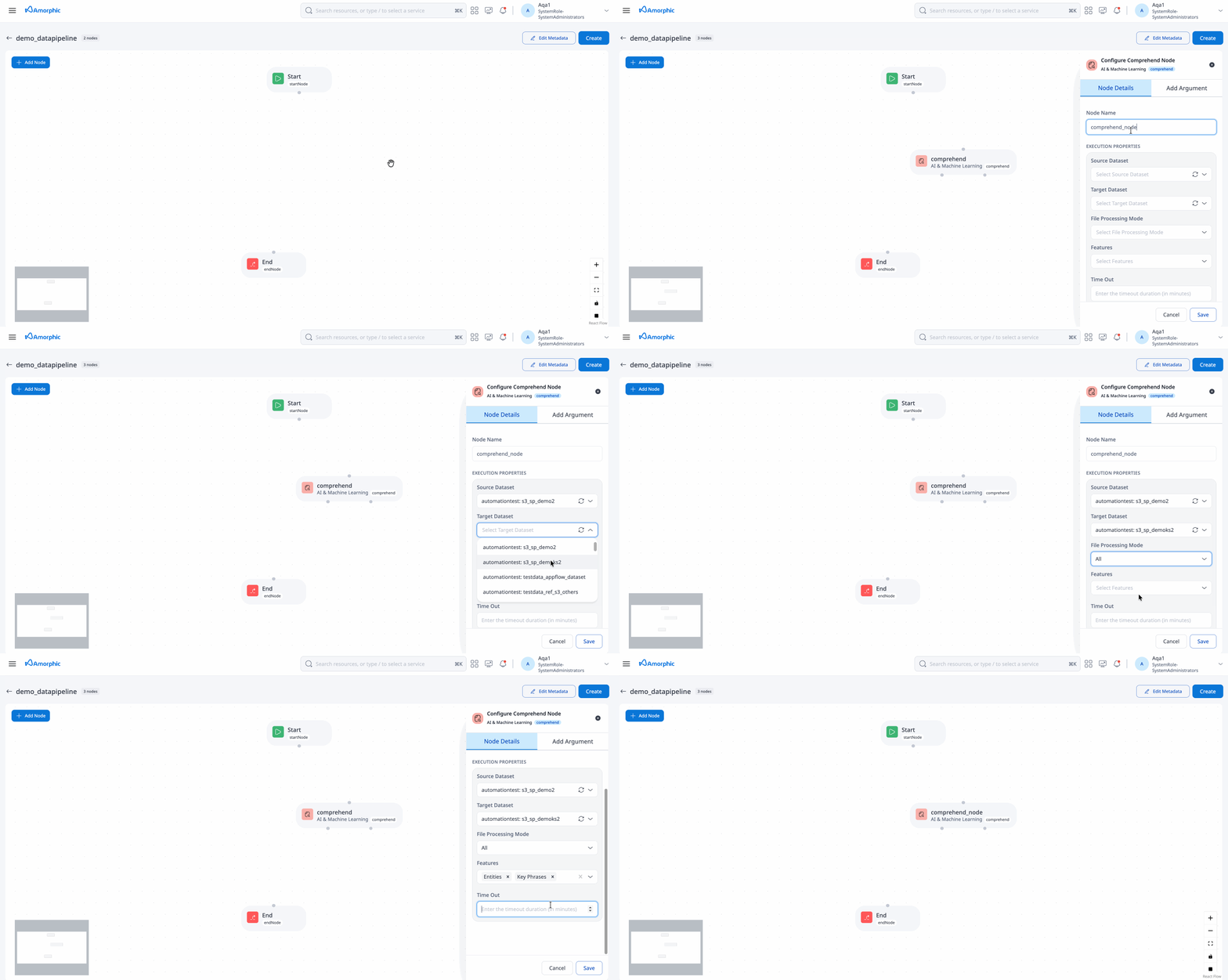
No two comprehend nodes can have the same input dataset within a pipeline.
Medical Comprehend Node
The Medical Comprehend Node processes medical text to extract insights and relationships.
| Attribute | Description |
|---|---|
| Node Name | A unique identifier for the node. |
| Input Dataset | The dataset containing files for analysis (TXT supported). |
| File Processing Mode | Modes: All, Change Data Capture, Time Based. All: processes all documents in a source dataset Change Data Capture: processes the documents that have landed after the previous pipeline execution Time Based: processes the documents based on the custom time period chosen |
| Features | Choose features to extract: Medications, Medical Conditions, Personal Health Information, Medical Entities. Medications: Detects medication and dosage information for the patient. Medical conditions: Detects the signs, symptoms, and diagnosis of medical conditions. Personal health information: Detects the patient's personal information. Medical entities: All the medical and personal information in the document |
| Target Dataset | The dataset where extracted medical information is saved. |
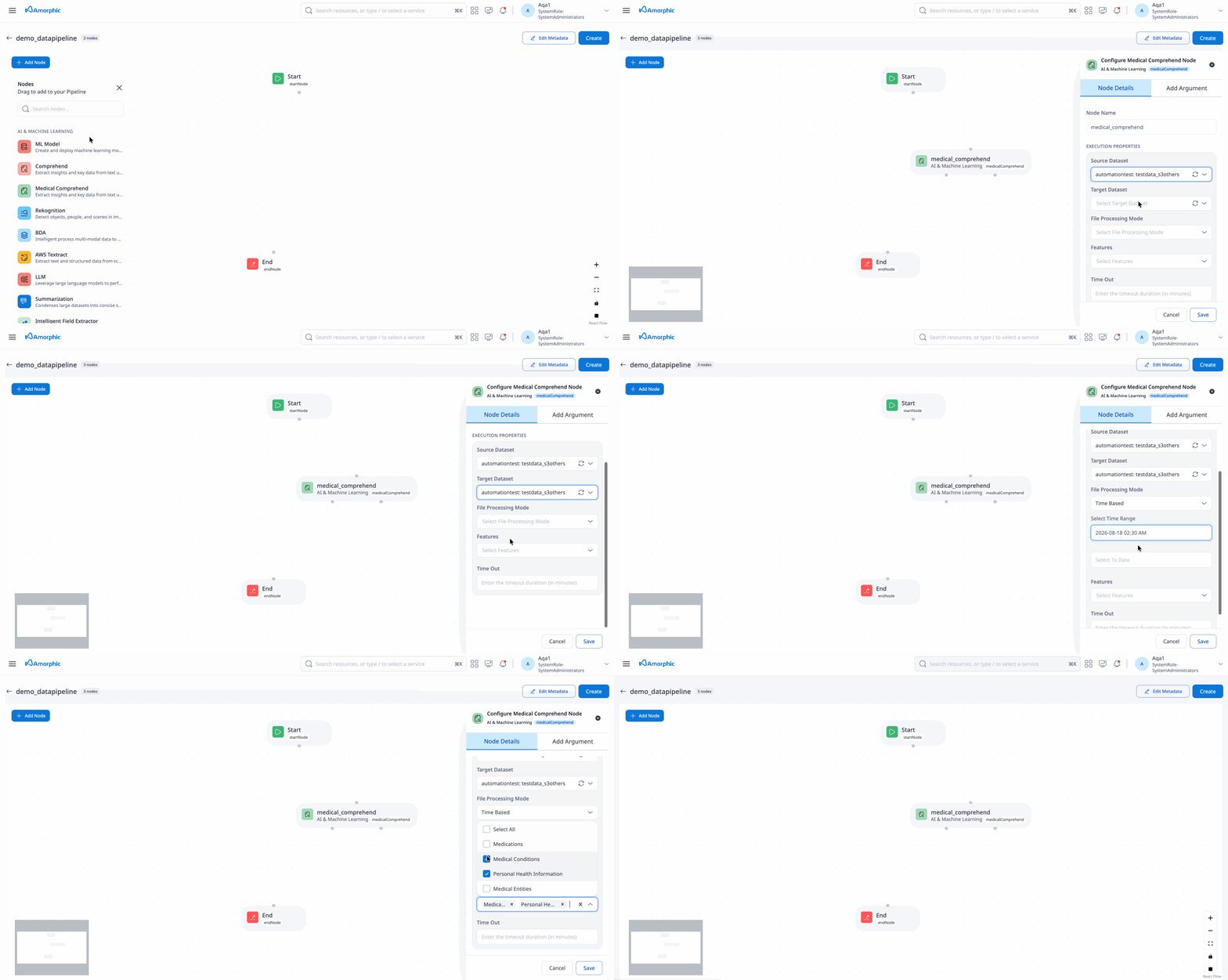
No two medical comprehend nodes can have the same input dataset within a pipeline.
Transcribe Node
The Transcribe Node converts audio files into text.
| Attribute | Description |
|---|---|
| Node Name | A unique identifier for the node. |
| Source Dataset | The dataset containing audio files for transcription (MP3, WAV supported). |
| Source Language | The language of the audio files. |
| File Processing Mode | Modes: All, Change Data Capture, Time Based. All: processes all documents in a source dataset Change Data Capture: processes the documents that have landed after the previous pipeline execution Time Based: processes the documents based on the custom time period chosen |
| Features | Choose features to extract: Text, ConversationBySpeaker, RedactedText, RedactedConversationBySpeaker.Text, ConversationBySpeaker, RedactedText and RedactedConversationBySpeaker are four features available. Text: Raw text extracted from the audio file. ConversationBySpeaker: Raw conversation displaying speaker and the sentence the speaker spoke. RedactedText: Extracted text from audio file with some content obscured for legal and security purposes. RedactedConversationBySpeaker: Conversation displaying speaker and the sentence the speaker spoke with some content obscured for legal and security purposes. |
| Target Dataset | The dataset where transcribed text is saved. |
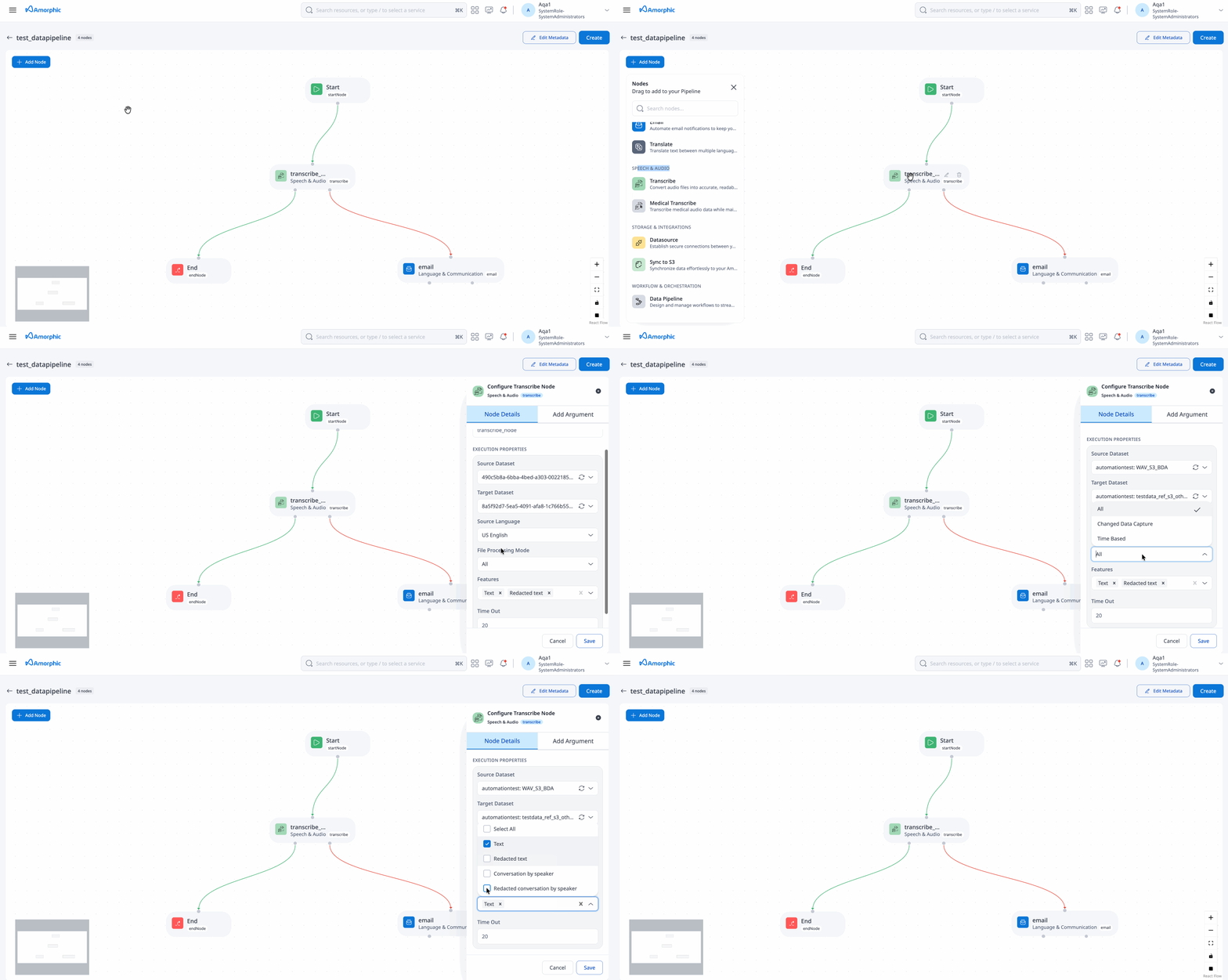
No two transcribe nodes can have the same input dataset within a pipeline.
Medical Transcribe Node
The Medical Transcribe Node converts medical audio files into text.
| Attribute | Description |
|---|---|
| Node Name | A unique identifier for the node. |
| Source Dataset | The dataset containing audio files for transcription (MP3, WAV supported). |
| Source Language | Currently supports only English-US (en-US). |
| File Processing Mode | Modes: All, Change Data Capture, Time Based. All: processes all documents in a source dataset Change Data Capture: processes the documents that have landed after the previous pipeline execution Time Based: processes the documents based on the custom time period chosen |
| Features | Choose features to extract: Text, ConversationBySpeaker. Text: Raw text extracted from the audio file. ConversationBySpeaker: Raw conversation displaying speaker and the sentence the speaker spoke. |
| Target Dataset | The dataset where transcribed text is saved. |
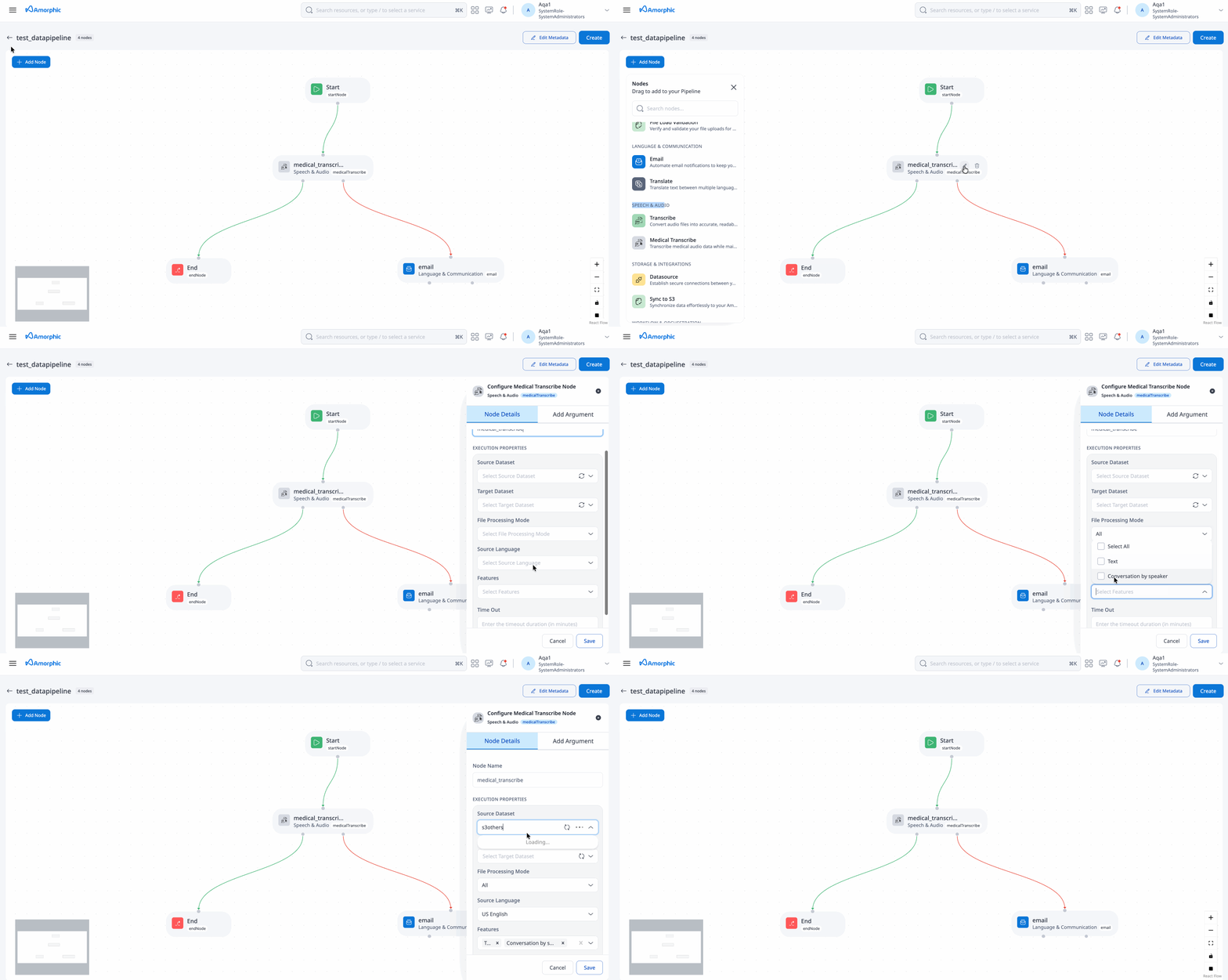
No two medical transcribe nodes can have the same input dataset within a pipeline.
Data Pipeline Node
The Data Pipeline Node allows for the integration of existing data pipelines, enabling them to run either in parallel or sequentially. For example, it can execute a data pipeline that consist of an ETL Job node followed by an Email node concurrently or consecutively with a data pipeline consisting of a Translate node followed by an Email node.
| Attribute | Description |
|---|---|
| Resource | Select a data pipeline from the list of accessible data pipelines. |
| Node Name | A unique identifier for the node. |
When a parent pipeline is stopped, it automatically stops all child pipelines. Execution properties set at the parent pipeline level take precedence over those defined at the child pipeline level.
File Load Validation Node
The File Load Validation Node is used to validate data before it is loaded into the system.
| Attribute | Description |
|---|---|
| Node Name | A unique identifier for the node. |
| Timeout | Optional timeout value (in minutes) for node execution. Default is 60 minutes. |
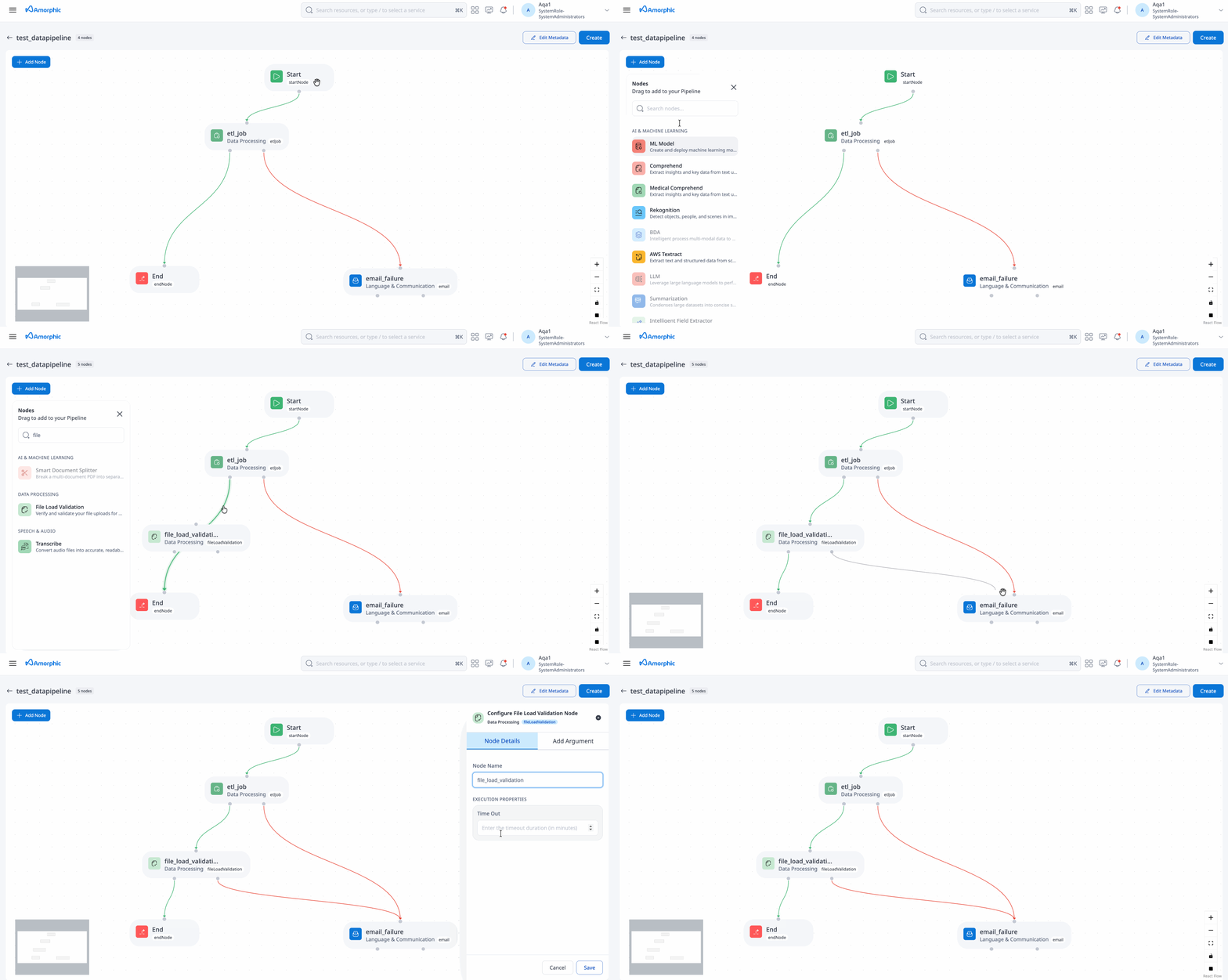
It is advised to set number of concurrent runs to 1 on etl job when file load validation node is used. For advanced use cases which involve concurrent data pipeline executions, please refer to: Advanced usage of file load validation node
A file load validation node can only succeed an ETL job node, it cannot exist by itself or succeed other type of nodes in a pipeline.
Sync To S3 Node
The Sync To S3 Node synchronizes data to the S3 storage.
| Attribute | Description |
|---|---|
| Node Name | A unique identifier for the node. |
| Concurrency Factor | The number of datasets to sync in parallel (1-10). |
| Domain | The domain name for dataset synchronization. |
| Sync All Datasets | Indicates whether to sync all datasets in the domain. |
| Select Datasets | List of datasets to sync if 'Sync All Datasets' is set to 'No'. |
| Timeout | Optional timeout value (in minutes) for node execution. Default is 60 minutes. |
| Is Parallel Copy Enabled | Controls whether Redshift UNLOAD writes data to S3 using parallel copy. When enabled (default), Redshift unloads data in parallel, which typically produces a larger number of files in S3. When disabled, Redshift uses PARALLEL OFF, resulting in fewer files. This setting applies only to the copy operation for each dataset and is separate from Concurrency Factor, which controls how many datasets sync at once. Disabling parallel copy may result in hgher latency, especially for larger workloads. |
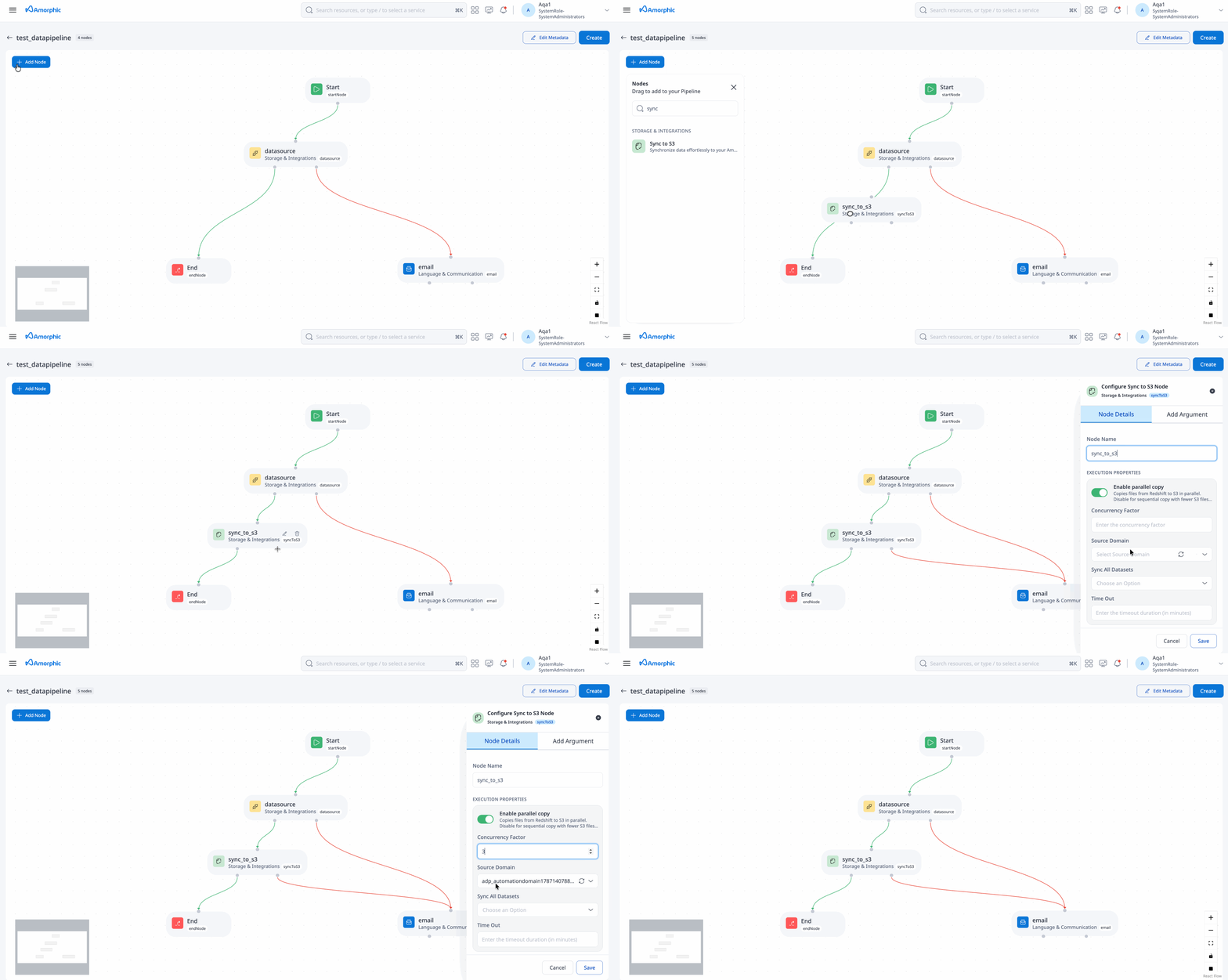
User is given an option to click & 'Download' the manifest file in execution properties of the Sync To S3 node. Below graphic shows manifest file that is generated/downloaded after the sync to s3 node is executed:

The "Sync to S3" operation can only be executed one at a time for a specific dataset within the same domain.
Datasource Node
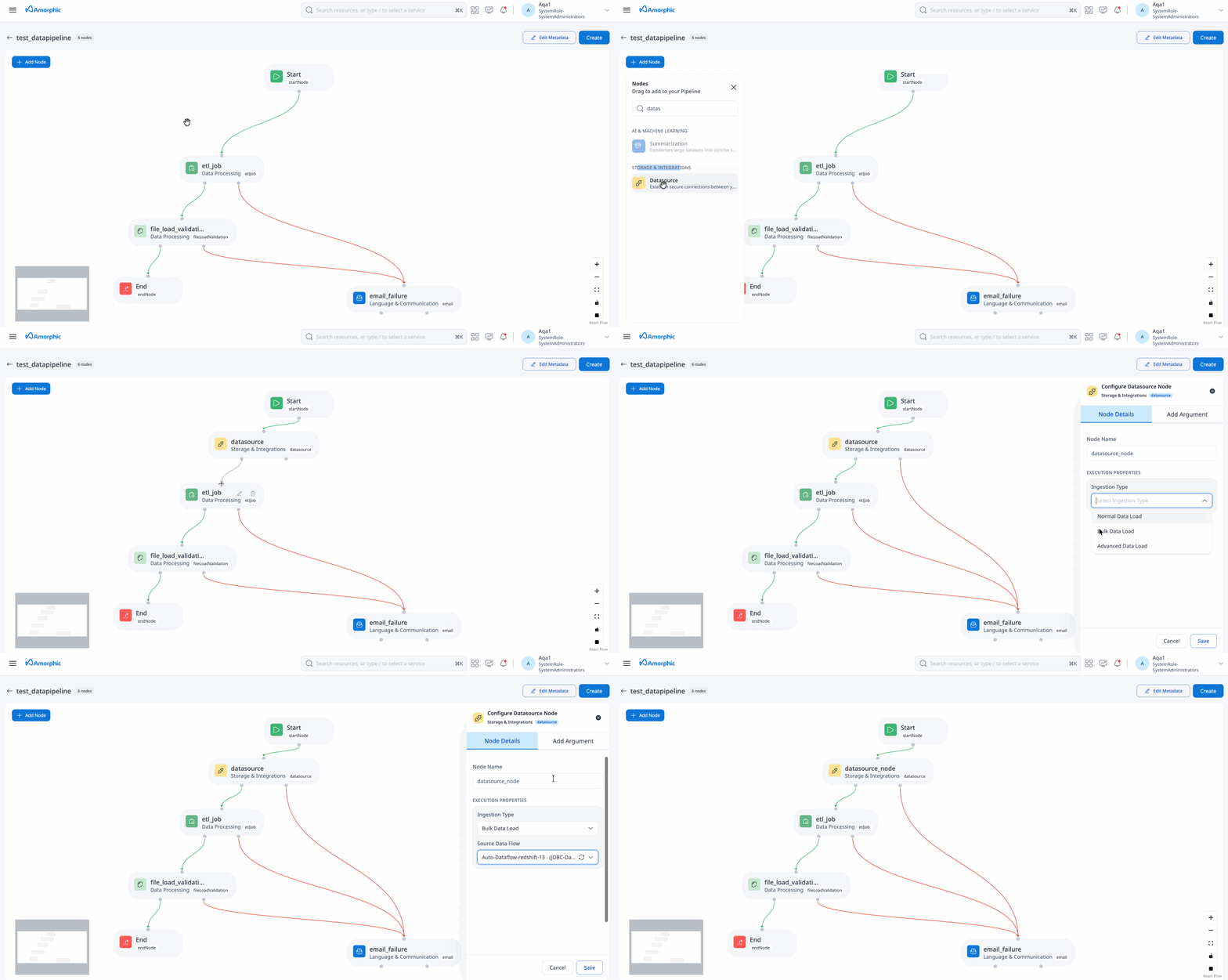
The Datasource Node integrates and runs datasources created within the Amorphic platform as part of the data pipeline.
| Attribute | Description |
|---|---|
| Node Name | A unique identifier for the node. |
| Ingestion Type | Select the ingestion type: Normal Data Load, Full Load Bulk Data. |
| Dataset | Select the dataset for data ingestion (available for normal data load datasources). |
| Dataflow | Select the bulk load dataflow to run (available for bulk data load datasources). Note: The Dataflow must be in a 'ready' state for the data pipeline execution to start. If it is not in a 'ready' state, ensure that it is brought to a 'ready' state from the Dataflows page before triggering the data pipeline execution. |
Summarization Node
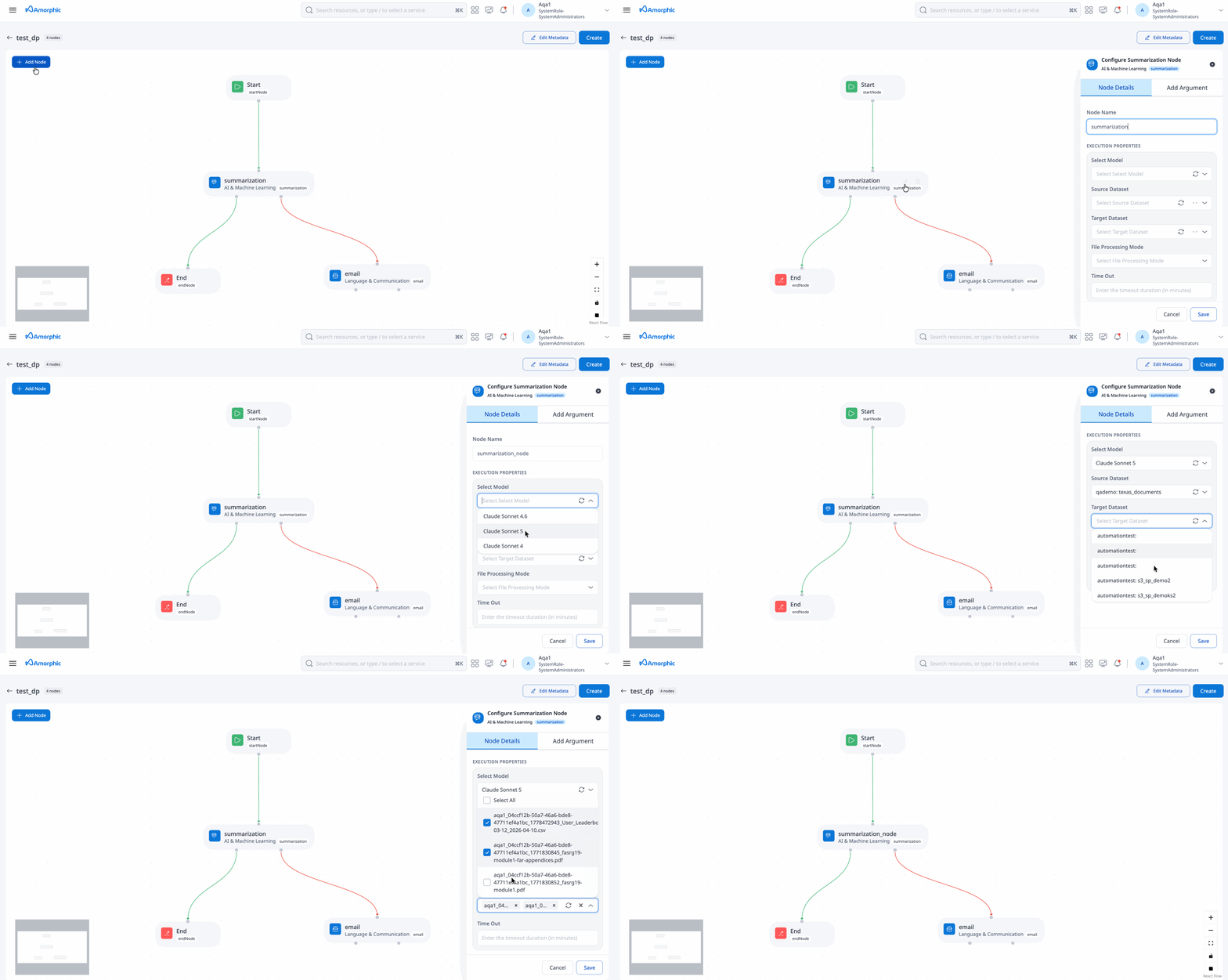
The Summarization Node generates a summary of the provided input text using an LLM
| Attribute | Description |
|---|---|
| Node Name | A unique identifier for the node. |
| Input Dataset | The dataset containing files for summarization (Txt, PDF supported). |
| File Processing Mode | Modes: All, Selected Files, Change Data Capture. All: processes all documents in a source dataset Selected Files: processes a subset of documents in a source dataset(Max 100 files) Change Data Capture: processes the documents that have landed after the previous pipeline execution |
| Model | Select the LLM model to use for summarization. |
| Target Dataset | The dataset where summarized text is saved. (Txt supported). |
The Model must be enabled from the AWS Bedrock console for the Summarization node to work.
LLM Node (Beta)
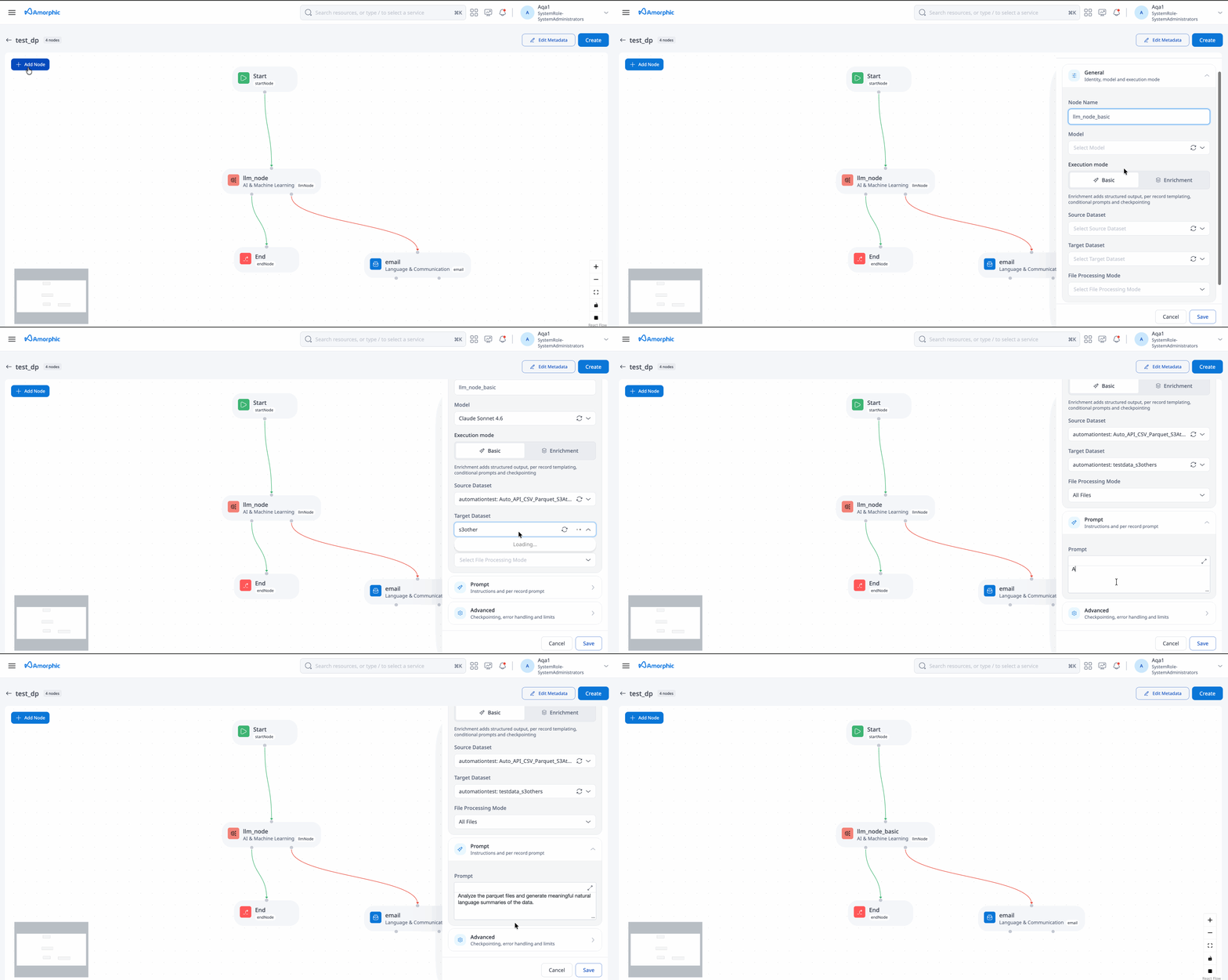
The LLM Node applies a large language model to the data in a source dataset and writes the result to a target dataset. It runs in one of two execution modes, selected when the node is created:
| Execution Mode | How it processes data | Use it for |
|---|---|---|
| Basic (default) | The model generates code from your prompt; Amorphic runs that code in a sandbox to produce one output file per input file. | File-level transforms, aggregations, reshaping and reports. |
| Enrichment | The model is called once per row and returns structured JSON that conforms to an output schema. | Row-level classification, extraction, scoring and labelling across large datasets. |
Example use cases:
- Basic — summarise a monthly CSV of survey responses into a single report file, or reshape a wide spreadsheet into a normalised table.
- Enrichment — classify 20,000 support tickets by category and severity, or pull the vendor, invoice total and due date out of every row of a payments export.
The following attributes apply to both modes:
| Attribute | Description |
|---|---|
| Node Name | A unique identifier for the node. |
| Execution Mode | Basic or Enrichment. Defaults to Basic. Existing nodes continue to run in Basic mode. |
| Input Dataset | The dataset containing the data to process. Basic mode supports tabular files (csv, tsv, xlsx/xls, parquet), plus txt and pdf. Enrichment mode has additional requirements — see Enrichment Mode. |
| File Processing Mode | Modes: All, Selected Files, Change Data Capture. All: processes all documents in a source dataset Selected Files: processes a subset of documents in a source dataset(Max 100 files) Change Data Capture: processes the documents that have landed after the previous pipeline execution |
| Model | The model used by the node. An administrator must enable it in the AWS Bedrock console and assign it to Data Pipelines in Amorphic. |
| Prompt | The instructions for the model. In Basic mode this describes the transformation to perform on the file. In Enrichment mode it is used as the system prompt and applies to every row. |
| Target Dataset | The dataset where the output is saved. |
Basic Mode
Basic mode processes one file at a time. The file's content is loaded before the generated code runs, so write the prompt as a transformation of data that is already in memory — not as an instruction to open, download or re-read the source file.
| Input type | Content is available as | Avoid |
|---|---|---|
| Tabular (csv, tsv, xlsx/xls, parquet) | df — a pandas DataFrame | Asking the model to load or re-read the dataset file |
| txt, pdf | text_content — the extracted text. | Asking the model to open or read the pdf or source file |
Phrase the task as work on the data that is already available. Prefer "Use the text already available in text_content. Parse the tabular content, double the values in column 5, and write the result to the output file" over "Read the PDF from the attached source dataset and extract the tables."
An example of a prompt is as follows:
For each 'region' in the dataset, calculate the average 'customer_satisfaction_score' for the last quarter (use rows where 'date_of_feedback' is within the last 3 months).
Then, identify regions where the average score is below 3.5 and list the top 2 complaints (based on frequency) from customers in those regions.
Output the result as a JSON object with fields: 'region', 'average_score', and 'top_complaints'.
With this prompt, the LLM Node performs the following advanced operations:
- Time-based filtering: Select only rows where date_of_feedback is within the last 3 months.
- Grouping: Group feedback by region.
- Aggregation: Compute the average customer_satisfaction_score per region.
- Conditional filtering: Select only regions where the average score is below 3.5.
- Frequency analysis: Identify the top 2 most frequent complaints in those filtered regions.
- Structured output: Format the result as a JSON object suitable for downstream analytics.
Enrichment Mode
Enrichment mode calls the model once for every row in the source dataset and asks it to return a fixed set of fields as JSON. Use it when you want the model to reason about each record individually.
Enrichment mode can be expensive to run, for two reasons:
- It makes one model call per row, so cost scales directly with the number of rows.
- It runs on more advanced compute than Basic mode (to maximize performance), so the model calls are not the only cost.
Always validate a node against a small dataset before pointing it at a large one.
Attributes
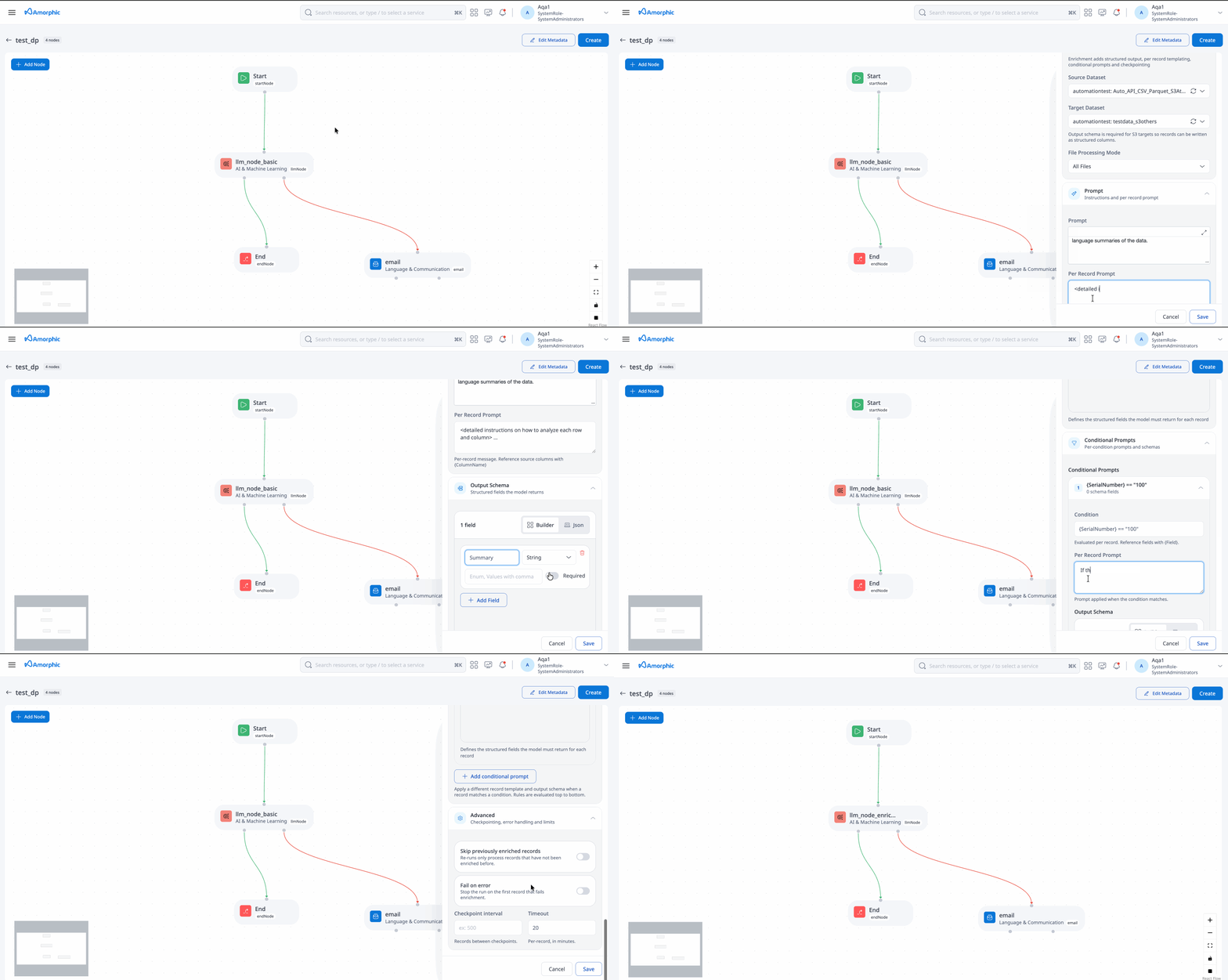
These attributes are available only when Execution Mode is set to Enrichment:
| Attribute | Description | Required |
|---|---|---|
| Per Record Prompt | The instructions applied to every row, such as the classification rules, definitions and rubrics the model should follow. | Yes |
| Output Schema | The fields the model must return, defined as a properties map. | Only when the target dataset has no registered schema — see Source and target datasets |
| Conditional Prompts | A list of rules that swap the Per Record Prompt and/or Output Schema for rows matching a condition. | No |
| Skip Previously Enriched Records | When enabled, rows that were already enriched successfully in an earlier run of this node are skipped instead of being sent to the model again. Enabled by default. | No |
| Checkpoint Interval | The number of rows after which output is written to the target dataset and progress is recorded. Must be between 20 and 1000. Defaults to 100. Lower values reduce the work lost if a run fails; higher values reduce the number of output files. | No |
| Fail On Error | When enabled, the run stops at the first row that cannot be processed. Rows already completed are still written out. Disabled by default. | No |
Source and target datasets
| Dataset | Requirement |
|---|---|
| Input Dataset | Must be a structured dataset with a file type of CSV, Parquet or JSON. JSON files are read as JSON Lines (one record per line). Raw S3 datasets are not supported. |
| Target Dataset — structured | For a structured target, the output fields are taken from the target dataset's registered columns and Output Schema must not be provided. Each output row contains the target dataset's columns, filled from the source row and then from the fields the model returns. |
| Target Dataset — unstructured | For an unstructured target, the file type must be others and Output Schema is required. Each output row contains only the fields defined in Output Schema. |
For a structured target, an enrichment field with the same name as a target column replaces the value from the source row. Source columns that are not in the target dataset are dropped.
- With File Processing Mode set to Selected Files, a run covers at most 100 files.
- A run times out after 48 hours by default. If a large dataset hits that limit, trigger the node again — it carries on from where it stopped.
Defining the output schema
The following sample Output Schema asks the model to return four fields for each support ticket, two of which are constrained to a fixed set of values:
{
  "properties": {
    "category": {
      "type": "string",
      "enum": ["billing", "outage", "feature_request", "how_to"],
      "required": true
    },
    "severity": {
      "type": "string",
      "enum": ["low", "medium", "high", "critical"],
      "required": true
    },
    "sentiment_score": { "type": "number" },
    "summary": { "type": "string" }
  }
}
Keep schemas as tight as the use case allows. Use enum wherever the answer comes from a known list — it makes the response far more reliable and cheaper than free text. The number and type of fields also determine how many tokens the model is allowed to generate per row, so large free-text fields raise the cost of every row.
Using conditional prompts
Conditional Prompts let users handle records that need different treatment. Each rule has a Condition plus a PerRecordPrompt and/or an OutputSchema to use when it matches.
[
  {
    "Condition": "{{region}} in ['EU', 'UK']",
    "PerRecordPrompt": "Classify this ticket using the same rules. Additionally, treat any mention of personal data handling as a compliance concern and set severity to at least 'high'."
  },
  {
    "Condition": "{{channel}} == 'phone'",
    "PerRecordPrompt": "This ticket was logged by an agent during a phone call, so the description is a shorthand call note rather than the customer's own words. Apply the same classification rules, allowing for abbreviations and incomplete sentences."
  },
  {
    "Condition": "{{channel}} != 'web_form'",
    "PerRecordPrompt": "This ticket did not arrive through the structured web form, so the description may not name the product area or list the steps already attempted. Infer them from the text where possible, and do not lower confidence purely because those details are missing."
  }
]
Rules are evaluated in order and only the first match is applied — matching rules are never combined. Put your most specific conditions first.
How to use
For every row, the node sends three blocks in this order:
- Prompt — the system prompt: the model's role, domain context and guiding principles.
- Per Record Prompt — the per-row instructions. Amorphic appends the output rules and the output schema automatically.
- The row — serialized as JSON.
Only the first two blocks are cached, and only for as long as they stay identical from row to row. That is what drives the guidance below:
- Do not put values from the row into your prompts. Write "Classify the support ticket below", not "Classify ticket 48213 from the EU region". A prompt that changes from row to row costs significantly more to run. The row is added to every request for you, and the essential prompt that you enter is cached.
- Keep the prompts substantial. Caching activates at roughly 1,024 tokens (about 750 words) per block. Below that the block is silently left uncached and every row pays the full input price, so expand short prompts with the context, definitions, decision rules and worked examples that improve accuracy.
- Do not restate the output format. It is appended for you; repeating it wastes tokens and can conflict with the generated instructions.
- Keep Conditional Prompts to a minimum. Each distinct prompt combination is cached separately, so many rules spread rows thinly across cache entries and reduce the saving.
Each row is identified by a fingerprint taken from all of its column values. This is what makes re-runs safe:
- Rows that were already enriched successfully are skipped, unless you turn off Skip Previously Enriched Records.
- Rows that failed are retried.
- A row is only enriched again if one of its values has changed.
So if a run is stopped or times out, simply trigger it again and it carries on from where it left off.
Rows with identical values in every column are enriched once and produce a single output row, even when Skip Previously Enriched Records is turned off. If your data has meaningful duplicates, add a column that makes each row unique before enriching.
- This node is currently in a beta stage. It is advised to use this node with caution and to test it thoroughly before using it in production.
- Enrichment mode currently supports Claude Sonnet 4.6 only. The mode depends on model-specific capabilities for structured output and prompt caching, and support for further models will be added as they are validated.
- Starting v3.2, LLM nodes include an integrated vulnerability scan check for LLM generated content. Customers migrating to 3.2 who want to use this feature should perform an update on their data pipelines (a minor update is enough to ensure the jobs use the updated vulnerability scanning functions).
Smart Document Splitter Node
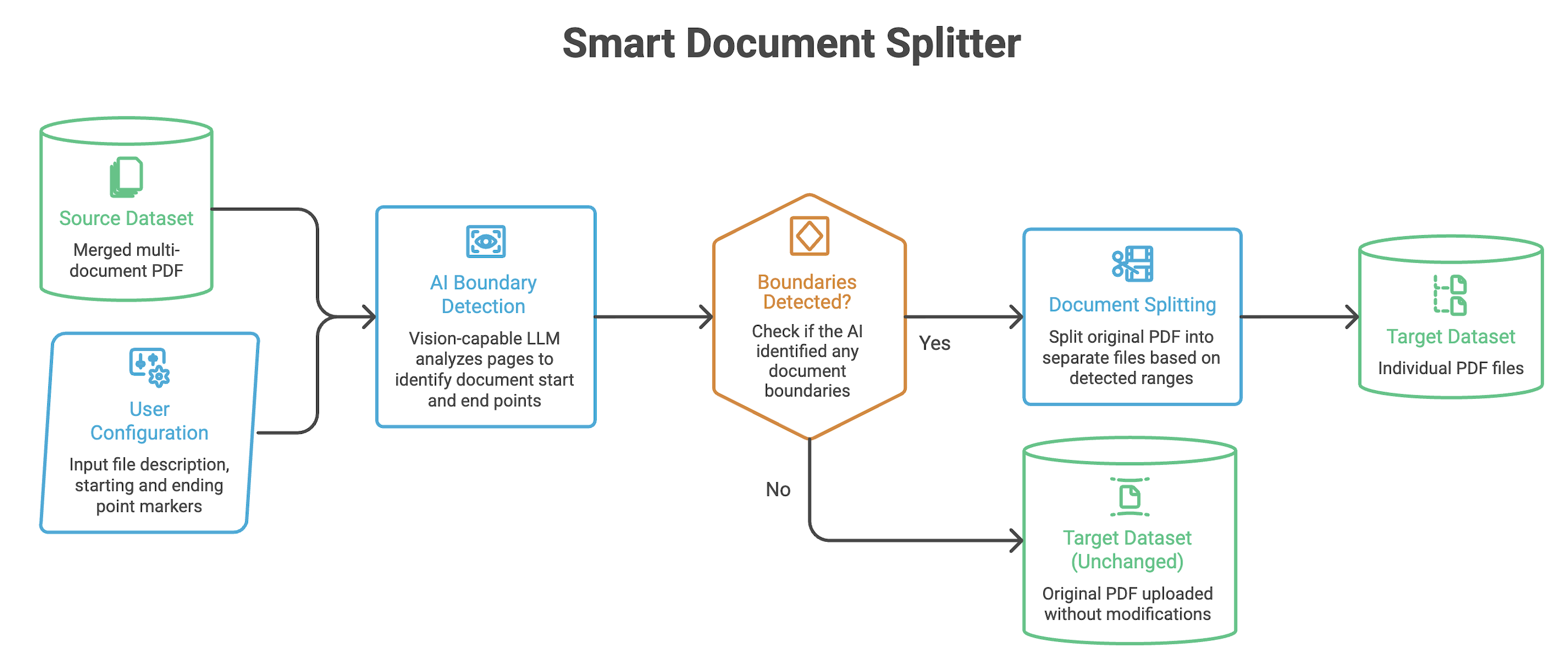
The Smart Document Splitter Node solves a common problem: documents that arrive as a single large PDF but need to be treated as individual files. For example, a vendor might send a monthly batch PDF containing 40 invoices merged together, or a scanner deposits every day's scans into one file. Rather than splitting these manually, this node uses a vision-capable LLM to automatically detect where each inner document starts and ends, then saves each one as its own PDF in the target dataset.
You tell the node three things: a description of the inner documents, what their first page looks like, and what their last page looks like. The node handles the rest.
Use Cases
- Batch invoice processing: Split a merged export from a billing system into individual invoice PDFs
- Scanned document bundles: Separate a daily scan dump into individual forms or letters
- Legal and compliance packages: Break a multi-agreement submission into individual contracts
- Medical records: Extract individual patient records from a bulk EMR export
| Attribute | Description |
|---|---|
| Node Name | A unique identifier for the node. |
| Source | The dataset containing the PDF files to split (PDF supported). |
| Target | The dataset where the split PDF files are saved (PDF supported). |
| Model | Select the vision-capable LLM model used to detect document boundaries. The model must support both text and image input. |
| File Description | A plain-language description of the inner documents to extract. Helps the model understand what it is looking for. (Max 5000 characters) Example: "Each document is a purchase order issued by a procurement department, containing a PO number, vendor details, line items, and an authorized signature block." |
| Starting point of file | Describes what the first page of each inner document looks like — any text, label, or layout element that reliably appears only on page 1 of each document. (Max 5000 characters) Example: "The page begins with the text 'Purchase Order No.:' followed by a numeric PO number." |
| Ending point of file | Describes what the last page of each inner document looks like — any text, label, or layout element that reliably appears only on the final page of each document. (Max 5000 characters) Example: "The page ends with a section labeled 'Authorized By:' followed by a signature line." |
| File Processing Mode | Modes: All, Selected Files, Change Data Capture. All: processes all documents in a source dataset Selected Files: processes a subset of documents in a source dataset (Max 100 files) Change Data Capture: processes the documents that have landed after the previous pipeline execution |
| Parallel Workers | Number of parallel workers used to process page batches (1–20). Default is 5. Controls how many model calls can run at the same time while scanning the PDF for document boundaries. |
| Batch Pages | Number of pages sent to the model in a single call (1–20). Default is 5. |
| Timeout (minutes) | Optional timeout value (in minutes) for node execution. Default is 2880 minutes (48 hours). Valid range is 10–2880. |
- Source and Target datasets must both use the PDF file type. Source and Target cannot be the same dataset.
- If no inner documents are detected in a source PDF, the original file is uploaded unchanged to the target dataset.
- The quality of the split depends on how clearly the boundary descriptions are written. The more specific and distinctive the starting and ending point descriptions, the more accurately the model can identify boundaries.
- All model calls made by this node are protected by a system-level prompt guardrail. Any guardrail hits are recorded in the execution properties of the node.
- Batch Pages and Parallel Workers control how the PDF is scanned for document boundaries. For a 12-page PDF with Batch Pages = 3, the node makes 4 model calls (pages 1–3, 4–6, 7–9, 10–12). With Parallel Workers = 5, up to 4 of those calls run at the same time (limited by the number of page batches).
Cost
- Each page batch requires a separate AI vision model call, and each detected boundary pair triggers an additional validation call. Costs scale with the number of pages in the source PDFs.
- Based on internal testing with Claude Sonnet, expect to pay approximately
$1 per 100 pages. - For large document sets, consider starting with a small sample in Selected Files mode to estimate costs before running on the full dataset.
Limitations
- Only PDF files are supported as input. Word documents, images, and other file types are not accepted.
- If a page cannot be rendered within the required image size limit even at the lowest resolution, that file will fail to process and will be recorded in the execution properties as unprocessed.
- Documents without a clear and consistent first-page and last-page marker may not split reliably.
Intelligent Field Extractor Node
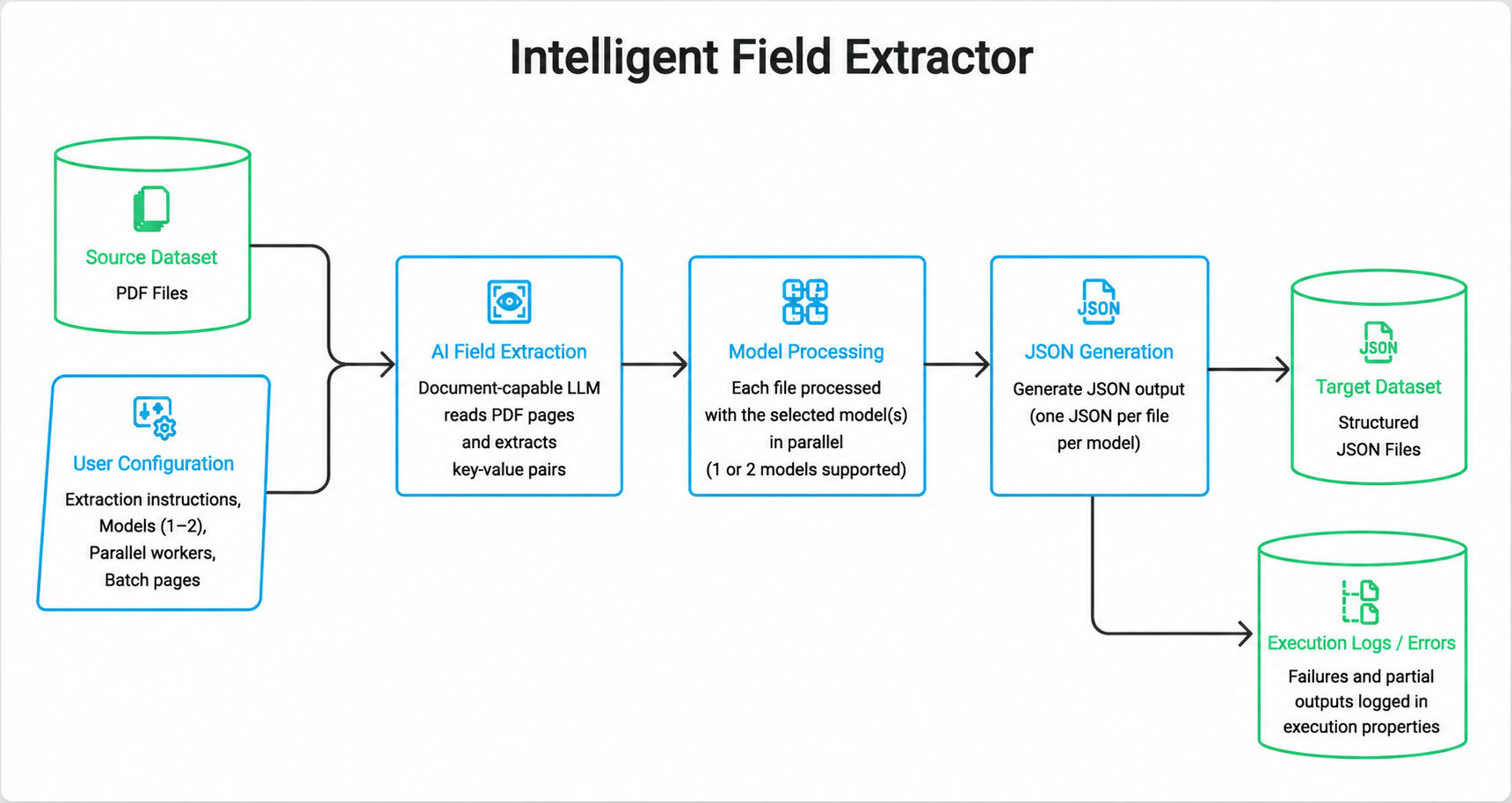
The Intelligent Field Extractor Node solves a common problem: PDFs that contain structured information — invoice numbers, dates, totals, names, addresses — that still has to be typed out by hand before it can be used downstream. Rather than extracting these fields manually, this node uses a document-capable LLMs to read each PDF in the source dataset, identify key-value pairs, and write the results as JSON files in the target dataset.
You tell the node which models to use and, optionally, how to extract the fields. Each source file is processed independently by every selected model (up to two), and a separate JSON file is written to the target dataset for each model.
Use Cases
- Invoice data capture: Extract invoice number, vendor, dates, line items, and totals from invoice PDFs
- Application and form processing: Pull applicant details, identifiers, and answers from scanned forms
- Contract metadata extraction: Capture parties, effective dates, terms, and clause values from agreements
- Claims and records intake: Extract patient, policy, or claim fields from bulk document uploads
| Attribute | Description |
|---|---|
| Node Name | A unique identifier for the node. |
| Source | The dataset containing the PDF files to extract fields from (PDF supported). |
| Target | The dataset where the extracted JSON files are saved (JSON supported). |
| Models | Select the document-capable LLM models used for field extraction (maximum 2). Every source file is extracted once per selected model, and a separate JSON file is written to the target dataset for each model. |
| Extraction Instructions | Optional. A plain-language description of the fields to extract and any rules the model should follow. When omitted, the model extracts the key-value pairs it identifies in the document. Example: "Extract the following fields from each invoice: invoice_number, invoice_date, vendor_name, vendor_address, subtotal, tax, and total_amount. Use ISO 8601 dates (YYYY-MM-DD). If a field is missing, return null." |
| Parallel File Workers | Optional. Number of source files processed in parallel. Default is 5. A lower value reduces concurrent model calls and is less likely to hit Bedrock throttling, but increases overall processing time. A higher value finishes the dataset faster, but raises the chance of Bedrock throttling. Start with the default and increase only if runs complete without throttling errors. |
| Parallel Page Workers | Optional. Number of pages processed in parallel within each file. Default is 10. A lower value slows extraction of large PDFs but keeps the request rate down. A higher value extracts multi-page files faster, but multiplies concurrent model calls (especially when several files are also running in parallel) and may trigger Bedrock throttling. Start with the default; lower it if you see throttling, or raise it only for large files when throttling is not an issue. |
| Timeout (minutes) | Optional timeout value (in minutes) for node execution. Default is 2880 minutes (48 hours). Valid range is 10–2880. |
- Source datasets must use the PDF file type. Target datasets must use the JSON file type. Source and Target cannot be the same dataset.
- You can select at most two models. If two models are selected, each input PDF produces two JSON files in the target dataset — one per model. If one model is selected, each input PDF produces a single JSON file.
- The quality of the extraction depends on how clearly the extraction instructions are written. The more specific the field names, formats, and fallback rules, the more consistent the JSON output.
- All model calls made by this node are protected by a system-level prompt guardrail. Any guardrail hits are recorded in the execution properties of the node.
- Parallel File Workers and Parallel Page Workers control how extraction is parallelized. With Parallel File Workers = 5, up to 5 PDFs are processed at the same time. For each of those files, Parallel Page Workers = 10 means up to 10 pages of that file are processed at the same time. The two values compound: total concurrent model calls scale with files × pages (and again with each selected model). Prefer the defaults unless you have a clear need to go faster or are hitting Bedrock throttling.
Cost
- Each page of each source PDF is processed by every selected model. Selecting two models roughly doubles the number of model calls compared with a single model.
- Costs scale with the number of pages in the source PDFs and the number of models selected.
- Based on internal testing with a 79-page PDF:
- Claude Sonnet 4.6: 298,785 input tokens and 123,693 output tokens (422,478 total) — approximately $2.75 USD
- Claude Haiku 4.5: 298,548 input tokens and 154,218 output tokens (452,766 total) — approximately $1.06 USD
- For large document sets, consider running a small sample first to estimate costs before processing the full dataset.
- This node runs as a Glue job. Glue cost is based on actual runtime, so a job that runs for a long time can incur significant cost.
Limitations
- Only PDF files are supported as input. Word documents, images, and other file types are not accepted.
- A maximum of two models can be selected for extraction.
- Poorly scanned or low-quality PDFs, and documents without clearly labeled fields, may not extract reliably.
BDA Node
The BDA Node runs Smart Extraction (via BDA) inside a Traditional Data Pipeline. Use it to extract structured content from documents, images, audio, or video in a source dataset and write results to a target dataset.
- AI services must be enabled for Data Pipelines.
- The BDA Node is available only in supported Regions: us-east-1, us-west-2, eu-west-1, eu-west-2, eu-central-1, ap-south-1, ap-southeast-2, and us-gov-west-1.
| Attribute | Description |
|---|---|
| Node Name | A unique identifier for the node |
| Source Dataset | Dataset containing files to extract |
| Target Dataset | Dataset where extraction output is saved (others or json file types) |
| File Processing Mode | Selects which source files to extract. Choose one mode; only some modes need extra fields:
|
| Configuration | Per-modality extraction settings (Document, Image, Video, Audio). At least one modality configuration is required |
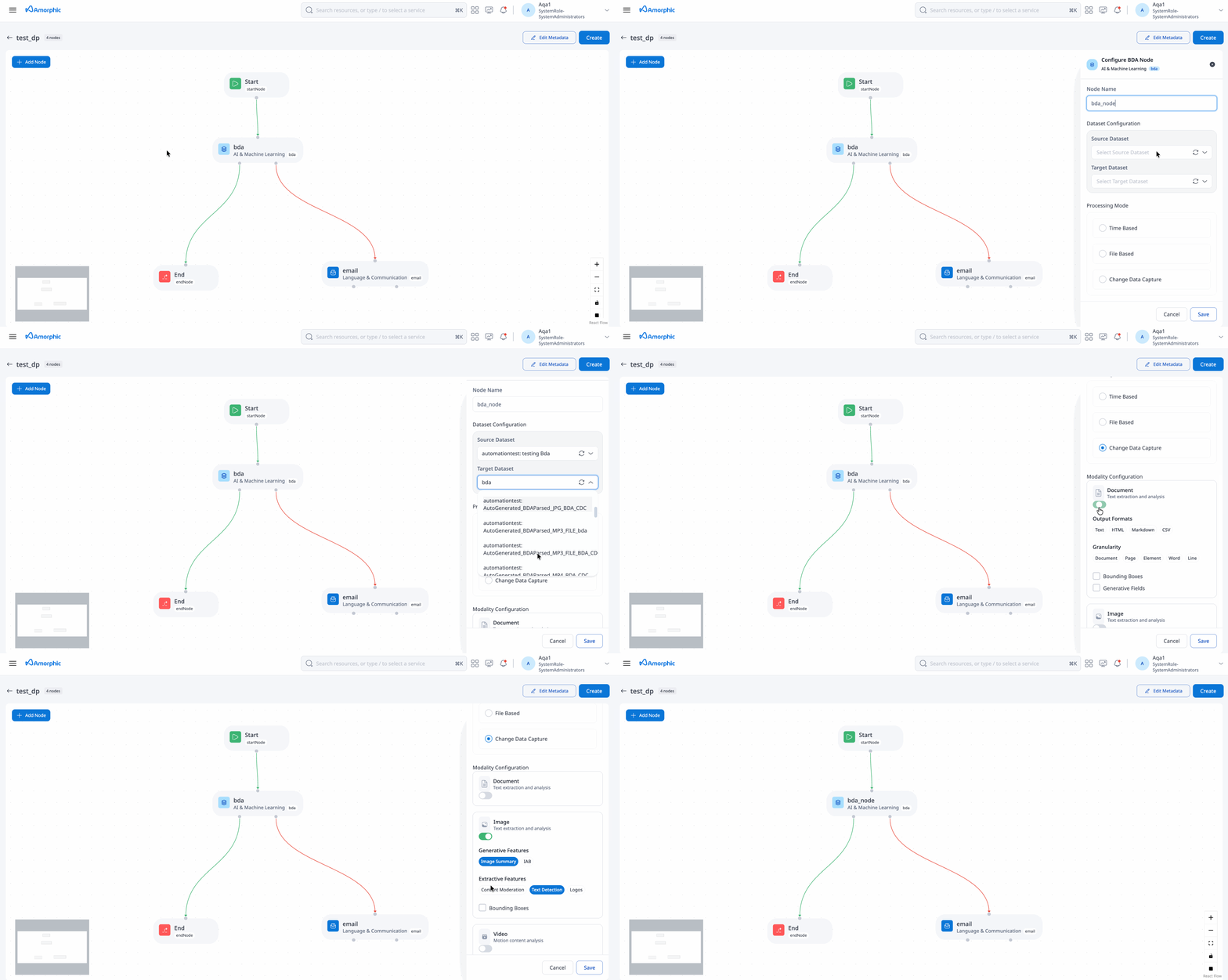
Configuration by modality
Configure one or more modalities under Configuration:
| Modality | Options |
|---|---|
| Document | Granularity: DOCUMENT, PAGE, ELEMENT, WORD, LINE TextFormat: PLAIN_TEXT, HTML, MARKDOWN, CSV BoundingBoxes: ENABLED or DISABLED GenerativeFields: ENABLED or DISABLED |
| Image | BoundingBoxes: ENABLED or DISABLED Generative: IMAGE_SUMMARY, IAB (Interactive Advertising Bureau) Extractive: CONTENT_MODERATION, TEXT_DETECTION, LOGOS |
| Video | BoundingBoxes: ENABLED or DISABLED Generative: VIDEO_SUMMARY, IAB (Interactive Advertising Bureau), CHAPTER_SUMMARY Extractive: CONTENT_MODERATION, TEXT_DETECTION, TRANSCRIPT, LOGOS |
| Audio | Generative: AUDIO_SUMMARY, IAB (Interactive Advertising Bureau), TOPIC_SUMMARY Extractive: AUDIO_CONTENT_MODERATION, TRANSCRIPT, TOPIC_CONTENT_MODERATION |
Supported file types
| Direction | File types |
|---|---|
| Source | pdf, jpg, png, mp3, wav, mp4 |
| Target | others, json |
For dataset-level enablement and on-demand runs outside a pipeline, see Smart Extraction. Platform-wide schedule and job settings are under Backend Jobs (BDA Extractor Job).
This document aims to provide a comprehensive understanding of the various nodes available within the data pipeline framework, enabling users to effectively design and execute complex data workflows.