
Provide extra resource access to Jobs and Data Labs
There are 2 ways of providing resources access to Jobs and Data Labs.
To receive notifications about the status of resource access update, users must subscribe to notifications for that specific entity during the resource update action.
How resource access scales
Extra Resource Access attaches datasets, domains, parameters, and shared libraries to the IAM role used by a Job or Data Lab. AWS limits how large a single IAM policy can be, so Amorphic avoids packing everything into one inline policy.
What happens behind the scenes (simple view)
- Policy slots – Each Job/Data Lab role can attach a limited number of customer managed IAM policies (the account’s “managed policies per role” quota; default is typically 10). Amorphic reserves some of those slots for datasets/domains and some for parameters, shared libraries, and external datasets.
- Character budget per policy – Each managed policy is kept under about 6,100 characters (compact JSON). When adding resources would exceed that size, Amorphic starts a new managed policy (another slot).
- What fills the character budget – Permissions are written as ARNs that include your domain and dataset names (for example
…/sales/orders/*). Longer names use more characters, so fewer resources fit in one policy. Shorter names leave more room. - Domain shortcuts – Granting a domain can use a compact path like
domain/*instead of listing every dataset. That only works when every dataset in the domain is the same type (all Iceberg or all non-Iceberg). A mixed domain expands to per-dataset paths and uses much more space. - Fail fast – If the update would need more policy slots than the budget allows, the request fails with an error such as Managed policy budget exceeded.
The published counts in Resource Limits are baseline maxima for typical naming. Actual capacity can increase or decrease based on name length, how many policy slots are reserved for static permissions, resource mix, and the AWS managed-policies-per-role quota.
Practical suggestions
- Keep Iceberg datasets in Iceberg-only domains (and non-Iceberg datasets in separate domains). Mixed domains cannot use
domain/*for Iceberg delete/update paths and grow the policy quickly. - Prefer Domain Access when a job or lab needs many datasets in the same domain. One domain grant is usually cheaper (in policy size) than attaching dozens of datasets one by one.
- Use shorter domain and dataset names when you expect large attachments. Names appear in every S3/Glue ARN; shorter names fit more resources per policy.
- Avoid attaching the same datasets both as Domain Access and as individual Dataset Access when domain access already covers them—duplicates waste policy space.
- Plan write vs read separately – Write (Owner) permissions generate more ARN entries (for example landing-zone and data-lake-zone paths) than read-only, so write limits are lower than read limits.
- If you hit budget errors – Shorten names where practical, split mixed Iceberg/non-Iceberg domains, use domain grants instead of long dataset lists, remove unused attachments, or ask an admin to raise the IAM managed policies per role quota.
How naming affects how many you can attach
Limits are enforced as counts, but how many fit before a new policy is needed depends on name length, because each ARN embeds the name.
Illustrative guidance (not a hard formula—Amorphic measures the real policy size at update time):
| Approach | Why it helps |
|---|---|
Domain name ~10 characters (for example inventory) | Shorter ARNs; closer to reaching the full Domain Write / Read baseline counts within the policy budget |
| Domain name near the maximum length | Each domain consumes more characters; you may need more policy slots before reaching the count limit, or hit budget sooner |
Dataset Access with long Domain + DatasetName paths | Each dataset adds a full ARN; long names reduce how many datasets fit per managed policy |
| Iceberg-only or non-Iceberg-only domain | Enables compact domain/* style grants instead of one path per dataset |
Rule of thumb: Prefer short names and type-homogeneous domains, then use Domain Access for bulk access. Use individual Dataset Access for exceptions, not for hundreds of same-domain datasets.
Resource access through API
Use the following API to provide datasets (read or write), domains (read or write), parameters, and shared libraries (exclusively for jobs) access to Jobs or Data Labs in large number.
| Property | Description |
|---|---|
| resource_type | jobs, datalabs |
| resource_id | unique id (uuid) associated with the jobs or data labs |
| API Path | /{resource_type}/{resource_id}/resourceaccess |
| HTTP Method | POST |
Input Body:
    {
        "DatasetAccess": {
            "Owner": [
                {
                    "DatasetId": "uuid",
                    "DatasetName": "dataset_name"
                },
                {
                    "DatasetId": "uuid2",
                    "DatasetName": "dataset_name2"
                },
            ],
            "ReadOnly": [
                {
                    "DatasetId": "uuid3",
                    "DatasetName": "dataset_name3"
                },
                {
                    "DatasetId": "uuid4",
                    "DatasetName": "dataset_name4"
                },
            ],
            "ReadOnly-FileLevel": [
                {
                    "DatasetId": "uuid5",
                    "DatasetName": "dataset_name5",
                    "FileLevelTags": [
                        {
                            "TagKey": "key",
                            "TagValue": "value"
                        },
                        {
                            "TagKey": "key1",
                            "TagValue": "value1"
                        }
                    ]
                }
            ]
        },
        "DomainAccess": {
            "Owner": [
                {
                    "DomainName": "domain_name1"
                }
            ],
            "ReadOnly": [
                {
                    "DomainName": "domain_name2"
                }
            ]
        },
        "ParameterAccess": ["param1", "param2"],
        "SharedLibraries": ["uuid_lib1", "uuid_lib2"]
    }
To retrieve the status of the latest resource update, use the GET HTTP
method without input body. Output retrieved would be
    {
        "Status": "in_progress"/"failed"/"updated",
        "Message": "update failed because of some reason", # When it fails this will appear
        "ParameterAccess": ["param1", "param2"],
        "SharedLibraries": ["uuid_lib1", "uuid_lib2"],
        "DatasetAccess": {
            "ReadOnly": [{
                "DatasetId" : "uuid1",
                "DatasetName": "name1"
            }],
            "Owner": [
            {
                "DatasetId" : "uuid2",
                "DatasetName": "name2"
            }
            ],
            "ReadOnly-FileLevel": [
                {
                    "DatasetId": "uuid5",
                    "DatasetName": "dataset_name5",
                    "FileLevelTags": [
                        {
                            "TagKey": "key",
                            "TagValue": "value"
                        },
                        {
                            "TagKey": "key1",
                            "TagValue": "value1"
                        }
                    ]
                }
            ]
        },
        "DomainAccess": {
            "Owner": [
                {
                    "DomainName": "domain_name1"
                }
            ],
            "ReadOnly": [
                {
                    "DomainName": "domain_name2"
                }
            ]
        }
    }
Below image shows how the extra resources access provided are shown in User Interface

Resource access through UI
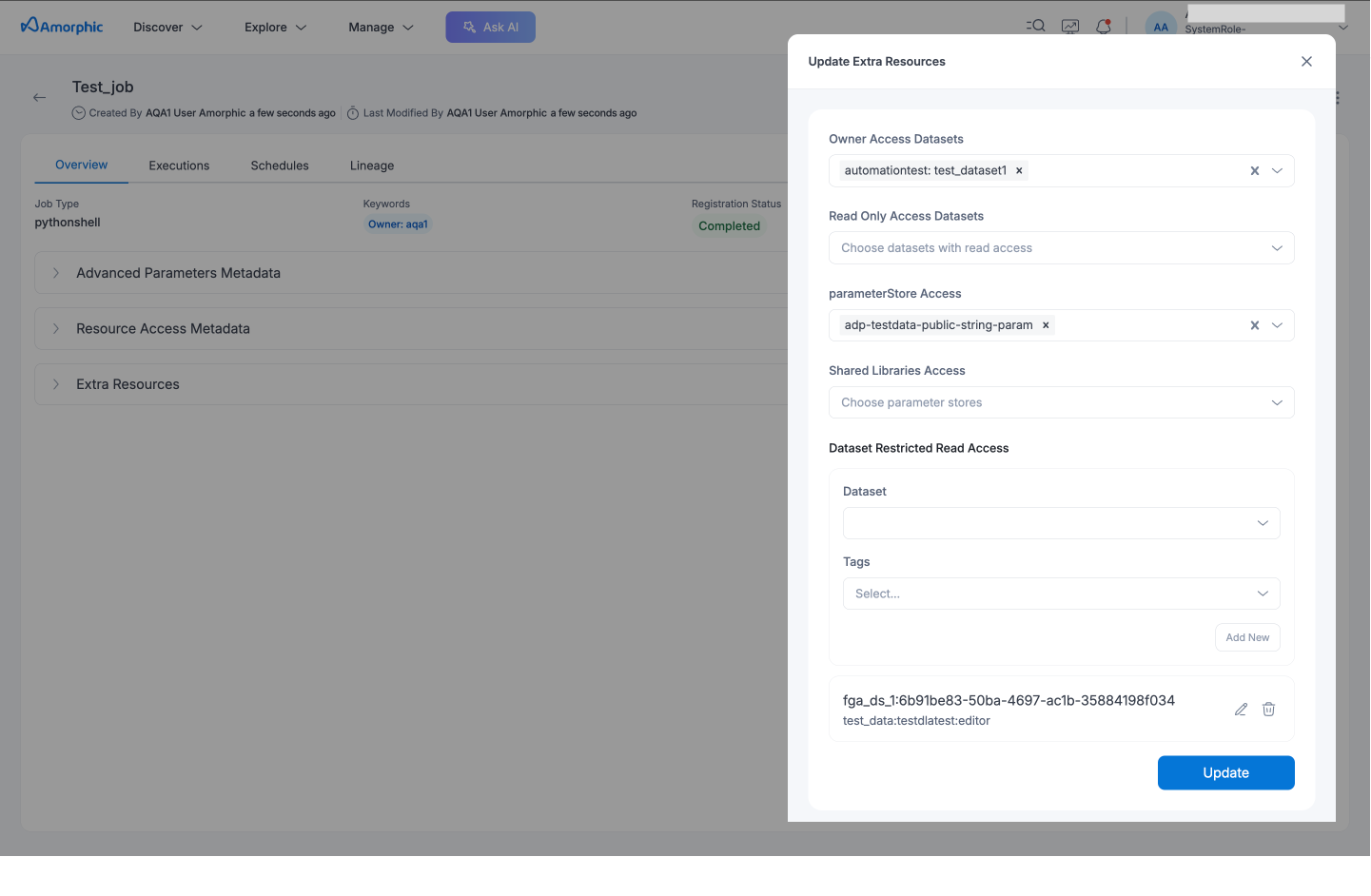
Provide datasets (read, read-only file-level, or write), domains (read or write), parameters and shared libraries access in large number using the 'Update Extra Resource Access' button on the top right side of the details page.
Click on the 'Update Extra Resource Access' button and select the required resources from the dropdown and click 'Submit' to update the resource access.
Once the resource access is submitted, the extra resources will be updated and displayed in the details page eventually.
The following picture depicts how to update extra resources:
If the extra resources are not getting displayed then refresh the details page to view the extra resources.
User can also update the extra resources or remove them all again through the same process.
All the extra resources added till that time will be displayed in the UI popup every time the popup is opened so that user can either remove or add accordingly.
Resource Limits
Jobs and Data Labs differ because Jobs also consume slots for shared libraries, and Studio / AI-enabled Jobs reserve a slot for a platform managed policy. Notebook, notebook-session, and Studio Data Labs share the same Data Labs counts.
These limits are dynamic. The number of resources you can attach can go up or down depending on factors such as:
- Name length of domains, datasets, and parameters (longer names fill each policy’s character budget faster)
- Policy slots reserved for static / platform permissions on the Job or Data Lab role
- Resource mix (write vs read, Iceberg vs non-Iceberg, domain grants vs per-dataset grants)
- AWS account quota for managed policies per role (raising it can increase capacity)
Amorphic measures real policy size at update time, so two Jobs with the same resource count may hit the budget at different points.
The table below shows baseline counts for the default AWS managed-policies-per-role quota (10). AWS Service Quotas can be incresed up to a maximum of 25; Amorphic scales these limits up when the account quota is higher. If slots are reserved (for example Studio / AI platform policies), effective counts can be lower.
| Type | Jobs | Data Labs | Notes |
|---|---|---|---|
| Datasets Write (Owner) | 48 | 35 | Write needs more IAM entries per dataset than read |
| Datasets Read (ReadOnly) | 122 | 90 | Higher than write because read policies are smaller per item |
| Datasets Read-Only File-Level | 122 | 90 | Includes file-level tags in the policy |
| Domains Write (Owner) | 32 | 20 | Easier to reach when domain names are short and domains are type-homogeneous |
| Domains Read (ReadOnly) | 40 | 35 | Same naming/type guidance as write domains |
| Shared Libraries | 55 | — | Jobs only |
| Parameters | 25 | 35 | Batched into managed policies by size |
- Exceeding the managed-policy budget returns an error such as Managed policy budget exceeded. Reduce attachments, shorten names / unmix Iceberg domains, or request an increase to the IAM managed policies per role quota.
- Domain and dataset names still appear in IAM ARNs even when you stay under the count limits—very long names can cause you to run out of policy slots before you hit the count ceiling.
- For Iceberg vs non-Iceberg domain compaction details, see ETL Jobs limits.