
Repair datasource / Generate datasource report in Amorphic
Repair Datasource / Generate datasource report in Amorphic allows you to repair metadata inconsistencies for a datasource or to generate a report that identifies resources that would be repaired, without making changes.
Datasource repair and report are available for:
- JDBC Bulk Dataload datasources
- JDBC Advanced Dataload datasources
Where to start: On the datasource details page, click the Repair Datasource / Generate Datasource Report button, then choose Repair to fix inconsistencies or Generate report to only identify resources with issues (no changes are made in report mode).
Outcome after repair or report: When the process completes, you receive an email and an in-app (push) notification with a summary—for example, what was repaired, what could not be repaired (with backend errors), or, in report mode, which resources have issues. If no issues are found, the notification indicates that as well.
Bulk Dataload Datasources
For JDBC Bulk Dataload datasources, repair and report align Amorphic metadata with AWS DMS (replication tasks / serverless replications and instances) and clean up stuck or orphaned resources.
The following issues will be repaired or identified and generated as a report:
Dataflow-level repairs
- Dataflow stuck in registration-running (V1): Aligns status to ready when registration completed (registered datasets present), or to registration-failed when registration did not complete.
- Dataflow stuck in task-preparation-running (V2): Aligns status based on backend preparation outcome (for example, to a failed or ready-equivalent state when preparation is stuck or finished).
- Dataflow stuck in transitional states: Covers dataflows stuck in creating, starting, running, stopping, scaling-up, scaling-down, modifying, moving, or deleting. Repair compares Amorphic status with the DMS task/instance (or serverless replication) state and Step Functions execution outcome, then updates the dataflow to the matching terminal or stable state (for example running, stopped, completed, or failed).
- Dataflow stuck in waiting: Marks the dataflow failed when it remains in waiting beyond the configured auto-retry window (or when auto-retry is disabled).
Entity and cleanup repairs
- Entity stuck in creating: Updates the entity to an active/ready state when the DMS replication instance exists and is available.
- Entity stuck in deleting: Completes entity deletion in Amorphic when the backend instance is already gone, or aligns status when deletion is still in progress where applicable.
- Orphan dedicated instance / custom endpoint cleanup: Removes dedicated replication instances and custom endpoints that are no longer associated with active dataflows but may still incur cost.
When you receive a "repair completed" email or in-app notification, it means the repair workflow has finished successfully.
Status updates can take time to be reflected in Amorphic while backend systems finish syncing.
Advanced Dataload Datasources
For Advanced Dataload datasources, the following issues will be repaired or identified and generated as a report:
- Dataflow stuck in preparation running: Dataflows stuck in preparation-running state are updated to dataflow-preparation-failed.
- Dataflow stuck in starting: Dataflows stuck in starting state are updated to failed, running, or completed depending on the situation (e.g. failed when the backend has failed; running or completed when the backend is healthy and dataload has finished where applicable).
- Dataflow stuck in running:
- Full-load dataflows: Evaluated for completion over repeated checks.
- If completion criteria are met, the dataflow is updated to completed state.
- If no data ingestion is detected during repeated checks (up to ~1 hour), the dataflow is marked failed with the message: The connectors have failed to ingest data from source tables due to some error
- If data ingestion continues but completion criteria are not met within the polling limit, the dataflow remains in running state.
- CDC / Full-load-CDC dataflows: Repaired to terminated if the backend resources are deleted.
- If repair conditions are not met, status remains running and no change is made.
- Full-load dataflows: Evaluated for completion over repeated checks.
- Entity stuck in creating: Entities (e.g. cluster) stuck in creating state are updated to active when the backend resource exists and is active.
- Dataflow in terminated or completed with connectors not cleaned up: For dataflows already in a terminal state (terminated or completed), repair runs connector cleanup so that the source and sink connectors in the backend are deleted and backend resources match the dataflow state in Amorphic.
- Orphan entity cleanup: Removes entities that are no longer associated with any active dataflow—or were left behind after a failed or interrupted run—and are still present in the account and incurring cost.
- Orphan resource prevention (related): Creating or starting dataflows validates connector / role provisioning so a rejected request does not leave behind unused connectors, IAM roles, or log groups that would otherwise need manual cleanup. Use Repair if orphans were left from earlier failures.
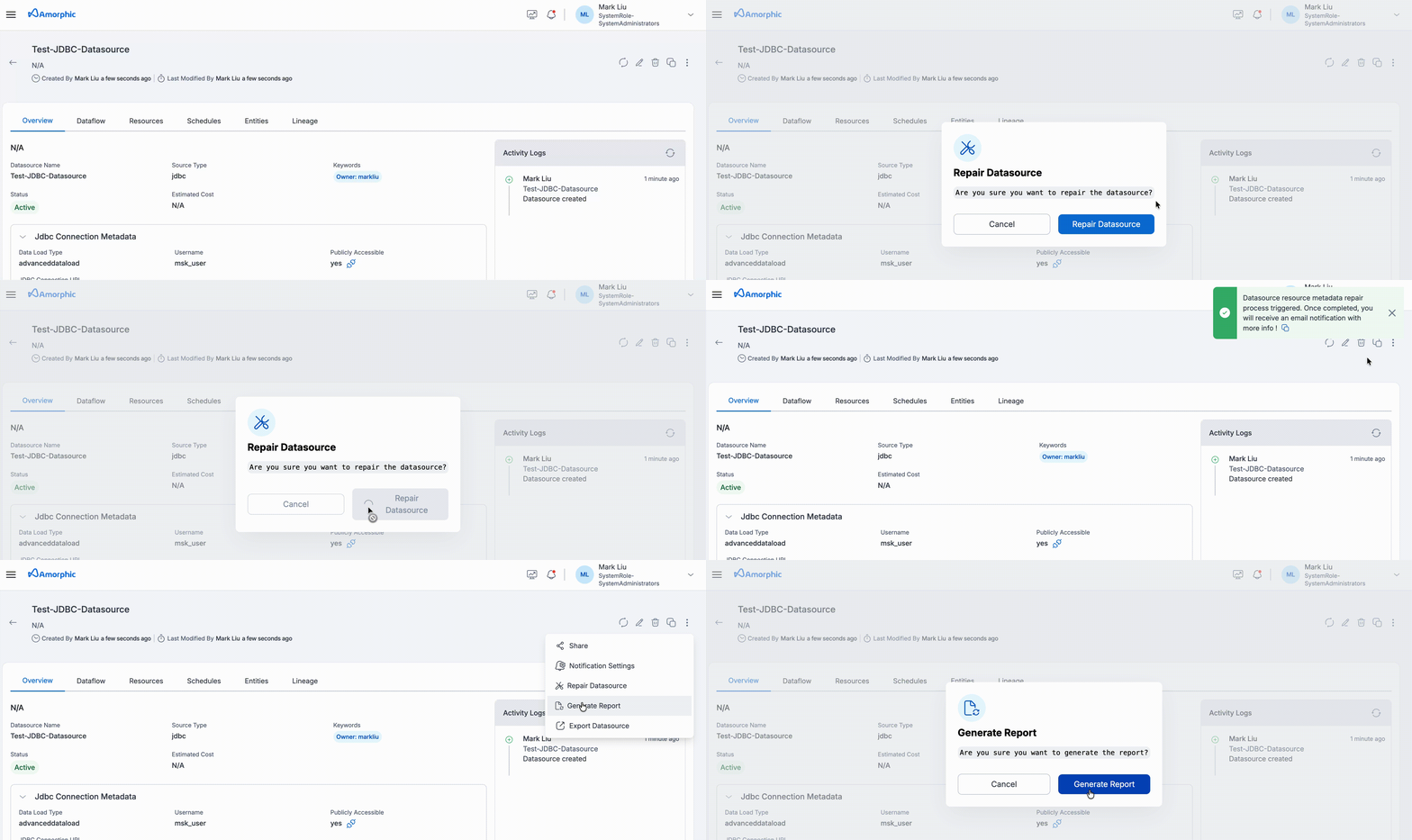
When you receive a "repair completed" email or in-app notification, it means the repair workflow has finished successfully.
Status updates can take up to 30 minutes to be reflected across in Amorphic while backend systems finish syncing.
Important notes
To avoid further metadata inconsistencies, it is strongly recommended not to perform any datasource, dataflow, or entity operations while a repair process is in progress. The repair workflow updates metadata in a controlled sequence. Triggering additional actions (such as start, stop, terminate, or edit operations) during this time may interfere with the repair process and result in unexpected states.
Additionally, if a dataflow appears to be stuck in a transitional state — especially starting, running, creating, or waiting — it is recommended to wait 1–2 hours before initiating a repair. Some backend operations (such as DMS task provisioning, snapshot processing, instance scaling, or cluster stabilization) may take time to complete, and initiating repair prematurely may mark a resource as failed even though it would have recovered naturally.
Repair should be initiated only after confirming that the state has remained unchanged for a reasonable duration.